Encaptechno

Author name: Abhishek Sharma

Abhishek comes in with a decade of technical experience in CRM, specifically Salesforce, Zoho & Microsoft Dynamics. A highly energetic individual and an equally good team player, Abhishek has a deep knowledge of complex, challenging and custom CRM implementations as well as integrations.

Benefits of Zoho Integration with WhatsApp | Encaptechno
Benefits of Zoho Integration with WhatsApp

Benefits of Zoho Integration with WhatsApp | Encaptechno
All businesses run to increase income and the number of loyal customers. For achieving this goal, the organization must grow and be led to improve its services. On one hand, it is established that a company cannot satisfy needs if it does not have an established connection between various departments. That said, in case your company is way too focused on the inner workings then it will not succeed without good quality customer service.

The Zoho integration with WhatsApp enables you to improve the client service and optimize the company’s work as well. This integration is somewhat useful in delivering a set of useful tools as well. It helps in analyzing and improving the sales department work. You can get noticed and communicate where it is comfortable for the customers.

The Zoho CRM integration with WhatsApp helps in extending your support through WhatsApp messenger to the customers. The customers will find it easy to reach your support representatives for support from their WhatsApp messenger while the representatives may continue using SalesIQ to respond. Other than this, customers can also look out for your business on WhatsApp and connect instantly.

In this blog, we will look at the benefits of Zoho integration with WhatsApp but before doing that, let us first get an overview of this integration and why it is considered important.

Zoho Integration with WhatsApp

Zoho Integration with WhatsAppZoho is a
CRM platform that unifies all aspects of a business in just one place. It allows to have everything centralized, improves productivity, and be more competitive. The data obtained from CRM is extremely important and useful and Zoho further helps in segmenting the customers, having more controlled management, and improving customer retention along with consumption.

The Zoho integration with WhatsApp makes sure that the communication with the current customers becomes way more productive. The communications can also be customized. With the Zoho CRM and WhatsApp, you will have many benefits over your competitions that have the ability to set you apart from the rest.

In case a business wants to have an image of caring about its customers then you must know that you are on the right track. With the multi-channel support of Zoho, it becomes possible to reach your customers with chat, calls, emails, and social media. All thanks to the integration of WhatsApp, this communication is also available for use.

The Zoho CRM integration improves sales performance with sales automation. The integration is expandable and customizable. On the other hand, the analytics and reporting tool also helps in giving you very important data that can be used to track everything happening in your business. This function can be used to draw business strategies and see important results.

Moreover, security is guaranteed with this integration. This is a rather important point since you cannot leave your company in the hands of just about any other CRM. It is necessary to invest in support and security. The Zoho CRM integration with WhatsApp promises streamlined business processes, a method to contact your customers, leads, and contacts of the messaging applications of millions of users directly from the CRM. 

You can use one of the most preferred communication channels like WhatsApp for connecting and getting help instantly rather than navigating to the website and initiating a chat every time. The chats can be managed by customers through WhatsApp, web, and mobile from a similar dashboard.

Top Benefits of WhatsApp and CRM Integration


1. Improved Business Control


The more workforces become involved in a business, the more difficult it can become to monitor the work of each individual. However,
Zoho integration with WhatsApp can help in controlling the sales department remotely. You can have first-hand information about the activity of your sales managers.

The integration of WhatsApp with Zoho CRM enables the owner of the business to check the communication that is happening between the managers of different departments. Therefore, you find it easy to evaluate the quality of work of every individual employee.

All thanks to the integration between WhatsApp and Zoho CRM, all communication will be stored in the CRM. The owner can track which sales manager closes the maximum deals and identify the most effective employees. Basically, the streamlined communication process ends up improving the overall business functioning.

2. Better Analytics Tools

Better Analytics Tools | Top Benefits of WhatsApp and CRM Integration
Another important feature of a successful business is the ability to accumulate and analyze important data. All businesses must be clear about their target audience so that estimation of the weaknesses and strengths of a company can be done adequately. This important information helps in identifying the potential for further growth and the quality of offered products and services.

The Zoho integration with WhatsApp can help in gathering all the information about the customers in just one place. You can analyze your age, gender, and choices of customers who are using your services and products. This allows you to see the target customers much more clearly and work dedicatedly to engage with these people in the future.

The connection of WhatsApp with your CRM can help you to learn more about the negative sides of a product. The CRM system can save you questions, suggestions, and reports about the problems that customers experience commonly. Therefore, the company can analyze reviews and work on the revealed issues properly.

3. Automation Opportunities

Automation Opportunities
The integration of WhatsApp and Zoho helps in properly adjusting the CRM system according to the needs of a company. You can create multiple marketing funnels and send deals, contacts, and tasks to different steps of the funnel.

The integration helps the sales managers to reduce multiple routine activities and spend more time in communication with customers. The incoming messages coming from WhatsApp trigger the Zoho CRM to automatically create a task that reminds managers to respond to the customer.

With the Zoho CRM integration, it becomes possible to automate the process of updating the CRM list whenever a prospective user or a customer messages. You can also set up a chatbot to collect information from users and collect or update information saved on Zoho. Automating the processes can help you and your team save time and effort for handling multiple customers at the same time.

4. Streamlined Workflow


In case you have got Zoho set up and running then it makes sense to have your team manage everything on Zoho. From getting important updates about new contacts to reaching out to your existing customers, the Zoho integration lets you use the platform with the added ease of automating an important bulk of the process.

After your customers have been listed on Zoho, you will be able to sort them into different categories and assign them to other agents as well, as you would usually do. A well-defined system can automate the complete process.

When you have a list of customers sorted into Zoho, you can easily reach out to them automatically with predefined messages or also have your team reach out to customers based on the queries. Other than streamlining your workflow, Zoho integration with CRM helps tremendously in streamlining the workflow with which you can stay on the top of your business.

5. Easy Communication


Easy Communication
The integration of Zoho with WhatsApp makes sure that you are able to access customer information and reach out to your customers on a platform that you are familiar with properly. You can engage with your customers on a platform that they are familiar with and use frequently.

You will have the ability to send out messages to a wide user base by using rich media such as documents, images, videos, etc. If used properly, it can be a perfect solution for businesses that have a large customer base.

It allows businesses to streamline the workflow and CRM processes while being accessible to users at the same time. Businesses can make good use of WhatsApp by greeting customers with a personalized message when a conversation is started with a business.

6. Follow-Ups


The
Zoho CRM integration with WhatsApp enables you to send automated messages with complete details about all your products and services to your current or even potential customers. The best part is that these messages are simple to set up and they can be sent out very quickly with just a little effort.

Therefore, you can ensure that your customers get the information they need without making them wait in any way or even risking their annoyance. You can also go a step ahead and save the answers to some of the most frequently asked questions. This helps in reusing the answers in the future and it also helps in increasing the speed of the issue resolution process followed by your business.

7. Better Internal Communication


Better internal communication in a business is done with team collaboration. In different words, there are different tools that enable collaboration between teams and business sectors. With WhatsApp and CRM integration, there is no need to worry about any team communication problems.

Other than allowing you to communicate with your prospects and customers seamlessly, the integration also helps in removing any kind of inefficient departmental silos that can improve communication in your company. Hence, the complete organization flows all the more optimally and effectively while improving organizational communication.

8. Optimized Business Marketing

Optimized Business Marketing
The WhatsApp CRM integration enables you to send a useful catalog of images, location, documents, audios, videos, to your potential customer. Based on the interest of your customers, you can send them marketing collateral that can spark their interest.

In this way, you can nurture leads and increase the chances of conversion as well. When you start putting this into practice, this can turn into one of the best ways to move the leads down the sales funnel and increase your chances of conversion.

Conclusion

WhatsApp is one of the most popular messaging applications out there that is used by one and all. It is used for both personal and business purposes. Organizations use it to leverage more benefits by integrating it with their CRM systems.

You can also integrate your WhatsApp account with a CRM platform to start messaging by getting in touch with an experienced CRM consultant from Encaptechno. The integration will allow your WhatsApp instance to use information that is already contained in your CRM.


Benefits of Zoho Integration with WhatsApp Read More »

Zoho Implementation, , , ,
7 Benefits of Integrating CRM with LinkedIn | Encaptechno

7 Benefits of Integrating CRM with LinkedIn

7 Benefits of Integrating CRM with LinkedIn | Encaptechno
LinkedIn is one of those social networks that can enable you and your business to become very well known professionally. Particularly, if your company has just started using it or it is about to target new markets in unknown lands then LinkedIn can be really helpful. One of the main benefits of LinkedIn is that it brings together people involved in a business together. You can keep in touch with business partners, potential employees, and customers.

Among the other benefits that LinkedIn brings on the table, the CRM integration is yet another one that can work wonders for you. The customer relationship management tools are evolving continuously. The CRM integration with LinkedIn can enable a sales team to explore new ways to expand and nurture business relationships.

In this blog, we will see some of the benefits of integrating CRM with LinkedIn. However, the fundamental thing to understand here is what the importance of this integration is?

CRM and LinkedIn


CRM and Linkedin
Customer relationship management is one of the fastest growing industries. When it comes to CRM options available in the market today, the options are endless. From large and comprehensive systems with so many integrations and tools to industry specific software applications focused on start-ups and small B2B businesses, there are many CRM options in the market.

It does not matter which B2B industry you may be in, the CRM integration with LinkedIn must be done so that the tools can be maximized to their potential. It is important to understand that using the power of LinkedIn along with the CRM means that more leads and better outreach campaigns can be developed for the sales teams.

A customer relationship management or CRM integration done with LinkedIn will enable you to get all the important information such as names, job titles, organizations, website addresses, etc. This information can be extracted and sent directly to the CRM system. Sending this important data automatically saves many hours manually as the input data for leads is used for outreach campaigns in boosting replies and sales.

Why is it Important to Integrate CRM with LinkedIn?


No matter which business it may be, time and strong professional relationships are two of the important elements that help in achieving the desired results. Sales teams across all industries work hard consistently to generate more sustainable relationships. Even though all these relationships have multiple components, the sales conversions and mutually benefitting situations must encounter one another.

The sales process becomes much more streamlined and effective when CRM is integrated with LinkedIn. What must be kept in mind is that the traditional sales activities are anyway provoking the loss of many business deals. The decision-making processes have turned complex and business reports assert that more people should be included in the process.

Basically, it can be said that it is no longer sufficient to just focus on the important within but it should become important to multi-thread a targeted network. There is an immediate need to apply digital strategies in the sales process. This is a process that entails personalizing content, teaching something new to people, and changing how the digital strategy can impact a business. The CRM integration with LinkedIn brings all this and more.

Benefits of CRM Integration With LinkedIn


1. Easy Leads Prospecting


Easy Leads Prospecting | Benefits of CRM Integration With LinkedIn
The
CRM integration with LinkedIn helps immensely in lead prospecting. LinkedIn is a social platform that is created for professional networking. It helps the sales team to find their target audience precisely. There are two important types of LinkedIn profiles including company profiles and personal profiles.

The fact is that B2B businesses can gain many benefits by finding out about a company that they are targeting, their needs, wants, and even an insight into an existing process. After this, they can also target specific decision-makers within a company through personal profiles.

Basically, LinkedIn is a place where professionals can connect with multiple like-minded professionals and organizations. They can store valuable data and make all of it available for the sales team and marketers so that much better CRM profiles can be built.

The CRM integration with LinkedIn will give the sales team a wide room to make the most out of all untapped leads without wasting any time searching the whole pool. The integrations are such that they let a salesperson have an advanced search option of the lead, prospect, or the customer directly from the CRM.

One of the best-added benefits is that all additional information can be provided by LinkedIn to understand and strategize accordingly. This does not just help in saving a lot of time but it also helps the team to provide a value addition while eliminating any unwanted research of non-prospects.

2. Saving Time


Saving Time | Benefits of CRM Integration With LinkedInA valuable and rather limited resource that all sales teams have to use is time. To ensure that the sales goals are achieved, it becomes important to engage and interact with the prospects and generate qualified leads. Think of a situation when you have created sufficient conversations on LinkedIn that they are all ready to be transferred into a CRM system.

When LinkedIn will be integrated with an online CRM system, it will become easy to save the leads from any conversations that you may have with a prospect. In another scenario where you have been using LinkedIn for a long time without knowing that there is a possibility of integrating CRM, you will again be able to save a lot of time.

You can import all of your saved leads from LinkedIn to the CRM system without thinking about transferring them manually. This is a great way to save time. In addition, the new version of LinkedIn also allows you to include the latest features that help in improving communication and speed of updating modifications in the sales pipelines of opportunities.

This way, you will end up saving time and also ensure that you don’t miss track of the buyer’s needs. Any alerts and insights will keep you up to date in real-time about all the important information that is needed to take the best action towards building a sales relationship.

3. Better Relationship Building


Better Relationship Building | Benefits of CRM Integration With LinkedIn
The integration of LinkedIn with an
online CRM system ensures a seamless lead flow and an ability to build better relations with the customers. All of the email contacts and the important information related to them can fall in perfect sync.

The integration can show the sales team a clear direction of working on the prospects by facilitating a smooth introduction with the information that is obtained from LinkedIn. This can be done with easy networks, predefined communication templates, information sharing, and using updates about prospects.  

The sales team can get detailed information about the profile of the leads which further plays an important role in the process of relationship building. The kind of information that you can obtain about the leads turns out to be highly useful for making the lead feel comfortable.

Sales teams anyway do so much and go out of their way to get information about the customers so that better sales pitches can be made. The CRM integration with LinkedIn serves as a perfect resort to this because it helps the sales team to make things very easy.

4. Targeting the Right People


Focusing on just one person is not enough to generate business opportunities. If you want to ensure that you achieve your sales objectives quickly then multithreading is something that you will have to pay sincere attention to. It is something that allows much better communication and conversations with the right set of people.

The CRM integration with LinkedIn can help in giving you the wide possibility of leveraging the data that gets collected from sales preferences. A consistency in the way you approach the leads can also allow you to learn who you may be interested in. As you synchronize LinkedIn with CRM, you can retrieve important information from your CRM.

One of the easiest ways to find the right insight is to look at the recommended leads. These profiles are generally within the targeted account or they are similar to the potential lead. When you find the right people, you can focus on reaching a constructive decision while uncovering other profiles that are included in the decision process. This way, you will save time and stay focused.

5. Improved Sales Intelligence


The
CRM integration with LinkedIn has the ability to improve sales intelligence to a great extent. You can easily get all the important sales insights with regular updates, information, and connections. Moreover, you can also save a lot of time in finding the right people and hence get your business a true value addition.

The ability to access information from any time and from anywhere will never let you lose on any prospect. While you continue enjoying the ease of building connections seamlessly, the customers are also somehow empowered to deal with the right person which is a benefit to both ends.

With so many sales representatives and business development professionals using social tools, it makes sense to access the information on one screen. The CRM integration with LinkedIn enables all the prospects to view the CRM window. All users can research the prospects before contacting them while pulling up information through LinkedIn.

Sales intelligence is also empowered because this integration saves a lot of time and expands the overall accuracy. You can get to know your prospects well in advance and you can ascertain if you have something in common. The system also shows a list of related leads and people while matching them to the profile that is being viewed.

Most of all, we all know that most of the buyers are always involved in the decision-making process so it becomes all the more important to access leads. The users can actually communicate with all the parties and make it extremely easy to close the deals.

6. Much Better Outreach Campaigns


After you have become successful in creating a list of potential leads and information about the professional life of a person, the outreach campaigns can become personalized and effective.

It becomes easy to create high conversion email campaigns that can plug in all important data that the CRM integration with LinkedIn has scrapped with accounting targeting and automating the entire lead generation process.

The final result is always a constant stream of new customer inquiries each month that come from the automated system. These inquiries have a great potential to turn into your leads while helping you do much better in the business with an expanded clientele.

7. Detailed Demographic Information


Detailed Demographic Information | Benefits of CRM Integration With LinkedIn
LinkedIn is an excellent source to get relevant data on the customers. You can know their job title, seniority, professional achievements, and much more. This knowledge will help in personalizing your outreach campaigns.

When you know more about the potential leads, there will be a much better opportunity to stand out and show everyone that you have done your research properly. More people are likely going to respond if you connect with them on a personal level.

The detailed demographic information also helps in a lead generation which becomes as simple as finding a suitable lead and hitting a button on their profile. All of this public information can be collected and sent to the pipeline so that it appears on the dashboard and helps in saving time that is otherwise spent on inputting the data manually.

Conclusion

LinkedIn is most definitely one of the most powerful business networks that you cannot ignore. It has a wealth of information and by making complete use of it, businesses can gain so much. Ensuring that the CRM software is compatible with LinkedIn can help a sales team to become way more effective.

One of the biggest benefits is the ability to use the information and foster communications with the prospects. Customers are anyway not prepared to respond to the sales and marketing literature that are not related to them. They look for immediate value and something that should be provided with what they are looking for.

The union of a CRM with LinkedIn helps in ensuring powerful sales and marketing processes. All businesses that wish to see real results from prospecting must make the most out of CRM integration with LinkedIn. If you also want to do the same, get in touch with our CRM consultants of Encaptechno who can help you achieve the best results.


7 Benefits of Integrating CRM with LinkedIn Read More »

CRM Services, , , ,
10 Common Zoho CRM Mistakes and How to Avoid Them? | Encaptechno

10 Common Zoho CRM Mistakes and How to Avoid Them?

10 Common Zoho CRM Mistakes and How to Avoid Them? | Encaptechno
The customer relationship management systems have been helping many businesses grow by streamlining the entire sales process. However, the most important requisite for the CRM structure to perform well is a successful deployment of the system. There are many factors that contribute to the effectiveness of the online CRM system. They include ensuring that all the features are included, process-oriented implementation, and correct third-party integrations.

No matter how much prior focus is laid on not making mistakes while CRM implementation, something or another goes wrong easily. When the CRM systems were introduced in the beginning, they offered businesses a long-term strategy to promptly engage and manage customer relationships, close more deals, and automate any kind of recurring tasks.

A common misconception that comes with a Zoho CRM implementation is that it is seen as a one-time event. People make the mistake of thinking that after the implementation of Zoho, all lost leads, broken sales methods, and lack of follow-ups will be repaired. Even though it is true that the Zoho CRM system is designed to support the sales process through and through, it must also be remembered that the system will not by itself cause the business to grow.
Hence, it is necessary to consider CRM implementation as an important long-term and company-wide process as opposed to a one-time event. Oftentimes, the managers have the best intentions but their strategies end up hitting the hard ground during the implementation phase. In this blog, we will see why that is by looking at the 10 common Zoho CRM mistakes and how to avoid them.

1. Inability to Underline a Problem


Inability to Underline a Problem | 10 Common Zoho CRM Mistakes and How to Avoid Them? | Encaptechno

Somehow, this tends to be one of the most common mistakes during the process of Zoho CRM implementation. Understanding that you have a problem is the primary step. You may also have heard this before but let us look at this point in reference to the sales cycle.

You must understand the CRM strategy starts to unfold right when you are deliberating about choosing a CRM system. It is very much possible to think that you do not even have a problem. You must know how to manage all the touchpoints a potential customer can possibly have with your business.

Factors such as knowing how to sift through emails, the important points in your notepad, managing your call records, the customers who are there in your sales pipeline, and the revenue that can be expected next month are all important. If you feel that any of these factors are not understandable or known by you then there is a good chance that there is a problem in your sales cycle.

When you know all the problems, you will be able to use the features offered by the CRM system in a much better way. After all, the CRM systems are there to support you and make your work-life easy to manage. So you must see the problem for what it is and own it because the good news is that there is always a solution.

2. Failure to Purchase the Value of CRM


You must remember that communication is key in this situation. As a manager, you should understand the value that a CRM system is capable of bringing to your business. Once you understand this value properly, you will be able to make a better sense out of the big picture and the value that CRM can bring to your organization.

All employees are like puzzle pieces that fit into a bigger picture of your business growth. Getting a better context of how the CRM can support these roles can help employees to buy into the CRM strategy. You can help your team make the most out of the value of CRM by considering factors like the business growth strategy of CRM, the value provided by CRM to each time and organization, and the context of an existing CRM process.

All through this, the important part is to keep in mind that the sales team needs extra attention during the change. You would not want the sales team to think that you are adding a mundane task to their already existing busy day. You can gain buy-in from the experienced sales professional by offering a context of how the CRM system is designed to work on tedious tasks and problems out of the way so that the focus can be on closing deals.

3. Failure to Communicate Goals

Failure to Communicate Goals | 10 Common Zoho CRM Mistakes and How to Avoid Them? | Encaptechno
Any changes can open a door for misunderstanding, loss of motivation, and frustration. Being a manager you can set expectations from the beginning. It doesn’t matter if your goals are not clear at the moment, you can give your team an idea of where you want to go and how the
online CRM system is going to help in achieving that.

It must be clear that a CRM is like a consistently functional strategy that helps a team close more deals so that the business can grow. You can keep your team motivated by answering questions like what is the need of implementing a CRM system, how will the CRM system support the individual roles, and how can a CRM system offer a better context about these processes?

4. No Ongoing Executive Support


Avoid being the professional who has one meeting with the staff only to disappear later. It is necessary to be present and involved in the integration process. This way, you will not just give your employees a new process but you will also integrate a system into an already existing process.

Your employees should be able to trust you and when you are proactive while keeping your team accountable for integrating the process, the online CRM implementation and function become easy. The focus should be to keep the team in the knowledge by facilitating regular communication on how the employees are integrating CRM into the process.

Other than this, you must also be able to schedule individual meetings with employees and ask for their special input on the improvement of processes within the CRM system. In addition, you should also be able to hold the team leads accountable for supporting a long-term strategy with the integration of the CRM system.

5. No Strategy In Effect


No Strategy In Effect | 10 Common Zoho CRM Mistakes and How to Avoid Them? | Encaptechno
It is easy to know that we need a CRM system but it is much harder to implement and use the CRM system in a suitable way. It is possible that you have deployed your CRM system to check off all important items. You could have also created roles and profiles, migrated the correct data, set up the workflow automation, put webforms on your website, scheduled the sales pipelines reports, and set up lead assignments.

However, the main challenges come when you are getting your teams to use it all. You have to give this part due consideration so that the job can be successful. Setting up the online CRM system and deploying it is a small part of the entire CRM strategy. The CRM system implementation actually continues after deployment as well. This is a long-term strategy.
You can consider factors such as how your team will be using the CRM, how the team will support the sales, marketing, and customer support, how the team will be held accountable for updating data constantly, how the employees will be trained, and which online CRM training will make you available to your team.

An effective Zoho CRM implementation strategy will include the development of a company culture where the customers are at the center of a business. You must be dedicated and consistent with your goals and strategy so that the CRM system can support your business growth in the right manner.

6. Taking More Features Than Needed


A common mistake while choosing and implementing the CRM system is getting attracted to multiple features without really understanding if your business requires them or not. There are many users who do not end up using the features of CRM properly.

You do not have to choose the most advanced and feature-rich uses. Rather, it makes sense to determine the most suitable features for you based on the business needs that you have. Make sure that everything is aligned with your budget and priorities.

Before the implementation, make a list of all the features that you want to use. It will also be beneficial if you end up getting the inputs of your end-users while asking them about the workflow pain points that they wish to solve.

7. Not Training the Team


Not Training the Team | 10 Common Zoho CRM Mistakes and How to Avoid Them? | Encaptechno
Choosing and implementing a
CRM structure is only the beginning of a long battle. A robust online CRM system will not mean anything if no one understands how to use it. Therefore, correct implementation and training the end-users on how to use the CRM system is important.
When you do this, you will help your team understand the need and benefits of using the system and also encourage them to integrate the CRM into their daily tasks. This will help you in having a low adoption rate. Businesses have a long way to go when it comes to CRM adoption.

Businesses must realize the importance that the CRM system is capable of bringing while increasing sales performance. The best way to avoid this mistake is by having a proper training program in the right place so that the end-users can have a chance to explore the system before officially adopting it in everyday activities.

Taking the support of a Zoho consultant can help you train the team for using CRM. You can discover the training tips such as planning, using resources, determining best practices, and creating training modules for making the most out of a CRM investment.

8. Not Using Mobile CRM


The most important benefit of accessing a CRM with a mobile device is that you can do it anytime and anywhere. This is one of the
common CRM mistakes made by many companies. You must realize that mobile CRM keeps you on top of your tasks without any need to be in front of the computer at all times.

Not using the mobile CRM app properly can slow down the response time to customers and increase the chance of missing out on important customer updates. Most salespeople who use their mobile phones are able to meet their sales quotas as compared to the ones who do not.

Most of the teams that use the mobile CRMs also end up improving their overall productivity. You can choose a CRM system with an excellent mobile CRM app and ensure that the sales team downloads and uses it.

9. Failure to Maintain Clean and Accurate Data


The customer data is more like the lifeblood of a CRM system. It is necessary to ensure that you migrate and maintain correct and updated customer data into the
online CRM system.

Despite understanding the importance of this, many businesses fall into the trap of maintaining bad data that result in inaccurate sales forecasts and outdated customer information. All the missing, outdated, and incomplete data ends up costing a lot to the companies. 

To make sure that this does not happen, organizations can create a standard practice on data entry for the team to follow. For instance, the process of identifying mandatory fields that should be filled out when creating a new customer profile so that duplications are removed.

This can include full name, company name, contact details, landline, and mobile details, address, and social media profiles. Other than this, you can also schedule periodical setups to clean the maintenance system. Doing this can help in seeing duplicate or missing information after which steps to rectify things can be taken immediately when the process is done regularly.

10. Lack of Integration


One of the prime benefits of using a business tool and multiple software applications is the ability to integrate tools with each other. Any failure to do the same will end up decreasing the productivity level as it forces the users to use various systems and toggle between different business tools.

As a result, the chances of data duplication and scattered business knowledge will increase. Most people understand that lack of business integrations with other tools is one of the biggest challenges of using the CRM structure.
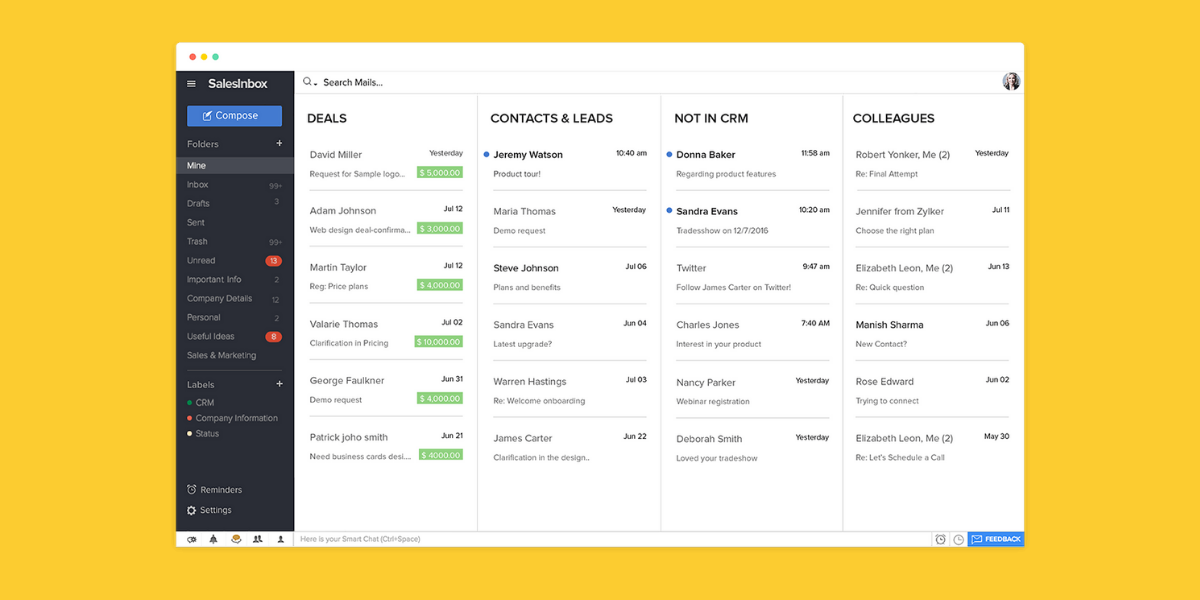
Before the CRM implementation, make a detailed list of all the business tools and see if they are compatible with each other or not. The CRM providers must have a list of native and third party integrations available to use the system. If you have a CRM system and are planning to subscribe to other tools then you can do the same by checking if the CRM integrates with these tools or not.

In case you discover that the CRM does not integrate with a business tool then you can also consult a Zoho consultant. The consultant will introduce an automation tool that can connect apps and services. Two or more applications will be easily connected to automate all repetitive tasks without any need to code or depending on developers for integration.
Conclusion


Making CRM mistakes can be costly. They do not just include financial impacts but they also lead to a loss of valuable time and key customer data management. The good thing is that careful research on important aspects such as knowing the right features, integrating them suitably and following the implementation process can avoid the
common CRM mistakes.

You can consider all the mistakes mentioned above so that they can be avoided or you can do a better job and take the support of a Zoho consultant. This way, your business will be prevented from making potential hiccups down the road.


10 Common Zoho CRM Mistakes and How to Avoid Them? Read More »

Zoho CRM, Zoho Implementation, , , ,
Collaborate and Communicate Effectively With Zoho CRM Feeds | Encaptechno

Collaborate and Communicate Effectively With Zoho CRM Feeds

Collaborate and Communicate Effectively With Zoho CRM Feeds | Encaptechno
Collaboration is an extremely important aspect of businesses. When you need to finalize a deal or even negotiate on the discount price or organize an event, you collaborate with a team to achieve your goals. To make this possible, the tools that help in communication are very helpful in making sure that everything is said, understood, and timely implemented.

Any platform that allows you to get actively involved in the discussions and share your ideas can be purposeful and time-saving as well. The feature of Feeds in Zoho CRM offers one such platform where you can easily share your views and also discuss matters with team members to speed up the decision-making process.

In addition, Zoho Feeds also gives you important updates on records that you follow such as updating a record, making changes to a record, etc. With the use of Feeds in your Zoho CRM account, you can effectively do the below-mentioned things.

  • Post a message and share it with all the users in your organization.
  • Post a message in a group and share it with all members of a group as well.
  • Mention a role, user, or group in the status messages.
  • Send a direct private message to your colleagues.
  • Comment on the status messages and reply to them with private messages.
  • Follow the records automatically by creating important auto-follow rules.
  • Attach important documents to messages that are being posted.
  • Get notifications for the mentions and changes that are made to the records and the ones that you follow.

What is Zoho Feeds?


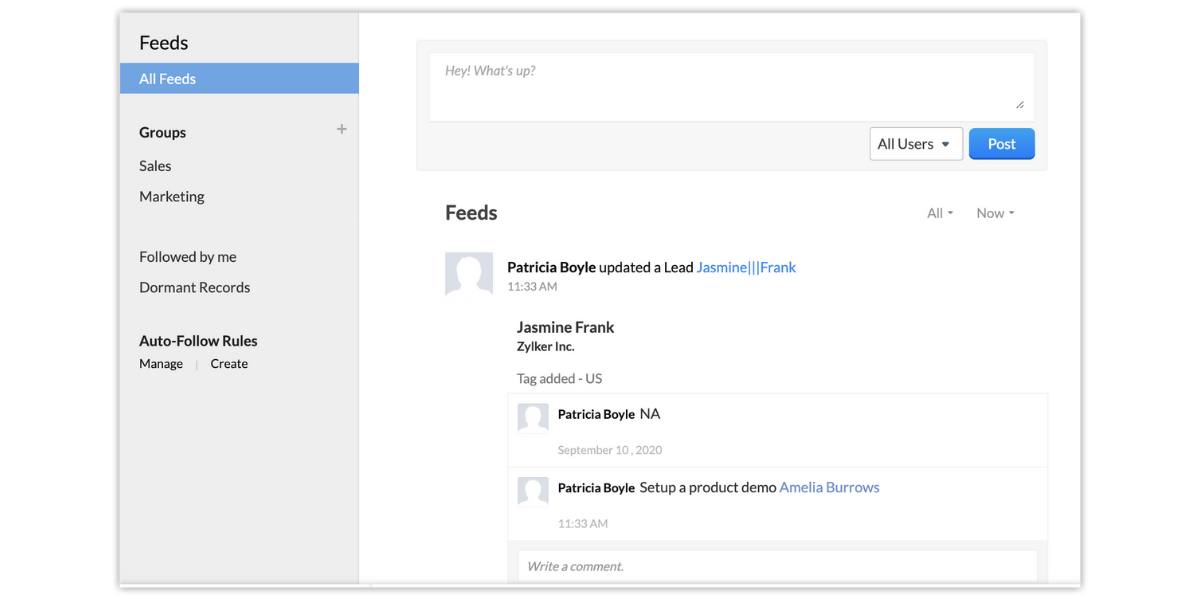
Zoho Feeds is more like a forum on Zoho CRM where any team can collaborate and communicate easily. Let’s understand Zoho Feeds with an example of the sales team. Using Zoho Feeds, the sales team can share insights on the go and keep the rest of the team updated about how they are doing while also giving each other recognition for sales accomplishments. The Zoho Feeds can allow a team to work together and accelerate the process of sales optimally.

All the status mentions, comments, direct messages, changes made to your records, deletion of records, adding notes to records, etc. can be listed. The Zoho Feeds can further be filtered based on the modules and time period as well.

You can mention other users, groups, and roles in the status messages. All users who are associated with the mentioned groups or roles can easily view the messages on their Feeds wall as well. You can follow the records that are important to you so that they can be shown automatically. You can also use the Follow button for manually following the records and creating auto-follow rules to follow other records.

Zoho Feeds helps in getting notifications within the Zoho CRM anytime when a user mentioned you in a comment or a message. In addition, the files can also be shared with other users in an organization or a specific group. You can send direct messages to the users. Any comments added for a record’s update can be added as a note for the record. In addition, notes can be added to a record that is available in Feeds as a comment.

Understanding Zoho Feeds


Understanding Zoho Feeds


All the information that you have does not necessarily need to be shared with everyone you know in your organization. It happens often that your content and information are only relevant to a specific group of people. In case you focus more on communication within a closed group, collaboration becomes much easier too.

Zoho Feeds helps you in sharing important updates while collaborating with all users in your organization. While making an important update on the Feeds tab, you can just select the required group and restrict communication in the same group.

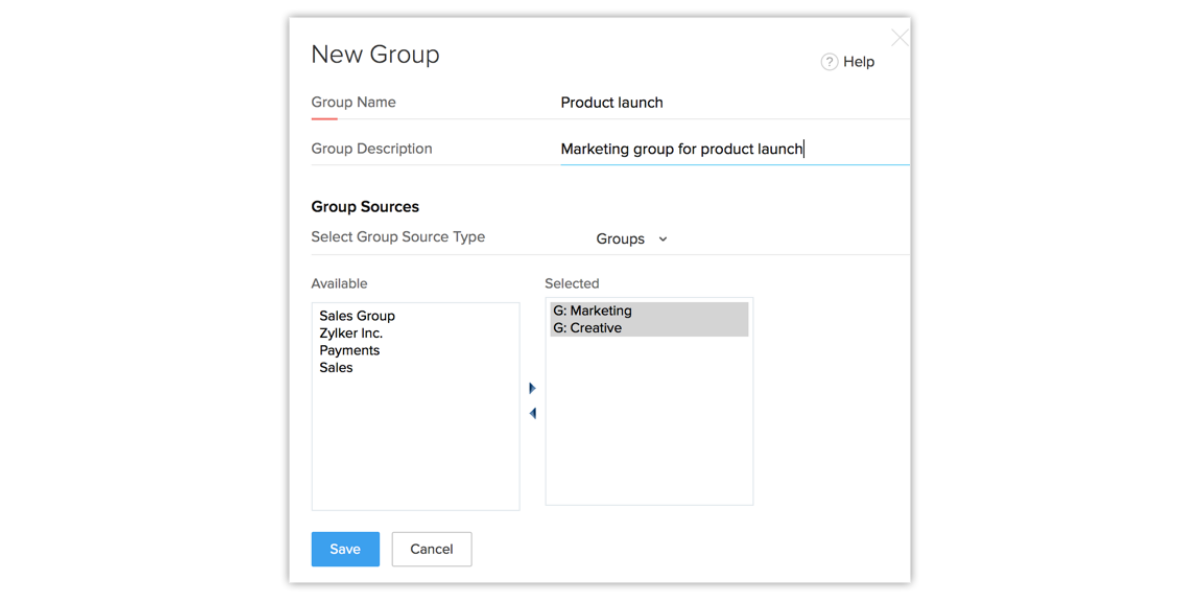
Zoho Feeds also allows you to create a group directly from the Feeds tab by simply clicking on the Create Group icon. For instance, you just have to specify the Group Name as Product Launch and Description as Marketing Activities for the product launch.

Within the Group Source section, you can also choose the group members you wish to add. You can choose the roles, users, subordinates, and people from different groups too. When you click on the group, you can just view the group’s feeds and group members while carrying out the conversations.

This is pretty useful, particularly because you can create more groups for specific sales regions too. In case you are a part of a sales team that follows up on leads and contacts from the USA, Europe, APAC, or the UK, you can also create Groups for these regions and put ideas, suggestions, and discussions in these groups.

Create Groups


Create Groups

You can have a marketing group, finance group, sales group, team leads group, and management group. Basically, in case you wish to facilitate communication within the closed circles then it can be easy to collaborate and share information in the organization.

The groups can be created under the Zoho Feeds and any discussion that is going on within a group can be used for sharing files, status messages, etc. The groups can be easily accessed by the users of the group and you can also mention your group in messages or send private messages to the group.

Changing the Feeds Preference


Changing the Feeds Preference

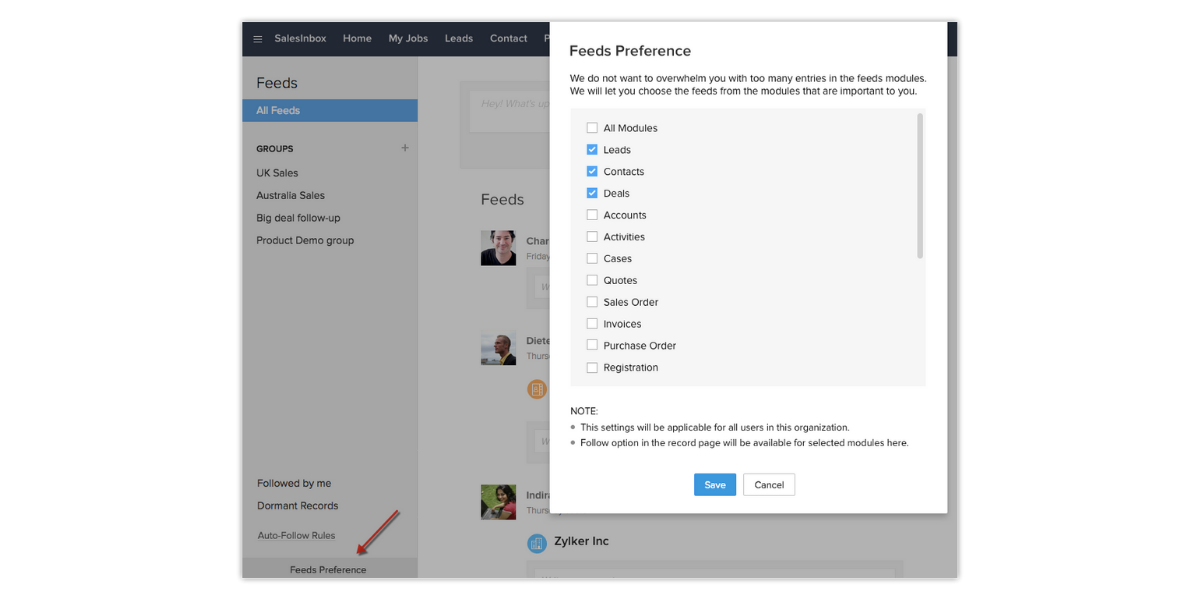
Zoho Feeds is one of the best ways to keep a tab on all records that are important to you. However, in case you think that the Feeds section is becoming too cluttered with different updates then you can choose the modules that you wish to receive updates from.

For instance, in case you wish to only see updates on progressing deals and not on leads then you can just uncheck the leads from the Feed Preference settings. This will help in blocking out all Feeds related to the important modules. The Feeds Preference settings are set up by the administrator and are also applicable to all users of the CRM organization account.

Adding Auto- Follow Rules


Adding Auto- Follow Rules

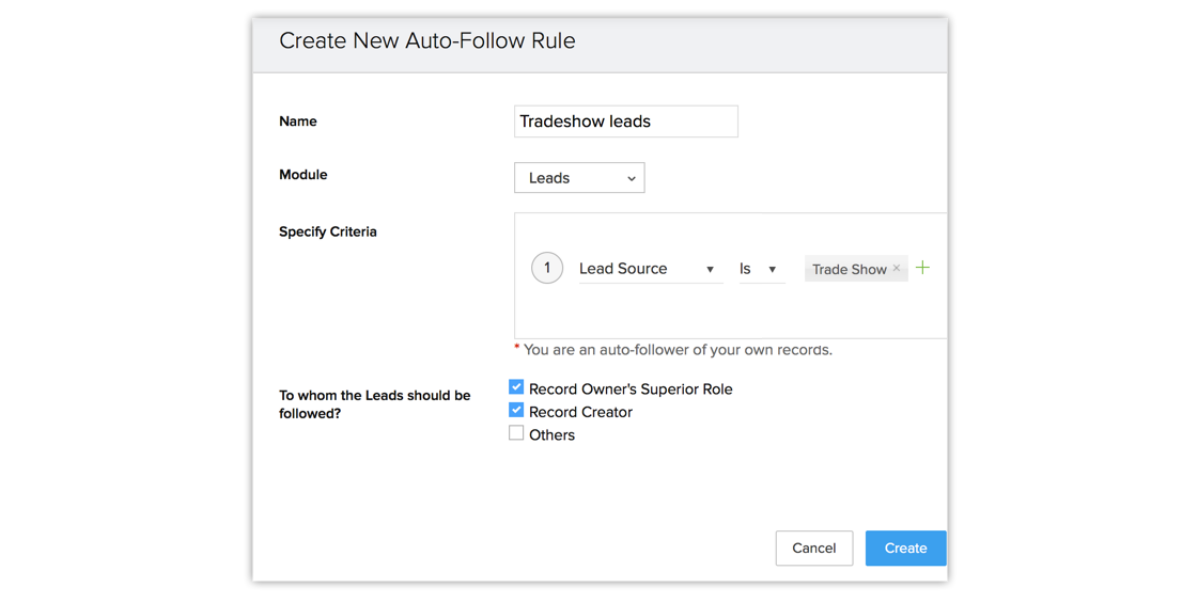
Just as the name suggests, the auto-follow rules help in automatically following records that are important. Anytime a record meets the criteria specified in the Auto Follow Rule, the record gets automatically followed by you. If you make changes to the records followed by you that are listed in the Feeds tab of Zoho CRM then you can keep a track of all activities and updates of important records.

Let’s say that you are heading the sales department in your organization and you wish to get updates on all important deals that have an opportunity of generating more than a defined amount. Rather than manually asking your team to send updates on important records, you can follow the records automatically using the Auto-Follow rules and get updates within the Feeds tab. This way, you can become well informed whenever a note is added to it, some details are added or any other activity is associated with the record.

See Any Inactive Records


See Any Inactive Records

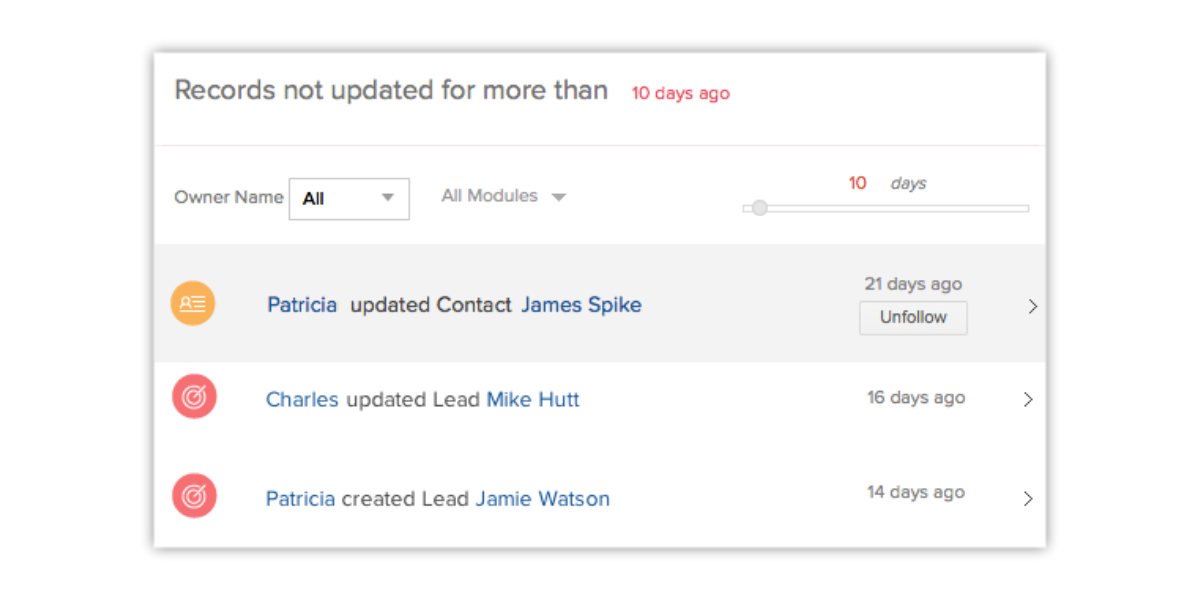
The Zoho Feeds slider shows the number of days and is also used to set the count between 1 to 180. On the basis of selected numbers in this slider, the records that are not updated for more than the specified number of days get listed. This helps in keeping a track of all important leads that have been inactive for a period of over 6 months.

In case you wish to view the records without activities or updates for the past five days then you have to set the Feeds slider to 5. The records that have not really been updated for more than five days will get listed in this way.

View Records That You Follow


View Records That You Follow

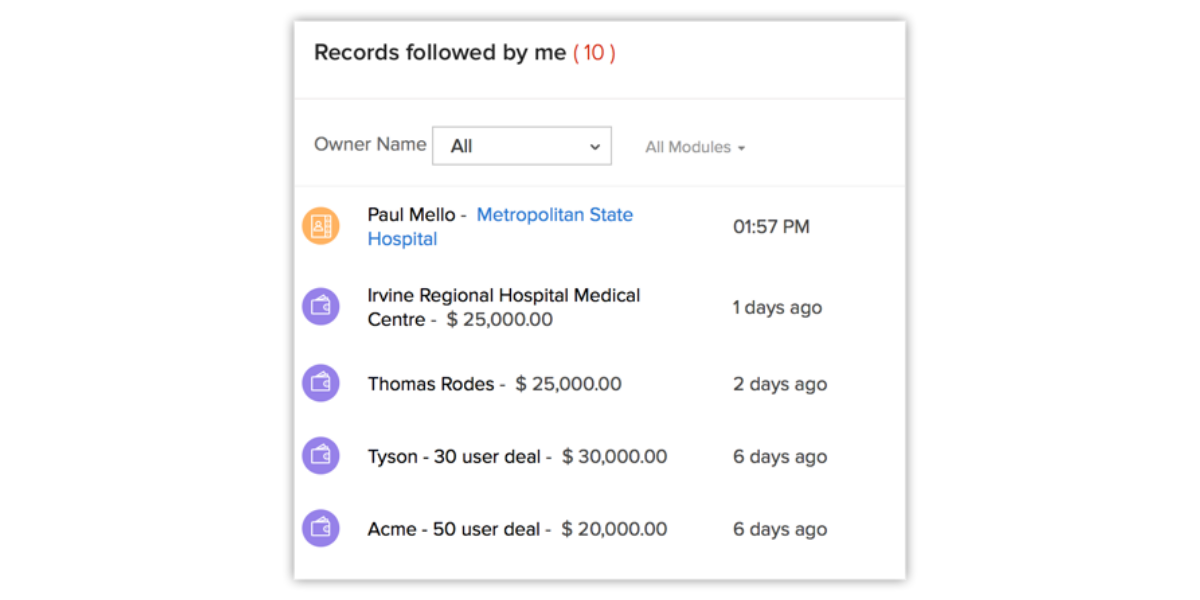
All records that you own will be followed by you automatically. These records that you follow manually or on the basis of the auto-follow rule will get listed in the Followed By Me section. This will regularly help you get all the updates that you are interested in.

Features of Zoho Feeds


1. All Announcements in One Place


It doesn’t matter if you wish to congratulate a team for performing well on closing a deal or you wish to send a routine update about the status of a contact, you can do anything much faster while using Feeds.

All you have to do is just notify your colleagues or groups by using the @mention feature. You can mention them so that they can get the message timely. When you keep the communication inside the CRM, you will spend less time looking for the information and also have an easy time knowing what your team is working on.

2. One On One Interactions


Zoho Feeds also allows you to create groups where teams can collaborate with each other and work together. The teams can close big deals way more quickly by sharing insights, answering every question, and sending updates for keeping everyone on the same page.

This also allows the team to understand when each assignment is completed while acting fast. The Zoho Feeds can be used for sending private messages directly to teammates. When the interaction becomes one on one, there is no lag in getting things done at the right time.

3. Getting Notified in Real-time


With Zoho Feeds, it also becomes possible to stay up to date on all deals that matter the most because you can get notified when something changes with a contact that you feel responsible for.

Anytime you will see a contact in the Zoho Feeds, a detailed record of all feeds that have been mentioned in the contact will appear along with the notes. The thing is that real-time notifications can play a very important role in keeping the sales operation on the right track because you will be prompt in taking action.

4. Share Sales Documents


To make sure that the sales process goes on as planned, it is necessary that you and your team have the right sales collateral. In case either of the team members does not have anything then important documents can be shared on direct messages.

There is no need to switch over to the email or chat window for sending attachments. All you have to do is just drag and drop the pictures, sales collateral, presentations, and spreadsheets for adding them to your post. In this way, you will be able to send any required sales documents to your team members easily.

5. Streamline Your Page


Zoho Feeds gives you an option that allows you to choose what updates to follow. There is no need to clutter your page with any kind of unnecessary updates. This way, the page can become highly streamlined. 

You can instead choose the records that you want and update them by either following them manually or by setting rules for automation. When you track the big deal records and the details of a specific customer, you can also keep the conversations focused and retrieve the information that is needed just at the right time.

6. Geotagging Sales Appointments


Your team can be kept in the loop by checking in for meetings with locations so that the colleagues can be informed about the whereabouts of your teammates. This helps in maintaining records so that your team knows what happened at the time of interactions with your prospects.

If you have been going ahead in your sales approach on the basis of location then this is even more helpful because with geotagging, the sales team can know about your progress based on the locations. The more deals you keep closing in a location, the closer you will get towards achieving your location-based sales targets.

Conclusion

Zoho Feeds is one of the best forums where the teams of your organizations can communicate and collaborate with each other. Once your team gets used to using Zoho Feeds, all communication will become very simple and effective at the same time.

In case you need any further support in knowing more about the use of Zoho Feeds, get in touch with our expert Zoho consultants for assistance. They will guide you at every step.


Collaborate and Communicate Effectively With Zoho CRM Feeds Read More »

Zoho Implementation, , , ,
Sell on the Go with Zoho CRM | Encaptechno

Sell on the Go with Zoho CRM

Sell on the Go with Zoho CRM | Encaptechno
Sales are all about closing deals and generating revenue. It is not something that can only be accomplished by making calls or sending emails from a desk. Many times, you have to travel as well. When you are on the road, you will need a CRM mobile application that is both powerful and intuitive.

The mobile version of a CRM application helps in doing a lot more in much less time while staying ahead of your work and following up with the prospects to get more deals. Don’t get this wrong. A mobile CRM is not like the low-sized version of desktop CRM.

It is actually a more specialized and dedicated platform that is aimed at higher productivity. It lets the professionals focus on what matters the most. Most companies understand that maximum internet usage is through mobile phones and tablets as compared to desktops. This actually shows that the mobile versions of software and applications also lead to much more productivity.

In this blog, we will discuss six ways in which you can sell on the go using the Zoho CRM while empowering your sales team when they are on the move.

1. Smart Planning


Smart Planning
You must be able to access your schedule within a moment’s notice. Opening up your laptop while you are commuting to see a prospect for finding your calendar is not something that is practical.

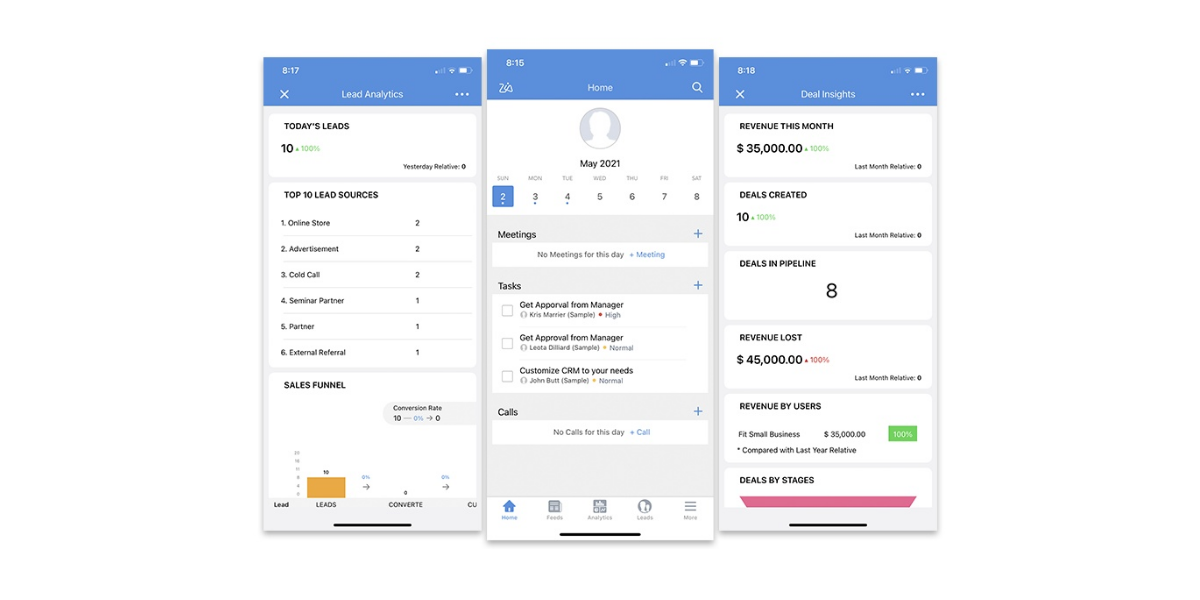
This is why Zoho makes it simple for you to view and track your schedule from the Zoho CRM mobile app. You can add tasks, create events, invite participants, and schedule calls from the Home Screen. In case you enable notifications, you will also be able to receive reminders of calls, events, and tasks that you have coming up in the future.

2. See Your Key Sales Metrics


The
Zoho CRM implementation helps you see dashboards in the desktop version which further enable you in tracking trends in your sales, support, and marketing departments. This dashboard can help you see how many sales deals your team is making each month, glance at deals you have in the pipeline, record campaign success rate, and see the generated revenue per quarter.

The same information can also be accessed in the mobile application. You can also use the mobile dashboard to classify your CRM information into different dashboards on the basis of Leads, Accounts, Contacts, Campaigns, Deals, Products, Inventory, Cases, and Solutions. Each segment differentiates information so that it becomes easy to find what you need quickly.

3. Locating Nearby Customers


Using the mobile Zoho CRM, it becomes possible to locate nearby customers. The
lead management system can become remarkably enhanced with the use of this feature. There is a Map View in the Zoho CRM mobile application that helps in finding prospects near you wherever you go.

With the use of this feature, you can easily locate the leads, contacts, and accounts in your area while scheduling meetings when you are on your next business trip. There is another significant use of the Map View. By using this feature, you can use where your leads are located and figure out the best time to contact them at any time.

4. Keep Track of Meetings


The sales professionals meet their customers almost on a daily basis but when the need comes, it is not so easy to recall all those customers. The
Zoho CRM helps to check in at a customer’s location and log in all visits while adding more metrics to the reports.

This helps the managers to improve their sales strategy by generating reports based on the number of meetings that get logged in at a given period. You can track the number of customers and places a sales professional has visited each day, the total distance traveled by the agent, the total time taken to travel, etc.

This thing becomes much easier by recording information as a voice note instead of typing it as a text. The voice notes can be downloaded at any time.

5. Work On the Go


Work On the GoUsing Zoho CRM, you can take your work anywhere you go. There is no need to sit behind a desk just for being productive. This feature helps in nurturing your
lead nurturing strategy as well.

Basically, Zoho CRM does not let you sit behind a desk for being productive. You can instead stay connected at any time and anywhere with the offline mode in your Zoho CRM mobile application.

You can easily update a note, log a call, complete a task and add an event to your calendar even when you do not have internet access. All changes made in an offline mode will be synced automatically as soon as you go back online.

6. Follow Up Instantly


Zoho CRM allows you to follow up with leads instantly. With features such as MailMagnet, you can get notified instantly about important emails from leads and customers.

In addition, MailMagnet can also be used to scan your inbox and bring the emails from prospects and customers to your focused attention. Not only does it allow you to prioritize attention, but it also helps in sending emails, adding notes, and adding follow-up tasks right away. You can do all tasks single-handedly.

7. Real-time Collaboration


Real-time Collaboration
You can never expect all of your team members to be at one location when you have to make a collective decision. With the use of features such as feeds, you can keep everyone on the same page and increase your chances of winning a deal.

It allows you to see the work done by your team, comment on it, and also post a status to keep your team updated on the work. Being a sales representative, it is not easy for you to be everywhere. In case you have a team of sales representatives, they will be in different locations at different times.

However, the Zoho CRM mobile app helps you and your team centralize the CRM data. You can stay up to date on all of your tasks and handle your work in a way that you feel comfortable so that productivity increases.

Conclusion

Take your CRM wherever you go and sell immediately. Getting in touch with a Zoho Consultant can help you in getting real-time updates, receive notifications, access customer information, find your customers nearby and do much more.

Encaptechno has a wide experience of supporting many customers by offering Zoho consultancy services. You can get Zoho mobile CRM today and begin selling on the move while making your business dreams a reality. Contact Encaptechno today!


Sell on the Go with Zoho CRM Read More »

Zoho CRM, Zoho Implementation, , , ,
List of Best Ways to Optimize Web Forms | Encaptechno

List of Best Ways to Optimize Web Forms

List of Best Ways to Optimize Web Forms | Encaptechno
A
webform is essentially an exceptional way to allow the visitor to get in touch with you and send information such as an important order request, query, etc. On some websites, information that gets submitted with web forms is transferred directly to the company email. Web forms are constructed in programming languages and successful implementation of the code is important for the success of any form.

They can include any form fields such as text areas, text boxes, radio buttons, checkboxes, file upload, buttons, and hidden fields. These forms basically work as a communication bridge that allows a user to communicate with a company and vice versa. You must know your target audience and market to frame important questions on a web form. Either you can research them all independently or you can get in touch with an expert for evaluating the target market and creating sensible questions as needed.

Importance of Web Forms


Web forms
are an exceptional way to get valuable customer information that can be used for a wide range of purposes. You can keep your customers updated about the new offers, discounts, and a variety of other things if you have their contact information.

If you have a running landing page, we are sure you must have had conversations about using that landing page for converting the incoming traffic into leads. The process of attracting people to your business is called lead generation. To do this, you can begin a marketing campaign, advertise, conduct seminars, and online webinars, or participate in an event or trade show. All of these methods help in getting the audience getting attracted to your offering.

With web forms, you can move a step ahead and get their information. Given below is a list of best ways to optimize web forms along with an explanation on how to implement these ways using Zoho CRM.

1. Connect the Web Form With CRM


Connect the Web Form With CRM
The usual course of action that most organizations follow is waiting until getting a good number of leads and then transferring them to a CRM system. However, the truth is that getting a bunch of leads all at once can be difficult to manage.

If you collect these leads one at a time, it can become relatively simple to assign them to the sales representatives, add tasks, schedule tasks, and follow up when the time is right. You can use and optimize web forms that are well connected to your CRM and get the data directly into the CRM database.

In addition, you can also relax without any doubt on the precision of data that gets captured into a web form and is linked to your sales representatives. Basically, the information recorded into your web form will be transferred to the CRM automatically and the sales cycle will eventually turn into a streamlined process.

2. Add Links and Clues to Fill Fields


Filling out a web form is not necessarily a task that most people enjoy. Most often, you will find that people are reluctant to share information, particularly when email address, contact details, and any other information are involved. To make this better, you can add a link to the privacy policy guidelines that your company follows and also assure them that the information is secure all the time.

Any further hints on the information including the date and time format, phone numbers with or without the code of an area can be useful for maintaining the CRM with clean and precise data. This will also ensure that all the data gets collected in the same format and also somehow helps the visitors to fill up the relevant details.

3. Take Important Information Only


It can turn out to be a big loss if you attract a lot of traffic on the web page but do not end up having a web form that is attractive enough to get the user to fill that form. Of course, you cannot deny that it is always tempting to collect as much information as you can but you cannot afford to present a lengthy web form with too many fields because it is certain that this will backfire.

A seamless user experience matters immensely and you should aim to give the user no reason to turn away from your website. Hence, you must focus on keeping the web form rather simple with only those fields that are required as that is a wise way to go about the process.

Create a form with only the important fields so that it takes less than two minutes to fill. You can probably add an extra field that you think may look good but check if it is really worth it. Ask for only whatever is necessary for the sales representatives to contact the leads and follow up with them.

4. Passing Hidden Values For Forms


Many times, there is a need to link some details to the new leads without revealing these details to the visitors. This detail could be the campaign that generated the lead or it could be a source of the lead. It could also be a hidden value that you want along with the detail of the lead.

You can add a hidden value that comes in with the lead for such requirements. For instance, if you wish to host a specific page then the best way to go about this is by getting a clear picture of the source of lead generation and passing the hidden values automatically.

5. No Spam or Automatic Form Submission


You would never want your site to get attacked by the bots that can sign up countless times within one minute. In addition, you would also want to avoid receiving any kind of junk requests that qualify in the category of spam.

One of the best, most used, and reliable solutions for this is Captcha. It is used a lot and is very useful as well. You can try and include captchas that can differentiate between human beings and computers. This will help in eliminating the automatic web form submission process to a great extent. It is also going to reduce spam and give you many quality leads to work on.

6. Keeping the Visitor Engaged


Keeping the Visitor Engaged
Convincing the visitors to fill the forms is not the only goal. You can go way further to keep the valuable users engaged for good. Attract the attention of users by giving them additional information. You can also redirect the users to a page that focuses on underlining updates, offers, and important information.

You can provide an overview of the product in the form of a video or an interactive UI. You can also list the testimonials from existing customers or just redirect them to a page that expresses gratitude.

7. Personalized Emails


Personalization is extremely important in these times. As long as you do not find a way to make the customers feel that they matter, you will not be able to stand out in the market. If the customers feel that something is customized according to just for them then they are bound to feel special and interested.

The practice of sending emails to acknowledge the requests sent by the leads is one of the best practices that you can get used to for nurturing leads. However, making this automatic is not fun anymore. You can add a personal touch to your emails and set the right note for customer relationships and sales. Make sure that you let your customers know that you are trying to help them.

8. Assigning Records to Sales Representatives


The leads might fill up a
web form to find out more about a product or while downloading a white paper or an e-book. No matter what case it is, the main question is how long it takes for the sales representatives to follow up on leads and get back.

There are different methods that can be used for connecting to the leads or prospects but keep in mind that the timing must be right. In case the process takes longer then you must revisit the lead management and follow-up process. The focus should be on making the most out of the opportunity and not making the leads wait for a long time.

You can create a simple workflow for assigning and routing the leads to the sales representatives for quick follow-ups. When you really put this into practice, you will see a massive change in the way the sales process starts working out and does well for the business. 

9. Filter Records


It is very important to make sure that the leads that get added to the CRM system are all genuine. They must not be from bots or junk leads. Captcha is actually for avoiding spam but the sales team should also be mindful of the junk leads that can enter the CRM. 

When the web forms and CRM systems are connected to each other, possibilities are that the uninterested leads get added as well. You would definitely not want the sales professionals to waste their time on any junk leads. For this reason, it is important to keep a check on records that get added automatically and approve them before they are ready for follow-up by the sales team.

Conclusion


All of the tips that are mentioned above can be extremely useful to
optimize the web forms and use them for your benefit. Web forms will make sure that each lead that gets added to the Zoho CRM is used to its complete extent.

If you need any more support in the optimization of your web forms or in making the best use of leads that get registered in the CRM, get in touch with our expert Zoho consultants. They come with a wide experience that can guide and lead you towards a much better sales process. 


List of Best Ways to Optimize Web Forms Read More »

Zoho Implementation, , ,
All You Need to Know About Zoho Contracts _ Encaptechno

All You Need to Know About Zoho Contracts

All You Need to Know About Zoho Contracts _ Encaptechno
The contracts are legal documents that govern almost every penny that either comes in or leaves a business. If the businesses are equipped with the right contract management software for managing them then they can transform contracts from static documents into strategic assets. In a business landscape that changes so quickly with the evolution of technology, regulatory measures are coming up often.

Moreover, the global supply chains are only becoming complex and the marketing and sales models are becoming increasingly diverse. This is a state that has led to a need for digital contracts that can be easily accessed and amended. There is an increasing demand for a powerful CLM platform that allows you to manage and get the most out of your contracts.

A powerful contract lifecycle management software lets you automate and streamline contract processes and unlock the real potential within them. With a CLM such as Zoho Contracts, legal teams can save considerable time which can be invested in high-value tasks.

In this blog, we will have a detailed look at Zoho Contracts and the functions that this software offers.

What are Zoho Contracts?


Zoho Contracts is a simple solution for all the contract challenges. It helps in efficiently streamlining the Contract Lifecycle Management process with a feature-rich platform while achieving compliance at scale with reduced costs.

The implementation of CLM platforms like Zoho Contracts enables you to reduce contract cycle times, mitigate business risks, and improve contract governance. It is a complete contract solution that eliminates the need for multiple applications.

All business owners can stay on top of their business contracts no matter where they go. Zoho Contracts applications create a personalized mobile dashboard that offers insights into key contract metrics. The application also comes with features that are needed when you are away from your desk.

Other than offering efficiency in legal operations, the Zoho Contracts software facilitates better business outcomes. It addresses the below-mentioned aspects of legal operations.

Streamlining Contract Lifecycle


There are five stages included in the contract lifecycle that Zoho Contracts takes care of and they are mentioned below:

  • Authoring: Zoho Contracts comes with an extensive library of predefined contract templates and an ability to create custom templates in Zoho Contracts which makes contract authoring a breeze. The contract type templates along with the clause library in Zoho Contracts bring a systematic approach to contract authoring. It helps in saving a lot of time at the authoring stage while ensuring that there is language consistency across all contracts. The document editor comes with advanced document assembly capabilities, collaborative editing features, fillable field features, contextual commenting, etc.
  • Approvals: All contracts are legally binding documents so the content included in them must be clear, concise, and accurate. The approval process of contracts can improve compliance and reduce risks by making sure that stakeholders are aware of the scope of a contract before it is executed. Zoho Contracts can be used by admins to set up approval workflows both sequential and parallel and associate them with contract types. The approvers can add contextual comments in the documents and approve or reject them as well.
  • Negotiations: As opposed to the traditional approach in which you send contracts back and forth as email attachments, Zoho Contracts helps you with controlled access to counterparty contacts with password-protected links. The counterparty contacts can collaborate with each other in real-time, suggest relevant changes that should be made to the document, make contextual comments, and set the visibility. This negotiation history tracking and comparing changes feature comes in as highly useful when there are various negotiation rounds.
  • Execution: Zoho Contracts is a CLM system that comes pre-integrated with an e-signature software called Zoho Sign which makes this important step in the contract lifecycle extremely quick and effortless. The turnaround time for emailing, printing, signing, and faxing cycles can be eliminated or reduced considerably. You can sign and secure the legally binding electronic signatures within a few minutes. A signing order can also be specified that pans all across the signer group, organization signers, counterparty signers, other representatives, etc.
  • Post-execution Management: The use of Zoho Contracts also supports the post-execution stages along with amendments, extensions, terminations, and renewals. The software comes embedded with a predefined letter template that is customizable for each of these stages. The conventional templates only offer a skeletal structure of the document in which all members can contextually edit the content and make it complete. On the other hand, Zoho Contracts enables a user to amend a contract by making changes in the contract as the amendment letter that gets generated automatically captures the current changes along with the entire contract history. This extreme reduction of any manual intervention in document generation makes the lifecycle management of post-execution contracts extremely simple and straightforward.

Creating Risk Proof Contracts

Creating Risk Proof Contracts
Zoho Contracts is excellent
contract management software that can help in gaining access to predefined templates for commonly used contracts such as NDAs and MSAs. Templates can act as a guide rail for the contract authors. You can change the details as much as you need while authoring a contract. You can also create your own template.

Instant contract creation is also enabled with the use of Zoho Contracts as you can simply add the contract and counterparty information in a form for generating contracts with all the right details in place. The contracts can be created based on the templates which empower all members to create contracts while also ensuring that there is language consistency across all contracts.

Zoho Contract comes with a built-in document editor with all features in a powerful word processor called Zoho Writer. The cloud offering allows you to author contracts from wherever you may be. Lastly, the advanced clause picker enables contract authors to search for and insert a clause in a contract easily. All the clauses in predefined templates including the ones you add are available in the clause library.

Contract Data Can Be Turned Into Business Insights


The feature of Dashboard lets you gain a high-level overview of your business at a glance while quickly making informed decisions. You can see the KPIs regarding your business health and growth at your fingertips.

Other than the Dashboard feature, the Reports feature also helps in gaining actionable insights across all aspects of the contract management system. You can check on things such as milestones, clauses, obligation, counterparty, performance, and other general contract attributes.

Enhancing Governance


Zoho Contracts is advanced contract management software that enables admins to make well-informed decisions by arriving at actionable business insights gleaned from a wide range of contract data. It comes with more than 30 standard reports across different aspects of contract management. And the personalized dashboard offers a high-level overview of business contracts at a glance.

Moreover, Zoho Contracts also allows activity tracking on three different levels including the contract level, user level, and stage level (approval, negotiation, signature). All kinds of activities performed by users on these levels are tracked chronologically. The stage level tracking presents the contract owner with information on whether the people involved in this stage have received the email notification, viewed the document, and performed the intended action along with time stamps.

The admins can structure the entire contract lifecycle process by configuring the clause library, contract letter templates, contract type templates, and approval workflows for contract types. The activity, access, and audit logs offer better visibility over organization-wide activities.

Reducing Business Risks


Reducing Business Risks
Adding suitable clauses such as limitations of liability and indemnity can eliminate all risks at an individual contract level and only a holistic contract management process designed with risk mitigation in mind can make a business truly risk ready. The use of Zoho Contracts comes with a peer review and approval workflow capability that offers better transparency over contract items to almost all the stakeholders involved. You can set up a clause library with legally approved languages and contract-type templates that act as a guide rail for contract authors. The governance settings give better control to the admins for the contract process while also improving compliance.

A critical risk factor for a business is to not fulfill contractual obligations. Any failure to comply with obligations can result in adverse regulatory and financial consequences and also leave the organization with damaged business relationships. A CLM system such as Zoho Contracts ensures that all obligations related to a contract can be tracked and managed from the contract obligations section. The contract owner can assign obligations to respective business owners and set reminders for them. Admins can also stay on top of these obligations with the help of obligation-based reports.

Promoting Cross-Functional Integrations


Contracts are considered dynamic documents that touch all parts of a business. The ever-increasing importance of the role of contracts necessitates cross-functional visibility and collaboration over them. The Zoho CRM integration allows sales professionals to initiate contracts from related sections of a deal record in CRM and track the contract’s status from CRM.

Most business development professionals report that any inefficiencies in the contracting process lead to slow revenue recognition. The main cause of this is sales and legal teams working in silos rather than together. The deals that were won and have been closed are often marked as complete after the sales agreement is signed which means that any inefficiency in the contract lifecycle management process of an organization impacts the revenue growth.

Any lack of transparency or difficulty in communication between the sales and legal teams result in long contract cycle times and it can even result in lost deals sometimes. With the Zoho CRM integration, you can establish a sort of transparency between the sales and contract processes while considerably improving the cycle times.

The integration can make the critical functional aspects of Zoho Contracts that are relevant for salespeople within the Zoho CRM. The sales cycle management offered by Zoho CRM and the contract lifecycle management offered by Zoho Contracts works together as the best contracting process for the sales team.

Much Better Control and Compliance

Much Better Control and Compliance
Zoho Contracts is highly functional
contract lifecycle management software that keeps all stakeholders aware of potential risks and opportunities in a contract before it becomes active by adding them as approvers. You can design your own approval workflows both sequential and parallel. The approvers can also collaborate through the comment section.

There is a central repository where all the contracts can be stored. There are search and filter options as well that enable much better visibility and accessibility. One can stay on top of all user activities in the CRM platform of Zoho Contracts. It is easy to view the history of all progress, changes, and suggestions made in one place.

With version control, all versions of a contract can be seen in chronological order. It is also possible to compare versions and restore any of the older versions simultaneously. There is another feature of Calendar View that offers a month view calendar display of all the contract schedules and reminders.

You can never miss any obligation or an opportunity for a renewal with the help of reminder alerts. Lastly, with User Roles and Permissions, you can assign roles for users in the organization. There are different access permissions for each role which enable better control over the contract lifecycle management software.

Conclusion

Zoho Contracts can empower organizations and individuals with better control over the contracts because of its impressive automated workflows. It has a wide portfolio of products and seamless integrations that make the workflow very easy to manage.

You can quickly set up Zoho Contracts with only a little support from a certified and experienced Zoho consultant. The professional will be able to introduce you to all features while also importing your key contracts. Get in touch with Encaptechno to stay on top of the contracts all through their lifecycle.


All You Need to Know About Zoho Contracts Read More »

Zoho CRM, Zoho Implementation, , , ,
Guide to Getting Started with Zoho CRM Features _ Encaptechno

Guide to Getting Started with Zoho CRM Features

Guide to Getting Started with Zoho CRM Features _ Encaptechno
If you are interested in sales, have a knack for selling absolutely anything to people, or work in the sales department of a company then you would identify with having that desire to be a smart sales representative at work.

Winning the sales game has a lot to do with using a good CRM system to its full potential. For example, with the Zoho CRM features, your sales can be completely automated leaving you to entirely focus on customer interaction and closing deals.

In this blog, we will be seeing the features of Zoho CRM that can help you in becoming an efficient sales representative who knows how to ace customer relations and be one step ahead. Keep reading to see and understand these features one after another.

Use Zoho Mail Integration


Sales have a lot to do with being prompt with the customers. In case you are a sales representative, you cannot afford to miss out on an important email from a customer. Let’s imagine that you are running through all of your emails and replying to them simultaneously.

However, by evening you realize that you ignored an important email from a hot lead. Now the probable reason behind this could be a cluttered inbox with many emails. Missing out on this important email may not be by intention but the fact is that as a sales representative you cannot afford something like this for your business.

It is important for the sales representative to attend to all the leads as soon as possible and for doing the same, there needs to be a filtered view of all the prospect emails. One of the most used Zoho CRM integrations called Mail Magnet allows you to not just receive emails but also get a filtered view of your prospect’s emails as well.

With this email integration, you will not need to keep checking the emails all the time. Every time you receive an email from a prospect, you will be notified by the mail icon that pops up right on the Zoho CRM home page. Remember that MailMagnet will be available with the Zoho Mail Integration only, so ensure that you ask your Zoho consultant to enable it and configure the email account with Zoho CRM.

Organize Emails According to Sales Priorities

Organize Emails According to Sales Priorities _ Zoho CRM _ Encaptechno


Another important thing to remember while dealing with the customers is that the most recent email is not always the most important too. If a lead has emailed asking about the price of a product or negotiating on the price of a product, then these emails must be immediately accessible. This can save considerable time and effort.

It is natural that you will be organizing the sales activities based on the pipeline and the level each deal is in. What’s notable is that you can organize your emails in a similar way as well with the use of Zoho CRM features. Using the SalesInbox, you can access columns, filters, folders, and columns that can show your sales priorities and allow you to stay at the top of the emails that matter.

SalesInbox functions smartly by organizing all emails according to the way in which you have set up your CRM. Even though the regular email clients allow you to filter emails based on the address of a sender, SalesInbox allows you to filter emails based on the sender’s email address and sales parameters.

For instance, if you get emails from customers who are offering you deals of more than 1 lakh, then that can be specified with the name Top Leads. Using SalesInbox allows you to create many folders and also shows them right on the side of the folders you have.

Using SalesInbox, you can also automate the lead creation in your inbox, get automatic reminders, and work with useful information.

Monitor Customer Activities


For all sales representatives, one of the most critical aspects to ensure sales success will be timing. SalesSignals gives you an immediate notification about what the prospects are up to. You will also know if the lead that you have been chasing has opened your email or not. An alert will be sent to you as soon as the email is opened.

Always keep in mind that the prospects and customers can reach out to you from different channels. They can visit your website, fill surveys, raise support tickets, and post on your social media. To improve customer relations, you will have to be consistent and prompt. The use of SalesSignal helps you track all customer activities by displaying them in an organized way.

SalesSignal will give you a prompt when your leads send you an email, open the email sent by you, click on the links in the email, or when the email gets bounced. You will also be notified when missed calls are received, surveys get filled, new tickets, comments, and responses are received, missed chats are received, or the support tickets are overdue or escalated.

Leverage Social Media for Getting Leads

Leverage Social Media for Getting Leads _ Zoho CRM _ Encaptechno


As a sales representative, you must be aware of all that interests your prospects, the kind of products or services they are looking for, and what their likes and dislikes are. Just like most people in the world, your potential customers use social media and also post regularly. In this process, some of them may also be talking about the prospects they are using, their influencers in decision making, and the product and services they wish to use.

Being a smart sales representative, you must convert every like, reshare, or comment coming from your prospects into an asset. You can effectively convert the social media conversations into actionable leads by lead generation automation through a workflow. All you have to do is configure your social media channel properly.

In case someone tags your organization’s replies to your social media posts then you can add this person as a lead and assign the lead to a sales representative. Anytime someone messages you on social media or comments on your posts, you can also add that person as your contact and assign this contact to another sales representative.

Customize Templates


All sales professionals do not like manual data entry. There are times when complete days get wasted in typing emails while leaving only a little time to do what you are actually hired for and that is selling. Email Templates is one of the Zoho CRM features that can help in getting rid of this.

You can personalize the emails for every activity and send these emails to individual prospects. In addition, you can also send mass emails to a list of leads. If you have imported leads from market research and wish to engage prospects, then you can send thank you emails. All that you have to do is choose the list of leads and send a mass email.

To customize the templates, you have to design your template with the help of text, images, and tables; merge fields to your template, and add headers and footers to the templates.

Track Email Performance
Track Email Performance _ Zoho CRM _ Encaptechno

You can also monitor how your emails have performed. Remember that you will not be able to send better emails in case you do not know how they have performed. Hence, a smart sales representative must be able to consistently send engaging emails that can grab the attention of prospects, get them to read and respond as well.

There are smart insights available on how the templates are performing and by using these insights you can get closer to writing better content. The email insights can also get you every day, weekly, and monthly reports on the open, click and bounce rates of the emails. The dashboards can tell which email templates have the best open and click rates.

Keep in mind that you can use the templates that have the highest open rates, update existing content, and create new templates as well. In case the email template that you have been sending then your job is done.

Complete Sales Activities On the Go


The sales representatives work all the time while also being a part of customer meetings, events, and conferences. While managing so many meetings altogether, there must be something handy to update the activities, keep the team in sync, and do important things on the go. Zoho CRM features solve this problem by coming into your pocket.

With Zoho CRM Mobile, you can add leads, create tasks, receive email notifications, find customers, etc. You can locate all prospects near you using Map View and locate leads, contacts, and prospects in any area while scheduling meetings on your trip. You can log in all your visits so that your team knows about all locations that you have visited.

In addition, you can also record your takeaways from a recent meeting with a customer effectively. There is no need to type out lengthy notes, you can just record the voice notes when you are walking and driving, associate the audio files with the records, and download them for reference.

Use AI-Based Sales AssistantUse AI-Based Sales Assistant _ Zia _ Zoho CRM _ Encaptechno

Being a sales representative, you should not let multiple calls go unanswered. There is a smart approach called Zia, an artificial intelligence-based sales assistant that shows you the notifications that let you know if your leads, prospects, or customers have been opening up and replying to your emails.

This assistant keeps a track of the time at which the prospects participate in surveys and posts on social media and based on this information, it tells you the correct time for reaching out to the prospect. If you know the best time to get in touch with your customers, you will be able to get more replies from them and at the right time.

Automate Actions


Being a sales representative, you will be following a fixed set of actions while contacting leads. For example, if you have a target of contacting 40 leads a day, and 30 of your calls get answered, then you can leave an email or even a voice message for the other ten leads.

After you complete your daily activities, you will update the tasks done. However, there is no need to manually follow a similar routine because you can automate these actions with macros. All you have to do is just choose the records and run the macro so that the repetitive tasks are taken care of automatically.

The Zoho CRM features know that a large part of your day includes a regular set of actions which is why it prompts you automatically with a suggestion to run a macro. If you call a lead, send that lead a follow up email and create a task then Zia can suggest the same list of actions as a macro the next time. All that is needed for you to do is run the Macro if it suits your needs.

Use CRM View for Activities


The workday of a sales representative is full of multiple events and activities that could be anything from visiting a prospect, demo shows, task creation for calling a prospect, or following up with customers after visiting a website. The main question is that how can a sales representative know which task needs to be taken first on priority?

The CRM View for Activities lets you prioritize all sales activities by being available for tasks, calls, and events in the Activities module. The interface uses a view that lets you plan who should be followed up on that day. This view is divided into the categories called Customers including all tasks associated with the customers; Open Deals including all tasks associated with deals in the pipeline, Leads including all tasks associated with leads and contacts, and Others including all other records.

Streamline With Tagging


You will need special identifiers associated with your CRM records that can help you search, sort, categorize, filter, and also segment the records effectively. The tags can help you in clearly prioritizing all records and contacting them as well. If you have some leads in your account that must be given high priority then you can tag these leads as Important and also filter all of them easily from other leads in the Zoho CRM account.

Conclusion


If you use all the amazing features of Zoho CRM that are listed above then you will see your productivity go very high. Zoho CRM can be used for maximizing your potential as a sales representative but for that you need to have knowledge of all the features offered by it.

If you need further support in the implementation of Zoho CRM then you can get in touch with our expert Zoho consultants. They come with years of experience that can lead them to help you maximize your potential.


Guide to Getting Started with Zoho CRM Features Read More »

Zoho CRM, , ,
How Is Zoho a Good Option for Business Organizations in 2022_

How Is Zoho a Good Option for Business Organizations in 2022?

How Is Zoho a Good Option for Business Organizations in 2022_


Ever since Zoho was launched in 2005, it has been focused on enabling businesses to expand effortlessly. This means that if a business wants to grow then
Zoho implementation can be very helpful. It offers an ease of use that makes Zoho one of the topmost CRM choices available. All thanks to Zoho, one can still have effective customer relationships even though there is no real person to do a specific job.

Zoho is user-friendly and comes with all that is needed to keep the customers satisfied. It is a decent CRM solution for many types of businesses. The pricing that Zoho is available at is quite competitive and is considered to be at par with Salesforce and Microsoft CRM. The fact that Zoho comes with so many features makes it a great tool for businesses to grow.

Zoho is available in several tiers of plans and ranges from the free option to the Enterprise solution which is a great option for virtually any company. Its applications and features make it worth using for any kind of business. In this blog, we intend to see the different features of Zoho and how it is a good option for business organizations in 2022. Let’s begin.

Overview of Zoho CRM


One can effectively say that Zoho CRM is like an all-in-one solution. It is an
online CRM system that does not need you to look through different departments or anything of that sort which makes it an excellent option for businesses of all sizes. Zoho CRM is a tool that all employees can use effectively and this is one thing that is very important.

The Zoho CRM implementation makes sure that employees do not need training for taking advantage of many features right away. It is a CRM solution that can effectively bend to your needs. You can customize the dashboard for different teams or projects and create multiple pipelines for matching the customer journeys. In addition, Zoho CRM allows you to create reports in a couple of clicks with deep insights on just about anything that you can think of.

Moreover, Zoho CRM includes features such as real-time sales signals and customer notifications, blueprint business management for online and offline processes, mass emails, prospect scoring capabilities, advanced customizations, AI assistant, inventory management, etc. The best part is that Zoho is affordable. The cheapest plan that Zoho offers starts at $14 per user per month and there is no skimping on features. If you need customization and features then Zoho’s upper-tier CRM plans come at $23, $40, and $52 per user per month.

What’s more, Zoho also provides a free plan with three users. It comes with many important features such as lead management, task management, document sharing, workflow rules, and a mobile application as well. To help small businesses, Zoho has recently started Bigin – a CRM that enables small businesses to manage their customer relationships easier than ever. When small businesses are prepared to move ahead of spreadsheets and legacy sales tools, Bigin is a great tool to begin.

What’s new in Zoho CRM in 2022?


Other than the many features that customers are already aware of, Zoho is coming up with other powerful features in 2022 that can empower business organizations. These features will be centered on delivering an exceptionally high standard in customer experience. Let’s have a look at them below.

1. Unified Platform for End-to-End Remote Working


One of the biggest problems that professionals have seen while working remotely is context switching. This is a problem that makes the professionals leave tasks incomplete and move on because of an interruption and it creates a negative impact on productivity. There can be many reasons for the disruptions and so many of them are inevitable when working from different locations.

For example, if the web developer is supposed to finish an important task in the fixed timeline and there is an immediate team meeting called then the developer will end up attending the meeting which will leave the task incomplete. This and many other interruptions can be avoided when there is a team collaboration tool in use.

With the Zoho implementation, you can set your status at “Engaged at Work” when you are working on completing an important task while informing your teammates that you will be unavailable. This way, remote work status in Zoho Cliq can help in focusing on work without causing any interruptions.

Zoho Cliq is a team collaboration tool that can be used by professionals for working and collaborating effectively. It comes with remote work features that help in working through the various disturbances along with being integrated with other apps or tools that you use. This helps in avoiding contextual switching at work and being all the more productive.

2. Client-end Scripting


The client scripts help the developers to use JavaScript codes for extending the capabilities of the Zoho CRM system in a way that addresses niche business needs. Since the scripts are executed on the client-side, a team can address many requirements.

This can be primarily done with low latency scripts that perform actions such as field validation, computations, UI actions, auto-population, field validation, enrichments along with trigger widgets, functions, and flyouts.

3. Omnichannel Communication


The present hybrid work environment presents a vital place for the sales representatives to maximize benefits across channels of communication when engaging with prospects. 

For building the robust omni-channel communication platform that is already a part of the Zoho CRM system, many enhancements have been introduced across email and telephony systems so that sales can become more effective.

4. Personalized Emails


The personalization of emails has proven to be an important step in building long-term trust with customers. Hence, Zoho is presenting new ways to add a personal flair to emails so that the business identity can be established strongly in the minds of customers.

Zoho will enable businesses to customize all aspects of emails from font styles and sizes to the email signatures for individual email addresses and email aliases. This will help the businesses to foster a much better reputation in the minds of clients.

5. Smart Working With Automated Workflows

Smart Working With Automated Workflows

Artificial intelligence will hold an important place in future workspaces. While curbing the challenges posed by the pandemic, many organizations realized the importance of AI because it helps in the automation of everyday tasks with the use of bots. 

AI also reduces workload and improves productivity by focusing on important work rather than manual data entry on a loop. The workflow automation does not just reduce human error in the workflow but it also saves a lot of time. In fact, automation of the workload can give the professionals the benefit of streamlining business processes.

For instance, one of the important tasks for any organization is to engage the customers and address their questions. This is an important task as happy customers form the foundation of any business. The customer service can address issues and an internal communication tool can help in discussing work items with fellow customer success executives.

Zoho CRM helps in navigating between the customer community while being updated on the new customer posts. You can also engage a bot that instantly notifies new queries and complaints within Zoho. This is an exceptional way in which routine tasks can be automated efficiently.

In addition, Zoho will also be coming up with exciting new updates to Zia which is Zoho CRM’s AI sales assistant. These updates will be bringing new levels of insights and understanding of customers and they will help in building meaningful and personalized customer relationships.

6. Defining Email Sharing Policy


Based on the roles of CRM users and the kind of email communications that you are engaging in, you might want emails to be available to every user in a CRM. The emails should be confidential and they should only be available to a small group of decision-makers.

With the Zoho CRM, you can effectively define your email sharing policy at the organizational level for each role while updating the policy for users in bulk. You can also set email sharing permissions for new employees or update them when users move to assume different roles in the CRM system.

7. Streamline Sales Calls


The native integration comes with an ability for managers to monitor, guide, and support the representatives to improve at making sales calls. The Zoho CRM integration enables sales professionals to keep an eye on how the representatives are performing in their active calls while managing the calls that are there in the queue waiting.

Sales managers can also coach new sales representatives as they progress through a call by jumping in directly to take the lead when the situation calls for it. This will lead to streamline the business process of sales effectively.

8. Understanding Workflow Failures


Workflows play the role of building blocks of automating the sales processes. Anytime when they fail to trigger or do not operate in the manner that they are supposed to, the direct impact can be on the sales performance which can negatively impact customer experience.

Zoho integrations make it simple to get in-depth information about when and where the workflow fails and all the records that get affected. The team can use important data for fixing the underlying problems and get the workflows up and running once again.

9. User Experience
User Experience

The user experience has been a forgotten aspect when it comes to CRM solutions. While pursuing robust functionality, strong market presence, and competitive prices, businesses can often overlook the experience offered by CRM solutions to the daily users.

A good user experience has the ability to offer a better customer experience because it helps the sales team to be more productive and effective when working with the CRM solution. This is why Zoho has come up with Canvas that lets businesses provide a hyper-personalized CRM experience to users. Moving ahead, Zoho will also be bringing more intuitive features for building on a strong UX foundation.

10. Accessing Multiple CRM Accounts


It will be possible to associate a user with multiple CRM accounts to allow business owners, upper management, and decision-makers for managing multiple businesses with ease.

The users will be able to switch between accounts easily and quickly which will make it easier to access key business data that helps in understanding growth and deriving insights. This feature of accessing multiple CRM accounts can be used to prepare agendas, reports, and ideas for future planning with a single set of login credentials.

Conclusion


The online CRM system that you use should keep growing to keep pace with the constantly growing work environment and technological advancements. Take the step of choosing and employing the best available CRM system for your business so that your organization can function well.

Zoho CRM comes with a free trial which can help you in experiencing all the features that it has to offer. If you want to make the most out of Zoho and all the amazing features that can offer your business, get in touch with an experienced Zoho Consultant of Encaptechno. You can look forward to consistent support and valuable suggestions that will prove valuable for your business. 


How Is Zoho a Good Option for Business Organizations in 2022? Read More »

Zoho CRM, Zoho Implementation, , , ,
Maximize Your Potential As a Sales Representative With Zoho CRM _ Encaptechno

Maximize Your Potential as a Sales Representative With Zoho CRM

Maximize Your Potential As a Sales Representative With Zoho CRM _ Encaptechno

Most of the sales representatives are not so fond of using a CRM solution. The reason behind this is that the sales representatives enter the data manually and spend multiple hours making reports. They also claim that CRM is not so user-friendly.

The use of CRM can offer multiple features to the teams that can also be quite beneficial to the sales cycle process. The main question is how can you implement and manage the CRM system so that your sales representatives can love it and adopt it seamlessly. However, the question is how is that possible?

In this blog, we will look at the ways in which you can maximize your potential as a sales representative with the Zoho CRM.

1. Use Related Lists


Zoho CRM includes multiple modules that include important information about a customer’s journey. This information can be consolidated in Activities, Quotes, Invoices, Deals, etc. Now, most of the sales representatives go back and forth between these modules regularly while simultaneously working with the prospects.

This process can be made easier by introducing Related Lists. With the use of these lists, the sales representatives can view all the records associated with a parent record. This means that all the tasks, deals, products, events, invoices, etc. get displayed in the contact information of Zoho CRM.

This way, there will be no need to navigate to different modules for viewing the related data. What’s more, all the lists will have an option to form a new record within the module and link it with the parent record. For example, if you are viewing a record in a module and you wish to strike a deal with them then you can click on the + New Deal button in the related lists section for deals to create a record in the Deals module while automatically associating it with the record in Accounts module.

There are also many places where information about a customer can be easily found. For example, text files, mobile notes, etc. The use of Zoho CRM can provide you an option to integrate social media, emails, and notes as well. As a result, all the important information about a lead or a customer will be in one place.

2. Streamline and Clean 


Make sure that you do not show the modules that are not being used. It is important to understand that Zoho CRM has many features that are focused on helping various businesses. There are times when some modules may not be useful for the sales representatives or in the 
sales cycle process.

When you set up Profiles and Roles for your users, you do not just define a structure for a company but you also remove all the unwanted modules while making sure that all the sales representatives have information that is needed without having to search for it. By using the Roles, you can form the hierarchy of an organization and the Profile will help you determine the level of access a user can potentially have.

If you set up a Profile then you can reduce the amount of unnecessary information seen by a sales representative. Make sure that you stick to gathering relevant information only because most of the CRM applications will have many fields for storing data. However, often many fields are left completely untouched.

Seeing empty fields can make things look like the sales representative does not have the right information but this is not always the case. You can use layouts to remove any unwanted fields and make the Zoho CRM look way more concise and complete. Also, remember that the conditional layout rules are a feature in Zoho CRM where the fields show up after the criteria are fulfilled successfully.

3. Leverage CRM Mobile App 


Leverage CRM Mobile AppA CRM mobile application can be used to get an edge in the process of customer acquisition. For example, let’s say a sales representative goes for a corporate business conclave to network more. Now this person may return with a bunch of leads.

Rather than manually creating all these leads, the sales representative can quickly add all of them using a mobile CRM app. This is an excellent step in the sales pipeline that can help in adding important information to the CRM app.

Zoho has many applications of its own that can help you instantly record the attendee’s information in the CRM database. This can save the time of your sales representatives and they can also follow up right from the CRM mobile application only. Using the application also helps in setting up a workflow for sending an automated email to the lead.

4. Social Media Integration 


A sales representative has the potential to make a stronger pitch to a prospect and advance a lead to the next stage in case they have clarity about the personality and inclinations of the potential customer. To get this information, social media is one of the best ways in the present time.

The sales representatives can pursue the profiles of all the leads and also get a sense of the requirements of these leads. With the Zoho CRM social media integration, a sales representative has no problem in finding a customer’s social media profile.

There is no need to open up new tabs and search for things manually. Moreover, the responses that are received from a company’s sales representative can make customers feel that the company always takes care and addresses the requirements of the customers.

5. Automate Work 


The sales representatives can also configure the workflow rules for making the Zoho CRM function in the way that is needed. A sales workflow includes acquiring new leads, sending emails, converting leads into deals, negotiating, and closing the deal.

This process can be used to reduce any mundane or repetitive work for the sales representatives. For example, in case the deal advances to the next step in the sales process, a follow-up task can be created for the deal owner stating that they must add a note in this record and summarize the main takeaways of the conversation with the sales prospect.

The workflows can be easily set up for sending an email, creating tasks, updating the fields, etc. In addition, you can also easily schedule an action to take place at a later time. For example, for creating a task, you can remind the sales representative to send a follow-up email after the field in the deal record.

6. Using Zoho CRM Template and Macros 


Using the CRM is a lot about making the system work for you. You can send many emails in different time zones, update the inventory, and do much more by using the 
Zoho CRM template and macros.

These are some of the repetitive tasks most businesses have to endure anyway and this is where a Zoho CRM template and macros come in. You will also find that your workloads get greatly reduced. The process of creating a template can save a lot of effort that would otherwise go in manually constructing an email.

You can set up a Macro that lets you send emails at specific periods without having to send them yourself. For instance, you can set up a Macro for sending an email when the deal is closed or when an activity is completed successfully.

7. Use Zoho’s Gamification Features 


Use Zoho’s Gamification Features
The Zoho CRM’s gamification features can be helpful in bringing out the competitive spirit of your sales representatives. These features are a fun way of adding a motivating spirit to the 
sales pipeline and meet the sales quota.

Zoho CRM offers Gamescope for setting up challenges and also rewards your team with trophies and badges. You can choose your team to convert the most leads they can win in a single day. The sales representative who manages to convert a fixed number can win a trophy.

Other than completing the everyday sales tasks, the gamification features of Zoho CRM also have a long-term value. They can be used to calculate the bonuses for the sales representatives based on their performance in all the games they participated in last year. This also boosts their morale so that they never get tired from their work.

8. Use Zoho Feeds 


If a business has to realize its complete potential then it has to be run forward by a cohesive team that can coordinate its work with a final aim to increase the revenue. This also involves the ones who are high up on the ladder too.

A serious problem that comes in most companies is a lack of constant communication between different levels or even among peers in the organization. There must be a culture of open communication in the company so that anyone from the company finds it easy to get in touch with anyone in the team. This improves coordination and ease of work as well.

There can be an increased collaboration and easy communication with the implementation of an effective policy. This can empower the collective effort made by the team members and also affect the sales process constructively. The use of Zoho Feeds is an excellent way to increase collaboration.

All the sales representatives have access to the Feeds section and any post made by a user can be visible to almost everyone in the organization. The users can post, comment, and add attachments as well. In case you do not want all the employees to see your post then you can make the post visible to the selected users only.

In addition, another effective method is to create Groups with specific users. In case you wish to make a post in the group, only the users in the group will be able to view it. These are some of the functions that can make the open communication policy in the company much more effective.

9. Customize the Homepage 


The Zoho CRM Homepage has the ability to give you a comprehensive overview of the sales aspect of your work. The Zoho CRM also lets you customize your homepage effectively.

It is possible to have dashboards such as Pipeline By Stage, Events, Tasks, Calls, Leads By Source, etc. Any normal homepage will not contain these dashboards but using the Zoho CRM, you can customize the homepage as per your requirements so that the sales cycle process becomes easy.

Conclusion


Zoho CRM has been made in a way that can help to maximize the potential of a sales cycle process. It has so many features that can be used to make the process of sales extremely productive and fruitful. Implement Zoho CRM today and see it for yourself.

In case you need any further support with the implementation and use of Zoho CRM for the sales cycle process then please feel free to get in touch with us.

Maximize Your Potential as a Sales Representative With Zoho CRM Read More »

CRM Services, Zoho CRM, Zoho Implementation, , , ,
Scroll to Top