Encaptechno

Author name: Abhishek Sharma

Abhishek comes in with a decade of technical experience in CRM, specifically Salesforce, Zoho & Microsoft Dynamics. A highly energetic individual and an equally good team player, Abhishek has a deep knowledge of complex, challenging and custom CRM implementations as well as integrations.

What is Zoho Catalyst? | Encaptechno

Introducing Zoho Catalyst
What is Zoho Catalyst? | Encaptechno

As one of the most popular technology companies, Zoho has built and vertically integrated everything from applications, operating system, network infrastructure, app infrastructure, and even data centres. It has been investing in technology for a long time now. An important form of this investment was released in the form of Zoho Catalyst, a reliable, scalable, and secure infrastructure that promises many features to the developers.

Zoho catalyst is a highly comprehensive serverless development platform that can be used for power applications. It provides multiple serverless features that are considered important for building applications and other solutions.

In essence, Zoho Catalyst is a serverless web applications platform that enables specific vertical applications to get developed quickly, tested, deployed, and even supported without worrying about global standards. Essentially, it sits at the very core of the serverless strategy and gives unlimited flexibility for digitalizing multiple manufacturing processes.

Ever since the launch of Zoho Catalyst, it has empowered many developers to build services and applications. With Zoho Catalyst, you can turn your ideas into innovation. It allows you to build many common serverless solutions.

Let’s have a look at them in brief one by one.

1. Microservices


Zoho Catalyst enables you to build modular, independent, and autonomous components that put the development process on a fast track while accelerating time to market. The developers can use Zoho Catalyst for accessing many out of the box services including sign up and authentication, search indexing, emailing, and push notifications.

2. Serverless Web Applications


Zoho Catalyst can be used to build powerful serverless web applications by crafting backend logic and using data stores, functions along with other components. You can then host them securely over the HTTPs with the web hosting of Catalyst.

3. Data Processing


Zoho Catalyst can be used to create many powerful data processing applications like data migration, ETL operations, cleansing, thumbnail generation, and many more using event-driven functions.

4.Scheduled Tasks


This lets you execute functions, data processing jobs, and microservices with the use of Catalyst’s scheduler. This helps in handling time-sensitive and periodic tasks for the applications.

5.Serverless APIs


The serverless APIs help in exposing backend logic to the first party and third party applications safely while using well-defined REST API endpoints. This further helps in improving security and advancing the APIs with the use of the Catalyst API gateway.

6. Intelligent AI Solutions


You can add intelligence to your applications using an extensive set of artificial intelligence and data science tools that are powered by Zia, Zoho’s AI assistant. This helps in creating AI-powered applications.

7. Mobile Applications


Zoho Catalyst allows mobile developers to quickly access backend data sources using the native SDKs and offloads intensive computer tasks to the backend using different functions. You can sign up and track users safely, gather the usage data, or debug crashes on mobile devices with the use of mobile analytics. In this way, you can also keep your users informed about using push notifications.


Developer First, Developer Friendly

 

Developer First, Developer Friendly | Zoho Catalyst

Zoho Catalyst strives to offer a seamless experience to the developers which are the reasons why it has handcrafted tools with each kind of developer in mind. It has a unified interface that drives the productivity of developers and enables them to access all the important tools from one location. In addition, it also offers web and mobile SDKs and APIs for developers so that they can build serverless applications easily.

The serverless development platform of Zoho Catalyst is such that the developers are able to host their web applications within the Catalyst along with managing distribution through built-in Mobile Device Management (MDM). Zoho Catalyst comes with extensive performance monitoring and metrics for tracking usage in real-time.

Some of the ways in which it helps the developers are:

1. Speaks All Languages


Zoho Catalyst is a serverless web applications platform that creates serverless functions in the favourite language of the developer such as Java and Node.js.

2. Deploys from Anywhere


The developers can use their favorite code or give the online version a complete spin. The code can then be tested and deployed with the powerful command-line interface or from Zoho Catalyst’s site.

3. Seamless Development and Production


With the use of Zoho Catalyst, the developers can ship with confidence. One can use separate sandboxes for the process of development and production while always being sure to ship a well-tested product to the users.

Features of Zoho Catalyst


1. Compute

 

Compute | Features of Zoho Catalyst

Zoho Catalyst helps the developers to compute with three main functions. They are:

  • Event Functions The developers can automatic and event-driven solutions with functions that essentially respond to changes in the Catalyst environment such as file stores, cache, user management, data store, and much more.
  • HTTP Functions Zoho Catalyst also enables you to build REST API endpoints quickly. The developers can choose between an advanced HTTP function that helps in processing requests and sending responses with the custom status body, code, and much more. In addition, you can also use HTTP functions to process string-based requests and responses.
  • Cron Functions You can schedule functions to run at a specific time or at a recurring interval as well.

2. Orchestrate


Zoho Catalyst is a serverless development platform that also enables the design of workflows and functions.

  • Circuits With Zoho Catalyst, you can design workflows and orchestrate functions for creating resilient business-critical tasks. You can also use features such as branching, fallbacks, retrying, and much more to create a perfect fault-tolerant system.

3. Storage

 

Storage | Features of Zoho Catalyst

Zoho Catalyst is an excellent storage platform.

  • Relational Data Store It helps in storing and retrieving large volumes of data on a powerful, managed relational data store. The catalyst data store comes with fine-grained access control so that security is taken care of completely at a database level for the applications and microservices.
  • Filestore Zoho Catalyst enables you to store and retrieve user-generated content such as images, videos, documents, and much more at a great speed. The catalyst file store comes with great security so that the files can be more secure and can also be accessed by authorized users only.
  • Cache Zoho Catalyst allows value-based backend caching that further helps in accelerating the applications and their functions.

4. Intelligent

 

Artificial Intelligence | Features of Zoho Catalyst

Zoho Catalyst is a serverless web applications platform that is intelligence-based.

  • Auto Machine Language You can perform predictions and forecasting with the use of Zoho Catalyst. It helps in solving complex data science problems with an easy to use Auto ML framework. In addition, it also helps in uploading large datasets for training your model and measuring its accuracy just as you go.
  • Optical Character Recognition Zoho Catalyst is a platform that enables developers to use advanced optical character recognition that helps in scanning and digitizing paper documents, receipts, and other images.
  • Object Detection With Zoho Catalyst, you can also detect objects in images with just an API call.
  • Face Analytics The developers can use face analytics for facial detection in images and computation analysis of the face with attributes such as age, smile, and gender. 
  • Image Moderation Zoho Catalyst enables the developers to use image moderation for inspecting and identifying inappropriate and unsafe content in images, verifying compliance of user-generated content, and flagging, filtering, or even automatically deleting unfit uploads.
  • Barcode Scanning Zoho Catalyst helps in implementing barcode scanners in the applications that further help in scanning standard barcode formats, and obtaining encoded information.

5. Other Services


In addition to all the services mentioned above, Zoho Catalyst also provides some other services. They include:

  • API Gateway It helps in creating, maintaining, and publishing REST APIs from the HTTP functions and web client using the API gateway. With the API Gateway, you can also create custom endpoints, throttle the API endpoints, and add authentication to the API.
  • User Authentication Zoho Catalyst offers the users registration and authentication for applications with just a single line of code. It offers many different options ranging from simple user ID and password to federated logins such as Zoho and Google.
  • Web Client Hosting The developers can comfortably host their web applications and serve them securely over HTTPs. It is also possible to map the custom domain to the web client.
  • Mobile Analytics Zoho Catalyst has in-app analytics, crash reporting, and usage stats for mobile applications which further helps in making informed decisions and shipping error-free and feature-rich applications.
  • Mail You can compose and send emails programmatically to many users with just a simple API call.
  • Push Notifications Zoho Catalyst also enables to send of push notifications to the users on both web and mobile.
  • Logging and Metrics With advanced logging and metrics, developers can diagnose the app performance and stay at the best of their game.

Benefits of Zoho Catalyst


1. Simplicity

 

Simplicity | Benefits of Zoho Catalyst

In general, app development can have a lot of complexity. However, with the serverless development platform of Zoho Catalyst, this can be simplified. You can test everything with multiple sandbox environments before taking apps to production.

Catalyst removes any hosting and distribution problems. You can in fact host your web applications within Catalyst while managing distribution using the built-in Mobile Device Management (MDM).

2. Low Coding

 

Low Coding | Benefits of Zoho Catalyst

Zoho Catalyst helps you in choosing your programming language including Java, Python, Node.js and Zoho’s relational datastore for quickly creating functions with the comfort of Command Line Interface or a chosen code editor.

With Zoho’s Catalyst, you never have to worry about server and database maintenance or repetitive coding. You can leave the maintenance and any other complexities to Zoho.

3. Save Time and Money

 

Save Time and Money | Benefits of Zoho Catalyst

You can develop apps and services in a smarter and easier way. Zoho Catalyst allows you to build your applications using the ready-made components that are otherwise available with Zoho while customizing the functional server-side components and integrating everything effortlessly into the microservices.

This is a cost-effective and quick development process that saves valuable time and budget. In addition, Zoho’s Catalyst is priced competitively based on a pay per trigger model. You are likely to be charged only for the time taken by the functions to execute and components Catalyst API call.

4. BaaS (Backend as a Service)


You can get an easy access to served side components and pre-written templates from one interface. Zoho Catalyst helps in taking care of hosting, database, testing, analytics, integration, and cloud storage.

This is while you focus on improving the user experience by modifying the programmable elements from the CLI in your terminal.

5. FaaS (Functions as a Service)


Zoho Catalyst offers cloud functions that contain intensive business logic. These functions are stored in one safe place. The developers can use APIs and libraries to call these functions whenever required. It provides server-side functions in Java and Node.js programming environments.

The server-side functions can be accessed dynamically at any time and these functions can be developed easily with a single command. These functions minimize developers’ work by automating reusable behaviours and execute background processes automatically.


Conclusion


You can break new ground with the simplest serverless platform. Zoho Catalyst is a highly scalable serverless platform that enables developers to build and deploy world-class solutions without managing servers.

Zoho Catalyst proved to be a strong tool to use in order to quickly develop and concept applications. The deployment process is well contemplated, with separate sandboxes for development and production, and the relational datastores is a lot different from the competition.

Encaptechno can support you in the implementation of Zoho Catalyst. Get in touch to get a variety of components that help you in shipping high-quality serverless solutions first.
 

The Smart Manufacturer: Evolving with Low Code Apps | Register Now

Introducing Zoho Catalyst Read More »

Zoho Implementation, , ,

How to Setup Blueprints on Zoho CRM? | Encaptechno

How to Setup Blueprints on Zoho CRM?

How to Setup Blueprints on Zoho CRM? | Encaptechno

Each business has a well-defined way of doing things. There are workflows that serve as a pathway to complete different tasks and projects. The way in which workflows transpire contributes as a significant factor while deciding the software requirements as the software must be robust to offer a vast amount of capabilities that handle unique business processes.  

Now, Zoho understands these different requirements down to the core and does everything possible to implement them properly. The Zoho CRM Blueprint is, in fact, a method in which the sales process can be broken down into individual stages. As we transition between every stage, it becomes possible to prompt users and the staff to enter relevant information so that nothing goes unnoticed.

Below, we will first understand what is Blueprint in detail to get a clear context on how we can set it up on Zoho CRM and what it can do.

Zoho CRM Blueprint

Zoho CRM Blueprint

From the time a lead gets captured in the CRM system until the time it is followed and beyond, there are many sales processes that an organization carries out in function. For example, there is a company called Explore Electronics Pvt. Ltd. that offers technical gadgets to customers.

Now, other than the online orders that this company might get, they can also have a dedicated sales team that is supposed to follow up on the leads that get generated via demonstrations, offline sources, and events. The sales representatives at Zoho CRM Blueprint can start by calling a set of leads and scheduling product demos with these potential customers.

By the end of this demo, when the prospects get interested in purchasing the projects, a quote gets generated, which can further get converted to an order once it is approved. The products can then get shipped and delivered to the customers.

Sales Problems in Explore Electronic Pvt. Ltd.


Now this process that we just spoke about may sound very simple to you when you read it. However, when it actually comes to the execution of this process, one can face many problems because of certain roadblocks and loopholes. Let us look at them in complete detail.

  • Oftentimes, the sales managers can spend most of their time training new sales reps, which means that they do not get enough time to focus on their work.
  • The product and all that it can offer are not always clear in the minds of all the sales representatives. Many times, sales representatives may not be aware of important product details requested by prospects over a call which may also disappoint the lead and result in loss of sale.
  • At other times, important customer information may be missing. It is only during the process of an order when the delivery team may realize that the customer information or address is wrong, and this can clearly delay the order delivery.
  • They may be times when the discount policies are not followed. Explore Entertainment may have a policy that discounts cannot be more than 20%, but in some cases, quotes with higher discounts may get processed, which may escape the attention of Sales Managers.

The instances mentioned above are some of the most classic ways in which problems can be encountered when you have a large team for executing a process, but a well-defined system is missing for executing it efficiently. In this case, the main problem always revolves around the absence of clear guidance and validation of CRM.

Solutions Offered by Zoho CRM Blueprint

Solutions Offered by Zoho CRM Blueprint

The Zoho CRM Blueprint can enable an organization to design and execute a process in an organized manner while being completely free from loopholes. With the Zoho Blueprint setup, almost every detail can be captured from the offline process within CRM, and hence the process of streamlining becomes very easy.

It is possible to define each stage in one process and link people with each stage. You can guide your teams along with the execution of a process, validate important information contextually, and also automate routine actions.

  • Lead Qualification

    To make sure that the lead qualification objective is met, Zoho CRM Blueprint helps in making the calling agent’s script pretty linear. The software guides the sales representatives at each step of scheduling a product demo. The Blueprint acts as a call agent script and helps the sales representatives with product descriptions while they are on the phone with a prospective customer. This can solve the problem of any inconsistency in the message being communicated to the sales representatives.

  • Following-Up

    With the Zoho Blueprint setup, almost every step can be regulated in the follow-up process, which consists of sending and reviewing a quote. In this, the discount offered to the customers can be validated by the CRM while ensuring that the sales team is adhering to the policies of the company. The email notifications are automated to the sales managers whenever anyone accepts the quote so that nothing skips their attention.

  • Order Management

    For guiding the sales representatives at each step of the order management process, the Zoho CRM Blueprint plays an important role. It takes care of inventory check, shipping, and even delivery. Here, the sales representatives are also prompted to enter the CRM information such as customer address. This makes sure that there are no delays in product delivery.

Fundamental Blocks of Zoho CRM Blueprint

Fundamental Blocks of Zoho CRM Blueprint

Blueprint in Zoho CRM is basically designed to execute a business process in a systematic and well-defined manner. With this Blueprint, one can define each stage in a process and associate the right people with every stage. It can also help in guiding the teams all through the execution of a process. In addition, it also helps in mandating and validating important information contextually while automating routine actions.

A Blueprint gets designed by creating a sequential order of the stages counted in a process. In the CRM language, the primary building blocks of a Blueprint are States and Transitions.

State

In a Blueprint setup, a “State” is the condition that something is in at a specific time. For instance, any deal in a CRM goes through different stages until the follow-up happens, which includes qualification, negotiation, and discount approval. All these stages are called a State. The states must be dragged and dropped in the Blueprint Editor to design the process flow.

Transition

A Transition is nothing but a link between two States that come in a process. It prescribes the conditions needed for a record to move from one kind of State to another. For example, the conditions and actions required for a record to move from Qualification to Negotiation are usually prescribed in the Transition block.

Designing a Blueprint

Designing a Blueprint

The process of setup or building a process is actually a three-step procedure. It includes:

1. Entering Basic Information


Here, you can specify the module, layout, and field for which the process needs to be created.

You can go to the “Setup”, then “Automation”, and then “Blueprint.”

  • You can then click on creating a Blueprint.
  • In this Create Blueprint popup, you can choose the module, layout, and the field for which the process is supposed to be created.
  • Let us say that the process is that of Following up with leads. In this case, you can choose the Deals module with a Standard layout and Stage field.
  • For more clarity, you can also specify criteria because if you do not do that, then all records created in the layout will enter the process.
  • Finally, click on Next.

2. Defining Process Flow


In the Blueprint Editor, you can define the process flow right from the beginning of the default state to the exit state.

In the Blueprint Editor, you can drag and drop all the States that form a part of the process.

  • You can also establish the process flow between States by connecting different nodes in the State buttons.
  • You must note that the Start state is equivalent to none value of the chosen picklist field.
  • You can create Transitions by clicking on the + button between two States. For deleting a transition, all you have to do is right-click on the transition line and click Remove Transition.

3. Configure Transition Settings


You can configure the Before, During, and After Transition settings between different states in the process just as required. For example, we can look at the Transition between the States.

We can name this “Closing”. In the example of Explore Electronics mentioned above, the following can be some of the guidelines that should be observed at the time of configuration.

  • For completing the Negotiation Transition, a sales representative in Explore Electronics can enter the Discount percentage and the closing date.
  • Based on the company’s policy, the discount for a product cannot be more than 20%.
  • Right when the Closing Transition is executed, an email notification can be automated to the sales representative’s manager while informing them about the deal submission.

Hence, one can easily say that Blueprint enables you to create a replica of offline business processes in your CRM. Right from lead generation to deal closure, an organization follows many business processes. The Blueprints can be used to give Zoho CRM users a detailed guide on how to carry out all steps in a business process.

For example, one needs to collect some documents before sending a quotation to a customer. One can set up a stage within a blueprint that mandates the document upload and enable the record to move to the next stage right after the documents have been uploaded.


Conclusion

When the process that you follow offline is not captured accurately in the software application, there is never any assurance that it will be followed in the right manner. There might be some inconsistencies and possible gaps in the process, and this is the problem that Blueprint solves.

The Zoho CRM Blueprint is like an online replication of a business process. It can capture all details of an offline process in the software. Implementing the Zoho CRM Blueprint by getting in touch with an expert Zoho Consultant can ensure automation, validation, and effective team collaboration which further make the process efficient and free from any kind of loopholes.


Get FREE ZOHO Consultation NOW

How to Setup Blueprints on Zoho CRM? Read More »

Zoho CRM, Zoho Implementation, , ,
What Is Zoho Vertical CRM And Its Benefits? | Encaptechno

What Is Zoho Vertical CRM And Its Benefits?

What Is Zoho Vertical CRM And Its Benefits? | Encaptechno

All across the industries, small to medium and then large-sized businesses want to have the same thing from their CRM and that is to build improved customer relationships with their workflows while making sure that the sales opportunities grow manifold. Some businesses do feel that their CRMs are unorganized and are not able to follow the leads.

While so many businesses try to work through the problem of the complex world of CRM software applications for finding a solution to their CRM limitations, the Zoho Vertical CRM has emerged amongst the top results. In contrast to horizontal CRMs, vertical CRMs offer a customized solution to the industries where the workflows and processes are more specific.

Let’s say that we are dealing with a real estate and construction company that has some specific needs as opposed to other industries. Now if a company in this field will use industry-specific CRM software then it will become much easier to manage the built-in processes while making customer relationship management easier.

Deliberations Over Implementing Zoho Vertical CRM

One of the considerations that multiple small to medium-sized businesses deliberate upon is whether it is possible to work with a CRM that can be specific to their industry or if they can get the functionality that they need from a general-purpose CRM?

Now, the thing to understand here is that although general-purpose CRM software solutions can be very well customized to offer suitable workflows and processes, that will come with an additional implementation cost. On the other hand, vertical CRMs have the needed built-in features that can solve niche tasks and also be very process-specific. This means that the industry-specific solutions will be meant for one kind of industry only.

A large number of businesses are always looking for a CRM that has progressive and specific features that help in better organization of the customer and leads data. For this reason, many companies prefer using industry-specific solutions over general-purpose ones.

The popularity of Vertical CRM Solutions

Going by the industry trends, it has not been so difficult to read the signs. If you wish to make the best use of CRM, vertical solutions have the capability to solve it all. In fact, vertical solutions are becoming highly popular and what’s more, they are very easy to build.

It is very commonly known that each business owner in the present world must use an effective CRM software application. However, most CRMs sold in the present time are horizontal which means that they are designed to work as a general-purpose solution for all businesses. This is a fact that comfortably looks above the need of each business to have a specific solution because each business solution requires special attention.

It will help to look at the situation in this way: What happens is that a diligently crafted business process tends to go completely to waste when a general-purpose solution is offered. Even if the best possible CRM solutions have multiple powerful features, they are not of any use to a business that does not need them in any way.

Hence, there is only one effective solution and that is the Zoho Vertical CRM solution. These are industry-specific solutions that are created by the experts and they are unique to each sector in which they operate. With the use of precise terminology and workflows, vertical CRMs are made to automate every industry process.

The potential for financial gain is very high and the industries such as solar energy, real estate, the insurance industry, are increasingly growing sensitive to recognizing the need for specific and comprehensive cloud applications for their business. It is also predicted that in the coming time the vertical CRM solutions will be the most preferred CRM choices for all kinds of businesses.

Benefits of Vertical CRMs

1. Cost-effective Solution

Cost-effective Solution - Benefits of Vertical CRMs

Just as it is with any other business, an important factor that is supposed to be considered is the initial investment needed for the implementation of a CRM. However, when you work with the Zoho Development Partners, the cost of building a Vertical CRM becomes significantly lower in case you build it on the top of a comprehensive CRM having an established market presence.

There is no need for you to hire a team of developers for building an entire solution from the beginning. The best part is that you do not even have to possess a lot of technical expertise because all the features have been honed properly in the CRM. It also does not take a lot of time.

All that is needed to do is using your imagination and industry sector knowledge for assembling an application that has the ability to work wonderfully with the established processes. With the use of Zoho Vertical CRM, your business will be brought into the limelight and in fact, leads will flow to the pipeline with almost very less marketing efforts.

2. Developer Console

A truly great feature that Zoho offers businesses across different industries is that of Developer Console. It makes complete sense to develop a vertical application on a responsive, feature-rich, and powerful cloud-based platform when it offers entirely free developer access. This is right when Zoho comes into the picture.

With the use of Developer Console, you can create verticals on the top of an award-winning Zoho CRM which further gives you a great chance to gain market attention when you publish the solution on the Marketplace that caters to millions of customers.

Zoho has an ever-growing ecosystem of many talented developers who have successfully created solutions for the automotive industry, insurance industry, real estate industry, and so on. In case you consider yourself as an industry expert or just someone who enjoys coding then you can make the most out of your potential by developing an excellent vertical CRM solution.

Zoho enables you to take an entirely free online Vertical App Development Course. This course has a detailed and step-by-step explanation given in slides and hands-on exercises that can be used to start building an industry-specific solution right away. In case you need help then you will get it easily from Zoho Development Partners. In this way, you can capitalize on the ever-growing demand for vertical solutions right away and effectively.

3. Vertical CRM Extensions

All organizations succeed when the different departments in that particular organization work together in tandem for achieving the common goal of meeting customer needs. However, more often than not, what happens is far from this. The various departments in most organizations work in isolation from others.

These departments tend to use a different system for their use and a proper flow of information is rarely there between these systems. The result is most often a chaotic ecosystem that has immense duplication of data and miscommunication between departments along with a haphazard execution of customer requirements.

With so many businesses spanning across different geographies and time zones in the present time, the effect of the department-independent approach grows manifold. It is common in this context that the importance of integrated application grows in importance.

Zoho Developer comes into the picture by countering this pertinent problem and creating Vertical CRMs that have other applications integrated into in the form of Extensions. This is an easy way to include other applications into the Zoho Vertical CRM because it helps in widening the use and the user-friendliness quotient of the Vertical CRMs. Regardless of which industry the CRM might be for, the extensions can prove an important addition to any industry-specific CRM software. It can be used to activate and configure the needs of an application.

4. Customization

The ability to customize a solution can be counted as one of the most powerful ways to achieve a successful industry-specific solution. For building a Vertical CRM, the Zoho Developer offers a wide range of customization options that can be included in the application.

One can customize many elements like the tabs, sections in a page, fields, modules, etc. These changes also include reordering or renaming items, hiding tabs, and even fields that are not needed.

With the module customization, the standard modules can be changed and new modules can be created by adding or removing fields and designing a layout. On the other hand, with the page-level customization, the columns available in the related list items can be customized while creating custom views for filtering records.

5. Automation

Automation - Benefits of Vertical CRMs

Automation is considered to be an efficiency multiplier and an increasing number of end-users are coming to terms with its massive importance in their corporate software solutions. So many business processes that happen on an everyday basis benefit from automation.

For instance, a Sales Manager could assign some leads to the Sales representatives based on a set of predefined criteria, and that sales executive can often send pre and post-sales follow-up emails to the customers at scheduled intervals. The automation of all of these activities can reduce an ample amount of time and effort that can be otherwise spent interacting directly with the customers.

With Zoho’s industry-specific solution, the automation of an application workflow can happen easily. You can also preset replies, alerts, and notifications. With just pairing the workflow rules with some tasks, and field updates, you can provide the end-users with a customized tool that can be helpful for business management. All the rules that are set while building an application can be saved as the default automation setting for the customers.

6. Settings Permissions

The permission settings help in fulfilling two purposes within the end-user organization and that is to determine who can access different types of data and limit which kind of system utilities are available to an individual team member. With suitably calibrated permissions, it is possible to ensure data security and accessing and managing the files.

While giving due importance to the system flexibility, Zoho Developer allows an end-user administrator to define a hierarchy of customized roles that fit suitably in the internal corporate structure. Each is assigned a profile which then enables a wide range of important functions and determines the security access linked with that role. 

Although the end-user is responsible for assigning the profiles in the form of an organizational structure, the system developers are tasked with the creation of custom profiles and the management of permissions associated with them. This makes the entire Zoho Vertical CRM extremely flexible and ordered. There is no scope of any chaos and all activities are laid out very clearly for the employees of an organization.

7. Zoho CRM Reports

The Zoho CRM Reports help in encapsulating the data from different modules so that you can process and use them efficiently. Even a single report can be prepared with data from different modules and the varied operations available for these reports can make it simple and comfortable for the users to handle reports.

There are useful provisions to be used for these reports in a collaborative environment because there are multiple inbuilt reports that span across modules to offer the user a large amount of information. While working with the reports, your Zoho Development Partners or you will have all details about creating reports and how to work with them.

In Standard Reports, there will be a set of inbuilt from each module of the application. In the Scheduling Reports, one can arrange to send reports to intended receivers at predetermined times, and in Organizing Reports, it is possible to work with the reports in an orderly and professional manner.

Conclusion

The Zoho Vertical CRM is a mature, customized, feature-rich, and powerful way of managing customer relationship management in an organization. Over the years, Zoho has offered industry-specific solutions to many organizations belonging to the real estate sector, insurance sector, financial services sector, retail sector, etc.

If you also wish to use industry-specific CRM software from Zoho then get in touch with Encaptechno, an organization that has the experience of working as Zoho Development Partners for many years. 

Get FREE ZOHO Consultation NOW

What Is Zoho Vertical CRM And Its Benefits? Read More »

Zoho CRM, Zoho Implementation, , ,
Detailed Understanding of Zoho Subscriptions | Encaptechno

Detailed Understanding of Zoho Subscriptions

Detailed Understanding of Zoho Subscriptions | Encaptechno

Automation in all business processes has become a necessity rather than a choice. In case a business desires to evolve with time while making sure that all the business processes are completed in an efficient way then automation precedes it all. Zoho Subscriptions introduced by Zoho is essentially an online subscription billing software that is created for growing a business.

You can think of Zoho Subscriptions as an innovative and evolved recurring billing and subscription application that is designed to manage all processes linked with a subscription-based business. It is a platform that comes with a wide range of features and benefits including that of generating multi-currency invoicing, offering discounts, trials, and online and offline payment methods, etc.

Zoho Subscriptions essentially comes pre-loaded with applications and important tools that make it compatible with Zoho Books – the accounting software of Zoho. Another important and significant feature of Zoho Subscription billing is that it comes with a dunning management feature that enables businesses and individuals subscription providers to chase overdue payments from customers and address payment failures.

Offering a highly flexible pricing scheme, Zoho Subscriptions allows the customers to pay a price that falls within their budget comfortably. What’s more, there is a free test package also available so that interested businesses and individual service providers can easily explore a platform’s functionalities and features.

In this blog, we intend to introduce you to a detailed understanding of Zoho Subscriptions, its features, and why you should adopt it. In case you wish to stimulate your entrepreneurial spirit by adding functional software to your use then this blog is for you.

What is Zoho Subscriptions?

What is Zoho Subscriptions?

After offering a small insight into the Zoho Subscriptions, let us move to understand more about this software application. Essentially, Zoho Subscription is a cloud-based recurring billing and subscription solution that is designed to handle each aspect of a subscription-based business. It is an online subscription billing software that is innovative and helps in addressing payment failures and chasing overdue from the customers.

It provides businesses and individual subscriptions with multi-currency invoicing, trials, offline and offline payment methods, discounts, and other features. What is the best thing about Zoho Subscriptions is that it is loaded with a pre-integrated tool and application that lies at the data level which is basically meant to connect Zoho Subscriptions with Zoho Books – Zoho Accounting software.

Each transaction linked with a new subscription, customer credit, renewal, and refund is almost instantly available in Zoho Books which saves the user’s time and effort to transfer the data manually. Since this integration involves no clicks, efforts, or costs, the users are free of all manual data entries for any of Zoho’s productivity suite products.

To ensure that things become even better, Zoho Subscriptions management also provides the users with a wide range of apps and integrations that help in streamlining the corporate operations. Some important features include RESTful APIs, integrated payment methods, Webhooks, and powerful reporting tools for mentioning a few.

The pricing scheme is actually very flexible which means that the entire system is available even for the users who are on a budget and this is actually great because one can explore important features while seeing if Zoho is the ideal product or not.


Reasons Why You Should Adopt Zoho Subscriptions?

1. Subscription Billing


Regardless of whether you are offering weekly, monthly, or yearly subscription-based advice, all of these things can easily be set up for the auto-billing of your customers. Some of the important features that can be added for the initial setup include the free trials, frequency of billing cycles, tax, price, expiration after some amount of billing cycles, and many more.

You can set up so many plans with ease while including the plan descriptions so that your clients are never unsure or unsatisfied when the billing time comes around. Very similar to the other functional online solutions that come in the Zoho Finance Suite, Zoho Subscriptions is a software application that comes with many pre-existing templates for invoices.

In case you do not have a fixed template, you can also create one so that your auto-billing is sent out on a rather professional level. With this, you can pull out fields from the customer’s data for automatically filling in blanks that are within an invoice.

By using the custom fields, you can record substantial information that relies on the needs of a business to make important decisions when it comes to growing a business. You can also know what works and what does not while adjusting a subscription model accordingly.

2. Processing Payments


One should always know that more is better and this goes for allowing a customer to have different ways to pay for a subscription. With the use of online subscription billing software such as Zoho Subscriptions, it is easy to collect payments. In fact, it can be done online and offline.

Even if you are running an international business, it is possible to do so because Zoho Subscription supports as many as 87 currencies. This means that the international portfolio of your business can be managed under one roof.

To make this simpler, let us give you an example. In case your customer’s payment fails to get processed then you might lose out on the revenue from that client for a month. However, with the implementation of Zoho Subscriptions, this can be helped. Let’s say your client got a new credit or debit card because they lost their old one. Now, this can be a real reason for the payment failure.

With the use of Zoho Subscription Billing, you can easily automate an email for going out to the customer while following up with an email after that. This can depend on the fact if your customer fixed the payment method on the file. When this specific thing goes overlooked, your client might not even realize that they are missing out on paying you for a month. This one stream of revenue that you might be missing out on can actually add up to your overall profit very quickly.

3. Impactful APIs

Impactful APIs - Reasons Why You Should Adopt Zoho Subscriptions

It doesn’t matter in case you are a small, medium, or large business, the more you can focus your energy on automating things, the more you will be able to save. An important rule to make all businesses thrive is by being smart with the labor costs. These small tasks should not be left to the risk of any kind of human error as well.

With the help of Zoho Subscription API – the root of automation, it becomes possible to create workflow rules that help in automating actions that particularly cater to the business needs. This majorly includes automated email alerts, custom functions, and buttons, and tracking the subscription changes with the help of Webhooks.

This place is right where you will be able to make the most out of the key features in an organization while creating functions that give analytics. In essence, once you have built a machine, maintenance must be minimal. The initial build-out can definitely be costly in the beginning, but in the long run, it can help in saving you a lot of money on the labor and also boost sales.

4. Manage Multiple Subscriptions


Subscription management has a tendency to become complicated when the clients have multiple subscriptions. However, it can become very easy with the help of Zoho Subscriptions management. You can send an invoice to a customer who has subscribed to different products or services along with adjusting their credits.

Zoho Subscriptions helps in adding and managing different pricing plans to the products and services. This further enables you to reach out to a diverse range of potential customers. In fact, you can also get a peek into all the pricing details from a screen while allowing more people to test your products and services on a trial period.

Other than this, the Zoho Subscriptions Customer Portal enables your customers to see important information about the subscriptions, payments made, and statements without any kind of need to wait for sending information. This also helps in updating a card and contact details directly from the portal.

Essentially, with the use of Zoho Subscription Management, you can create plans, offer add-ons and coupons, empower your customers with a dedicated self-service portal, manage multiple subscriptions, and consolidate invoices for different subscriptions.

5. Customized Subscription Experience


By using the Zoho Subscriptions Management, you can choose the invoice templates that you want and make them reflect your brand simultaneously. By adding a company logo and including your terms and conditions, you can customize each element of your invoice.

Other than this, you can change and customize the hosted payment page to make sure that it matches the image of your brand. By using customizable elements, you can convey important information to the prospects before they subscribe to your products or service.

What’s more, Zoho Subscriptions has a ready-to-be deployed pricing table along with a checkout button widget that helps the prospects to get all the important information they need to make a payment in a couple of clicks. All you have to do is edit the widget for matching your needs and embed the code on the website.

In addition, the best is that Zoho Subscriptions makes your clients feel at home after they subscribe because it offers them access to the customer portal. You can personalize the portal to make sure that your customers can make subscription changes without leaving a brand environment.

6. Getting Important Insights

Getting Important Insights - Reasons Why You Should Adopt Zoho Subscriptions

There are more than forty subscription metrics and analytics from Zoho Subscriptions that do the job of reviewing quick insights into the subscription business health such as churn rate and monthly revenue from the intuitive dashboard of Zoho Subscriptions.

Zoho Subscriptions Billing provides financial reports such as net revenue and invoice details, activity-based reports such as API usage, and activity logs that help in understanding subscription billing, the business revenue, and customers. Regardless of the fact if you need to filter a report for a particular time period or see results for a specific product, Zoho Subscriptions helps you. You can easily create custom reports for all of your business needs.

You can also know your taxable amount and the amount of tax you have collected from the clients, with detailed reports that depict your tax summary and the outward supplies to enable you to file your GST returns accordingly.

With more than thirty analytic reports, encompassing sales, revenues, and subscription activity, you can stay at least two steps ahead with your decision-making operations. You can view important information from the dashboard, get important reports such as MRR, churn rate, and LTV, understand the tax liabilities, and get reports delivered to your email.


Conclusion

Zoho Subscriptions is a one-stop recurring billing and subscription management solution. Using the Zoho Subscriptions, you can manage important billing cycles, see customer subscriptions, automate invoicing process and payment collection, manage failed payment retries, and analyze business growth.

Hence, if you make the decision to adopt Zoho Subscriptions now by getting in touch with an experienced and knowledgeable Zoho Consultant, it will pay off immensely for your business. You will be able to experience some of the best integrations that help you in managing all the important aspects of your subscription business.

Encaptechno offers reliable services in the implementation of Zoho Subscriptions. Get in touch today to have the subscription management software installed and experience its unlimited benefits.


Get FREE ZOHO Consultation NOW

Detailed Understanding of Zoho Subscriptions Read More »

Zoho CRM, Zoho Implementation, , ,
Why Is Zoho Implementation A Good Investment for Your Business - Encaptechno
Why Is Zoho Implementation A Good Investment for Your Business?
Why Is Zoho Implementation A Good Investment for Your Business - Encaptechno

The success of any business is dependent on customer relationships. Organizations of all sizes are increasingly realizing the importance of investing in a credible customer relationship software application for improved business processes. A CRM application that has managed to change the entire ecosystem of business considerably is called Zoho CRM. This CRM works on the SaaS model, it is light in weight and is cloud-based while being packed with numerous customizable features.

Zoho implementation is perfect for carrying out business operations efficiently and in a cost-effective manner. Moreover, Zoho CRM is particularly targeted towards small and medium-sized businesses for storing customer and vendor data, improving customer engagements, and increasing conversion rates.

Empowered with a network of hundreds of thousands of businesses spread across 180 countries, Zoho CRM integration has proven useful to many organizations. It is a highly rated software application that enables companies to grow their revenue, convert leads, and engage with customers.

In this blog, we will understand the way in which Zoho implementation proves to be a good implementation for a business. If you own a company that you wish to expand then understanding the benefits of Zoho implementation will help you considerably.

Zoho Implementation and Business Efficiency
Zoho Implementation and Business Efficiency
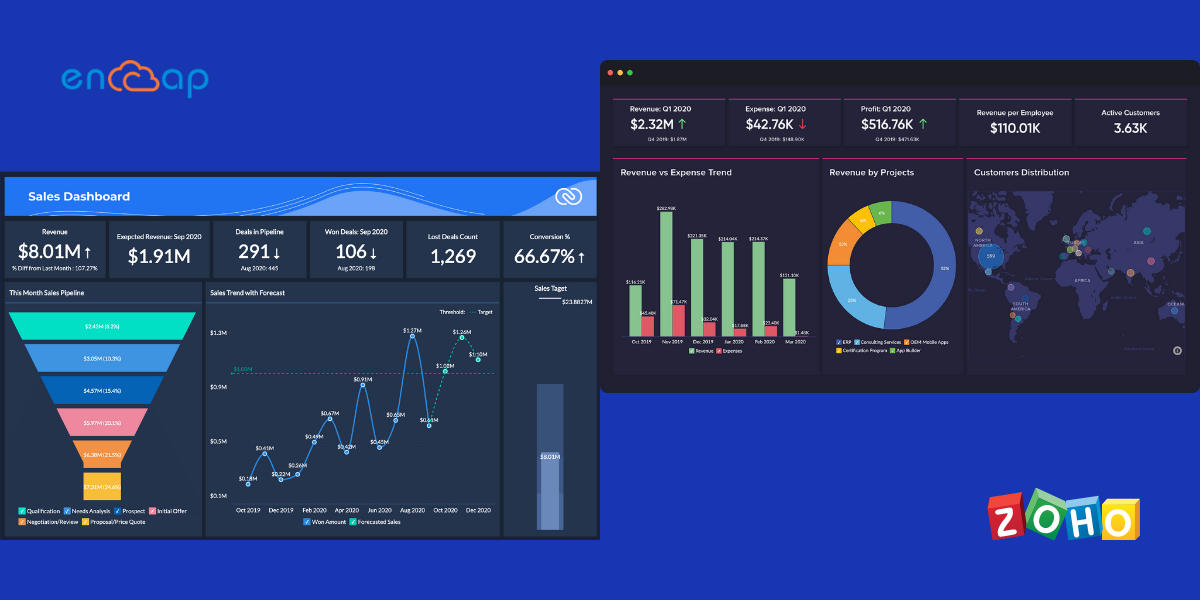
Zoho can be very easily customized for fulfilling the needs of different businesses regardless of their nature and size. Right from small and medium-sized start-ups to large scale organizations belong to a diverse business vertical, all businesses use CRM software for increasing their marketing operations, sales efforts, and customer service processes.

The implementation of Zoho helps to automate business processes with various modules. Some of them include marketing automation, order management, salesforce automation, contact management, customer support, activity management, inventory management, vendor management, website integration, workflow automation, CRM analytics and reporting, and billing and payment management.

Other than this, Zoho can also be integrated with many other applications. In fact, when compared to all the CRM options that are commonly available, Zoho CRM provides some of the widest range of integrations. Other than email integration in Zoho CRM, one can integrate Zoho CRM to applications such as Gmail, WordPress, Office 365, LinkedIn, Facebook, Slack, and much more.

Zoho Implementation – A Good Investment for Business
The decision to integrate Zoho CRM can without a doubt be the best decision to enhance the business efficiency. The Zoho CRM actually comes with different applications as add-ons that help businesses to boost their overall sales. Below, we will be mentioning some of the benefits why Zoho implementation is a good investment for your business.

1. User-friendly CRM

User-friendly Zoho CRM

One of the most important factors that make a software application desirable and we might as well say, beneficial is the user-friendliness quotient. When it comes to ease of use and simplicity, Zoho CRM is exceptionally user-friendly.

The employees of an organization do not need comprehensive technical know-how to monitor and customize the platform. The Zoho CRM integration enables the employees to take care of all the departments that need attention. Moreover, there is real-time access for monitoring sales, deals, and contact history.

All in all, the company’s employees can stay ahead of managing important customer relationships with the implementation of Zoho CRM.

2. Improved Customer Relationships

The implementation of an efficient customer relationship management application is one of the strongest and also an efficient method for maintaining and creating relationships with the customers. With the implementation of Zoho CRM, customer relationship management does not only stay limited to businesses but also ideates to strong bonding with the customers.

The development of this kind of strong bond enables the business to reach new levels of success. Once the personal connection is built with the customers, it becomes very easy to find the actual needs of customers and help them to serve in a much better way.

It is a strong belief that the more streamlined strategies involved in the implementation of customer relationship management, the better and more productive the business becomes. Zoho CRM empowers organizations to be armed with dedicated tools for the maintenance of CRMs in the workplace.

3. Advanced Marketing Processes

The implementation of Zoho CRM leverages and amplifies the customer base of an organization with an effective marketing strategy. In fact, the Zoho CRM brings new dimensions when it comes to marketing by significantly enhancing the overall operations and their execution as well.

The intuitive CRM-associated marketing strategies such as web marketing; email marketing, direct marketing, etc. have been developed in the recent past. These methods are more promising and effective as compared to the traditional ways of marketing because they deliver higher business performance.

Zoho CRM makes all these processes very easy by enhancing the response rates on the marketing campaigns, streamline costs on the promotions and also provide better security on marketing investments. With the assistance of a dedicated Zoho partner, you can improve things such as web marketing, email marketing, analyzing the buying behaviour of customers, forecasting future marketing strategies, and building business impact models.

Zoho CRM comes with synergistic marketing strategies that help in developing high-end marketing businesses. Therefore, it is important for an organization to incorporate them completely by anticipating change, testing their performance, assembling the best strategies, and maximizing the marketing growth.

4. Easy Migration of Data

If you have been looking to change your data management system or even adapt consciously to a new CRM then Zoho CRM is the way to go. It helps in migrating extremely valuable data precisely in just a few simple steps. Once the data gets converted in the required format, Zoho implementation maps out the import files with the modules within the CRM and vice versa.

In case there are no important fields left to map then Zoho CRM takes the responsibility of creating them for you. The entire process of migration is very simple and easy to carry out. In fact, with the support of an experienced Zoho consultant and Zoho’s dedicated data migration, there will be reduced manual work and everything will become much easier when it comes to the migration of data.

5. Telephony Features

To enable optimized call dialing and automatic call logging, Zoho comes up with a single click dialing that can take place directly from the CRM. After the successful integration of telephony, anytime a user views a contact card, there is an option to click to call.

Further, the telephony feature comes with a built-in reminder so that you can set the future callbacks and also automate the call logging which then makes it simple to see the customer information and conversation history. The call analytics and reporting round out Zoho’s telephony features by offering extremely important data visualization and feedback on customer service.

6. Detailed Reporting and Advanced Analytics

Detailed Reporting and Advanced Analytics - Zoho

Zoho CRM integration enables much more visibility into a business. It allows the sales, marketing, and support team to capture the leads from incoming calls, emails, or messages that come through websites.

You can log into important information about the lead and also the sales activities like important calls, meetings, and emails. With the analytics feature of Zoho, it is also possible to convert the lead to a potential sale for pipeline reporting, run the reports on sales activities per user, and record the sales performance.

This further helps in creating quotes and invoices even in multiple currencies while closing sales and tracking business revenue. You can focus on ROI with better marketing campaigns, track the customer complaints or problems, enhance customer retention, and reduce the overall sales time.

7. Task Automation

With Zoho implementation, it becomes possible to automate various activities within a business workflow and triggering certain actions. This further enables businesses to save a sufficient amount of time because the employers will no longer have to manually record the information which in turn will help them focus on the lead nurturing process and the conversion rate.

In essence, Zoho understands that the task processes can be pretty complex in function. They might include multiple teams, require certain approvals at stages from some people, and may also need notifications to be sent out. Since doing all of this manually can prove pretty tiresome, Zoho comes with tools such as Blueprints that let the tedious work gets completed.

8. Artificial Intelligence Feature

Zoho CRM is known as one of the very few business-focused SaaS CRMs that come with a high-quality AI drive functionality. Zoho’s proprietary AI assistant comes with predictions on trends, anomalies, conversions, and closing deals.

At the most advanced level, which means the ultimate subscription plan, this assistant called Zia offers detailed insights about the best time for contact customers. It also sets auto-reminders that can be used for reaching out to the customers and analyzes the tone of emails sent by customers to come up with the best response.

9. Customization

You can customize your CRM application in the best way possible that suits a business’s needs. By presenting the information you acquire in a unique way, the Zoho CRM can be used for great customization. With the option of Layouts, one can create individual layouts for different processes and in turn control the data that enters a system for making a quick sale.

With custom components, you can use custom modules, fields, and buttons that present the information the way in which you want in the CRM.  In addition, you can also cater to more customers across the globe by offering multi-language and multi currency to a team. Finally, the option of views and filters helps in adding custom filters and other settings that mark the important information and make it easily available.

10. Effective Collaboration

Zoho implementation comes with many collaboration tools that are considered suitable for small to medium-sized teams. It has a built-in document management system that stores important documents, pictures, music, and videos which makes accessing these things simple at the time of need.

The access privileges also make it easy to lock down important material and share some items with the team members. The feature of the calendar is also helpful for collaboration because it allows the teams to share calendars so that individuals can maintain an easy calendar within their CRM.

Conclusion:

In case you are handling a business and your focus is on the maintenance of customer relationships then Zoho CRM will help you get everything that is needed to improve the organizational infrastructure and productivity.

You can actually customize your business infrastructure with the assistance of Zoho CRM integration because that will prove beneficial in building a strong organization and improved customer relationships. At Encaptechno, we have a team of focused and experienced Zoho consultants who have offered the best assistance in Zoho implementation to many businesses.

If you wish to ensure smooth workflows then get in touch with us to know more about Zoho implementation.

 Get FREE ZOHO Consultation NOW


Why Is Zoho Implementation A Good Investment for Your Business? Read More »
Zoho Implementation, , , ,
Salesforce Spring '21 Release Quick Highlights - Encaptechno

Salesforce Spring ’21 Release Quick Highlights

We all know that Salesforce releases regular updates to its platforms almost three times a year so that the end-users experience much better functionality and stay in alignment with the new technological advances.

Salesforce Spring '21 Release Quick Highlights - Encaptechno

With the release of Salesforce Spring ’21, the tradition of moving towards developing in solution improvisation continues. With the consistent updates, Salesforce is always trying to improve the experience of cloud computing for the customers. The updates are simple, user-friendly, and are only meant to offer a better user experience.

When any new update comes, the platform also updates automatically behind the scenes while benefiting the users with improved performance and functionality. Salesforce also allows its users to submit relevant feedback and their own ideas with the online Salesforce ideas. This tends to create a linear and collaborative community that enables more and more people to put their ideas on the table that can come in the next update and be finally released.

It has often been made clear by Salesforce that the organization values customer experience and satisfaction more than all else and will strive to provide the best possible improvements numerous times a year.

Salesforce Spring ’21 Release

With the new release of the Salesforce Spring ’21 release, our team of expert Salesforce consultants has come together to put forth a comprehensive list of some of the most important and quick highlights for the admins.

The highlights that will be mentioned below will be a brief description but they will offer a high-level description of enhancements and new features as well. With the assistance of a qualified consultant, you can get started and use the best practices for ensuring continued success.

Going through the highlights that are mentioned below will be a great step for using the features. The highlights will help in being ready for what is coming your way. The features of the Spring ’21 release affect all users almost immediately. Hence, we suggest you go through them in complete detail so that you are well aware of the functionality of each of these highlights.

The Salesforce Spring ’21 release is said to help deepen the customer relationships, maximize the ROI, improve user experience, and offer many search filters. In this blog, we will be shedding clear light on all the important updates in the new release so that you can get a better understanding.

1. Salesforce Einstein

Salesforce Einstein

In the new release, the Einstein Recommendation Builder is made generally available and is meant to check the data as you keep building. The Einstein Article Recommendations will have a scorecard to help you make the most out of your data and improve the recommendations. You will also be able to navigate more easily with the help of the Salesforce Einstein Discovery story interface.

In addition, Salesforce released Einstein Opportunity Scoring completely for free for all the Sales Cloud instances around a year ago. With the release of this new feature, it required around 200 opportunities to be closed for having enough data to make predictions. However, this has changed completely.

With the use of Einstein Opportunity, one can prioritize the right deals as it helps in applying a score to the opportunities with the help of Artificial Intelligence. In case an instance has a small volume of closed opportunity data then you can use this feature by using the global scoring model which is made up of the aggregated data to score more opportunities. The new customers can start using this feature right away.

2. Vertical Solutions

Salesforce has come up with a wide range of vertical solutions that can be extremely useful for the customers. With the help of Loyalty management, one can run personalized customer recognition, reward, and retention programs. Batch management helps in processing and tracking millions of important records. With decision tables, one can define multiple business rules for evaluating products and calculating discounts.

In addition, the new data processing engine helps in extracting and transforming data from an org while creating records using the transformed data. It is simple to manage sales agreements and account forecasts in the Manufacturing Cloud, support volume, revenue, growth-based rebate programs, and also do rebate management.

On the other hand, the health cloud makes the process of provider management easy with a new API and new FHIR aligned support for the maintenance of health records while the financial services cloud helps in tracking branch performance and capturing life events and business milestones on the go.

Lastly, the Consumer Goods Cloud store visits and delivers smarter features while the Public Sector solutions add calendar support and help in making an application approval process more transparent. The emergency response management adds a list of updated flows for improving the emergency response experience.

3. CPQ (Configure, Price, and Quote) Improvements

Salesforce has come up with new CPQ improvements that include a smooth amendment and renewal service upgrades, background contact amendments, and a change of ensuring correct price rule configuration.

By using Salesforce Billing, you will be able to configure how the invoice lines get created when you use a bill with the data override and map financial information for customer accounting and enterprise resource planning (ERP) systems.

At the same time, you can also highlight the long-term value of life cycle managed assets. In addition, the standalone order activation and product creation logic are also improved because the advanced approvals users can manage their approvals without the need of logging into Salesforce.

4. Unified User Experience

The language used all through the Salesforce product has been updated to reflect inclusivity. The Salesforce Release Notes moved to Salesforce Help for an efficient and unified user experience. The viewed lists now have customizable actions.

You will have an option to add images to the in-app guidance and snooze the guidance thereon so that you can see it later on. You can also use new survey actions in a flow and target specific survey participants with invitation rules.

You can also use the new Salesforce Scheduler trial org for getting a head start on the implementation and set default time zones for the appointment slots. Go ahead and search using everyday words with natural language search for the Government Cloud and the Salesforce Mobile app.
5. Improved Sales

Improved Sales

Salesforce has remarkably changed the way in which Sales representatives engage with prospects and the customers. The new functionality has come up to make meetings much better and productive for everyone. The two new aspects of functionality called Meeting Digest and Meeting Studio have come up as a preview in a way that they become generally available but one can also try them on a beta or a pilot overview.

The Meeting Digest is a part of the Salesforce Meetings and is meant to offer a single pageview for the Sales Reps before a meeting where insights can be received about who is attending a meeting. In addition, reminders about meeting invitation responses and details along with any related record activity are also received.

Other than this, the Meeting Studio is a tool that keeps the prospects and customers engaged at the time of meetings. The representatives are able to show their camera and presentations in the same window so that the meetings flow and bypass any possible awkward transitions while switching the content to share next.

6. Marketing Cloud

The Spring ’21 Marketing Cloud is one of the most premier platforms for delighting customers with an easy customer journey. It allows a person to build a single view of the customer, use data from any source along with a plan, and optimize the customer journey on the basis of business objectives.

You can also deliver personalized content across each channel and device at a specific right time. In addition, you can also measure the impact of every interaction on the business so that it becomes easy to streamline the approach in real-time and deliver better results simultaneously.

7. Salesforce Flow

The Lightning Flow in Salesforce has actually been rebranded to the Salesforce Flow. This will include all the processes and flows. The screen elements will now support multiple columns and admins will now be able to configure the screens while making sure of winder monitors by adding up to 12 columns added to a page.

The simple ability to access the previous values in a record triggered flow. The time-based flow actions will allow the admins to configure flows for executing an action at a particular time.  This was previously available all through the process builder. The rich text emails will also be introduced which will allow some admins to have more control over the way the emails look and feel.

8. Opportunity Product Relationships

The opportunity product relationships had been in the process of being released for a long time. The idea of this feature was known to be posted on the Idea exchange a long time ago. With the new release, the users will be able to create relationships with the opportunity products so that the sales team can easily access useful information without taking extra clicks or flicking between the screens.

A perfect example of this can be tracking the delivery locations in related lists for a suitable opportunity record. For using this feature optimally, you can create a lookup relationship in the object manager between any standard or the custom object and opportunity product. You can also ensure that the lookup field and related list are added to the page layouts where you wish they should appear.

9. Forecasting

Since it is supported in the mobile version, the feature of forecasting has become simple to update. Forecasts are essentially perfect expressions of expected sales revenue that enable the sales team to predict and plan the sales pipeline. In the past, changes could be done only in desktop mode.

However, with the new release, the users can now make adjustments to the forecasts on the go from their mobile while they are using the Salesforce application. The new updates will in fact help the representatives to stay updated with the forecasts as opposed to waiting until they can access the forecast for making changes.

For the process of adjusting, the users should be in the Salesforce mobile app, they should then select “Adjust” for getting started, enter the required adjustment, add a note, and select save.

10. Manual Sharing

For all the admins who are tired of switching back to the classic mode for sharing records, managing record share will become possible now. Salesforce will bring back the functionality in the Lightning Experience.

The admins will now be able to rejoice as the Sharing button is now available in the Salesforce Lightning. The users will now be able to share a record with the user, or even a group of users similar to the Salesforce Classic.

With the use of sharing, it will now be possible to know who can manage the record and share the associated records. The manual shares are also available only for the accounts, opportunities, contacts, leads, cases, and custom objects.

Conclusion

All in all, the new Salesforce Spring ’21 release has brought about many new changes that offer better functionality to the end-users. In case you find yourself being unable to understand some important things or you have some questions then get in touch with a reliable Salesforce consultant from our team at any time.

Contact Encaptechno Salesforce

Salesforce Spring ’21 Release Quick Highlights Read More »

CRM Services, , ,
Advantages of Salesforce Over Other CRMs - Encaptechno

What are the Advantages of Salesforce Over Other CRMs?

Customer focus and customer-oriented approach is an important aspect of creating a comprehensive ecosystem where the customer data can converge. Connecting significant business areas such as customer services, marketing, sales operations, and account management enables enterprises to get a holistic understanding of the customer while also managing customer relationships much better.

Customer relationship software can offer great benefits to companies. At the present time, many organizations all over the world understand the importance of CRM and implement this software for better productivity. However, with so many options available at one’s disposal, choosing a suitable CRM can seem overwhelming.

In this scenario, Salesforce emerges as one of the most widely chosen CRM adopted by many people and companies. This impressive level of success that is shown by Salesforce is a result of the many remarkable benefits and resources that it provides.

There are many Salesforce advantages that make this CRM a top choice for customers. In this blog, we will be mentioning some of the most common ones that make the implementation of Salesforce indispensable.

What is Salesforce?

Salesforce is a customer relationship management solution that enables companies and customers to come together. It is basically an integrated CRM solution that gives all the departments including the marketing, sales, technology, etc. a single share of each customer.

Salesforce actually began as a Software as a Service CRM company. However, today it provides various software solutions and a platform for the users to develop and distribute custom software applications. It comes with multi-tenant architecture and allows customers to share common technology that runs on the latest releases. One never has to worry about application or infrastructure upgrades because they happen automatically. The benefits of Salesforce help an organization focus on innovation rather than just managing technology.

How it All Started?

Much before Salesforce came into the picture, customer relationship management solutions were hosted on the server of a company. It took a lot of money and time for companies to have their own CRM solutions and even after setting up the solutions, the purpose was not fulfilled because the solutions were difficult to use.

Hence, building a cost-effective CRM software solution and delivering it online as a service became an evident solution. This was actually the main idea behind Salesforce which started as Software as a Service company. After considerable development, it has now grown into one of the largest software companies in the world.

Not long after the release of Salesforce, it became a hit because it was not merely a product at a fraction of cost; rather it was a software that solved many purposes all at once. Some of the cloud software solutions offered by Salesforce are Salesforce Sales Cloud, Salesforce Marketing Cloud, Salesforce Service Cloud, Salesforce Community Cloud, Salesforce Commerce Cloud, etc.

Advantages of Salesforce CRM

Advantages of Salesforce Over Other CRMs - Encaptechno

1. Collecting and Using Customer Information

One of the best and most important benefits of using Salesforce is the information that this software solution is capable of extracting, both in terms of quality and quantity. Getting in touch with the Salesforce implementation partner and actually adopting the solution will enable you to look at a substantial amount of information needed before getting in touch with a potential customer.
Now, there are a couple of reasons why this is considered as important. In the first place, it helps you in easily tracking information that is needed to keep your customer profiles organized. You can have all information that is considered useful at just one location and you can also look upon any lead that you want even when the leads are assigned to other representatives. This offers a holistic and complete approach to manage a business.

Moreover, with shared customer information, a company’s representatives can have better control over getting things done. They can also eliminate any possible gaps that a person can have in a customer support model. All in all, it becomes easy to manage and use important customer information with the help of Salesforce.

2. User-friendly

User-friendly

A standpoint that makes a software solution effective is the ability of that software to be user-friendly in nature. When it comes to Salesforce, this is particularly true and cannot be refuted. The CRM solution is designed in a way that even companies that do not have a technical background can use it for their benefit.

The benefits of Salesforce help many companies to reach their complete potential while being easy to use for even beginners. As a matter of fact, Salesforce is competent to meet and even exceed the user-friendliness quotient by offering its users a highly intuitive and simple user interface.

As opposed to many other CRM solutions, there is never any need to get increasingly involved in coding or pouring through information about different product updates. Rather, almost everything is served in an easy-to-understand format which is designed to reduce any problems and difficulties.

3. Scalable CRM Solution

Investing in a good quality CRM solution is actually like an investment. It should solve the business needs of the present and the future while assuring the businesses of better results. Salesforce does just that. Be it looking after a company’s present customer relationships or ensuring a strong customer base that can build in the coming years, Salesforce carries the capacity and ability to scale up.

All businesses have their own needs and this thing is valid for the customers of a business as well. Other than being scalable, Salesforce can also be customized to solve the unique needs of a business. Since most customers look for personalization while getting their needs solved and making important purchasing decisions, Salesforce plays an important role in solving that purpose.

As a matter of fact, Salesforce makes it possible for businesses to personalize the emails that get sent to customers. It takes the purchase history of almost every customer into consideration. With the assistance of Salesforce App Cloud, businesses can create and even run their personalized applications with ease.

4. Flexibility

Salesforce comes with a wide range of benefits for companies and businesses. One of the most important benefits that it offers is flexibility and customization. It integrates seamlessly with business models and is also able to offer a detailed report and analytics tailored to the specific needs of the users.

Furthermore, the benefits of Salesforce enable the companies to measure and monitor the success of marketing campaigns while also customizing the outreach efforts on a need basis requirement. This allows in creating a completely optimized system that has the ability to function on its own. The Salesforce Cloud system also means that employees can access the software from anywhere and at any time, allowing for increased flexibility.

Basically, the objects that are found in Salesforce can be set completely in line with a person’s desires at any time. As a user, you are never actually tied into a certain set of page layouts, workflow, and processes. This makes Salesforce way more flexible as compared to other systems that are present in the market.

5. User Resources

For offering ease of use and educating its customers on the excellent functionality, customization, and flexibility, Salesforce stands out as being one of the best CRM solutions. It provides many educational posts, webinars, and other informative materials on a spectrum of topics that can be published through a comprehensive web-accessible user guide.

The final goal of the varied resources that Salesforce offers lies in empowering customers with the ability to find quick solutions in different ways. Based on what customers might think is comfortable, they can choose a suitable solution because Salesforce does its best to present the solution in many different formats.

In addition to other style resources, Salesforce also employs a knowledgeable, remarkable, and customer-oriented tech service that helps the users in overcoming any difficult problem as and when it arises.

6. Functionality and Integration

Functionality and Integration

Salesforce that offers great services needed to enable quick and easy data collaboration with multiple departments. It also offers centralized customer information, an array of reports, statistical options, and the ability to run on any browser, desktop, mobile device, etc.

In addition, Salesforce also delivers dependable data security and protection which ensures that sensitive information does not get compromised. It offers employers all the resources that are needed for enhanced business efficiency and productivity. Customers can also benefit from better customer service.

7. Time Management

Time Management

With a comprehensive range of customer information available and a wide range of planning resources at a user’s disposal, one gets the benefit of remarkable time management with the implementation of Salesforce. You can have all the information that is needed to prioritize work for the customers, and this means that you can also organize tasks for different accounts based on the same criteria.
Along with this, the built-in calendar tools can also be used for better visualization of the schedule for the approaching days, months, years. This means that you can constantly stay on the ball all through the steps while nurturing a potential lead.

8. Comprehensive CRM Solution

Comprehensive CRM Solution

With the help of CRM Salesforce, a customer can have almost everything in just one place. It is actually a software solution that is capable of fulfilling all the expectations of the customers and the organization as well. If the companies make the best use of Salesforce they can easily be successful in the long run.

In case a company wishes to grow and climb up the ladder of success then one shouldn’t waste time and consider the opportunity of acquiring this software for the company. When the team of a company will be able to facilitate work, develop and explore its full potential, it will become way easier to achieve great things.

Salesforce can be a remarkable CRM option for improving the commercial aspect of a business and lead the company’s sales and productivity. Hence, companies should approach an experienced Salesforce implementation partner as soon as possible to make the most out of the advantages that Salesforce is capable of offering.
Related ReadBenefits Of Hiring a Certified Salesforce Consulting Partner

Conclusion

Salesforce is one of the most popular and highly favored CRM solutions that offer immense benefits to its users. It is a platform that has been evaluated by many users and continues to offer assured benefits. In case you have still not implemented a CRM solution then take that decision today to give your business a positive transformation.

Encaptechno has been working as a reliable Salesforce consultant and implementation partner for many companies. Experience the unlimited benefits offered by Salesforce by implementing its software, today!

Contact Encaptechno Salesforce

What are the Advantages of Salesforce Over Other CRMs? Read More »

CRM Services, , ,
Integrate Your Apps with Zoho Flow - Encaptechno

Integrate Your Apps with Zoho Flow

Workflows, deadlines, and the progress of a project are significant things to focus on in any business. Today, we have a different application for managing different tasks. Now imagine a web tool that can be used for linking business applications to produce effective workflows and application pipelines. Sounds good, right?

Well, we are here to tell you that this is actually possible with a tool called Zoho flow. It is a tool made to offer an empowered way for creating solutions that work in the best possible way. With Zoho integrations, you can modify and adjust the flows as business processes change and an organization develops.

Integrate Your Apps with Zoho Flow - Encaptechno

With the Zoho flow, it is possible to develop tools for data processing or constructing robust routines for everyday use. Zoho flow helps to solve several problems in an independent way.

In this blog, we will understand how we can integrate applications with Zoho Flow but first, we will begin with the basics.

What is Zoho Flow?

What is Zoho Flow

Zoho flow can be described as an integration platform that helps in connecting cloud applications. It helps in setting up important workflows for automating information exchange amongst the applications a person uses. With the use of Zoho flow, there is no longer any need to learn to code for integration.

A flow is actually a combination of triggers and actions. The trigger starts the flow, and the other actions are tasks that are executed by the flow. The trigger can also be a data update or even a scheduled point in time. For instance, it is possible to create a flow that either creates or updates contacts in Zoho CRM anytime a new entry gets submitted in the Zoho Forms.

In the Zoho flow, a flow can be termed as a connection between a trigger and an action. A trigger acts as the “if” part in the “if-then” logic, it is what listens to a triggering event and what “fires” or starts the flow. The action on the other hand is the result of flow. It is best to think of this as the work that gets done once the trigger fires. Typically, it is for people to configure an associated path between applications to share machine-related data with the variables.

The business workflow automation enables one to create a flow that is capable of sending monthly email reminders to the employees for submitting reports. The actions can either be updating data in an application, delaying a project, sending an email, creating a custom function, etc. In addition, it is also possible to include branching logic based on conditions that create powerful flows.

For example; you can have a flow that is capable of sending an email over 15 minutes after an entry gets submitted in a form. This flow has two actions that include sending an email or delaying for 15 minutes.

Working of Zoho Flow

Zoho Flow is responsible for offering a platform that enables a person to create flows that connect cloud applications for automating data and transferring information. It is a tool that helps in saving time so that one can focus on tasks that need more attention. This allows saving time so that one can focus on the tasks that need more attention.

For instance, let’s say that you want to create or even update a contact in Zoho CRM each time a new entry gets submitted in Zoho Forms. Here, receiving a new entry is the main trigger, and creating a contact is an action.

Zoho flow also helps in adding multiple actions to a flow for executing things sequentially. In the example mentioned above, one can add an action for sending a message to a specific channel with details of all contacts from CRM.

The business workflow automations that Zoho flow brings, the logic elements automate complex business tasks down to small details. In this example, one can also configure logic to choose which channel is good for sending the workflow message dependent on the value of a deal.

Zoho Flow Makes Businesses Efficient

Zoho Flow is an integration platform that connects different applications together for setting a person free. From moving important information between applications to carrying out some complex business processes, one can automate a whole range of tasks with Zoho Flow.

The way in which Zoho Flow makes a business efficient is as follows:

1. Dynamic Integrations

Zoho Flow comes with a builder that removes all hassles from building workflows. It has a drag and drop interface that brings all applications together only within a few seconds while giving a flowchart view of all steps involved in the integration.

In addition, Zoho Flow also includes handy editing tools so that one can quickly adapt to workflow changes in a business. The dynamic integrations make business workflow automation much easier.

2. Customizing Workflows

Any efficient business needs extensive workflow management. By using the powerful logic elements of Zoho Flow, it is possible to introduce if-then decision branches for carrying out tasks in tandem or defining time intervals between the tasks.

For fine-tuning the workflows to custom business requirements, one can create functions with Deluge with an easy-to-use scripting language.

3. Automating Workflow

Zoho Flow provides effective business workflow automation with its features. With the use of Zoho Flow, one can collaborate to build workflows and share them all across an organization.

In addition, one can also add team members to an account, be a part of multiple teams and switch between them easily anytime when it is required.

4. Tracking History

The history interface that is offered by Zoho Flow helps in digging through all the Flow executions for identifying when and how a problem has occurred.

This registers the timestamps for every trigger and action that is involved in the Flows and keeps one informed about all details.

5. Workflow Insights

The dashboard in the Zoho Flow tool offers a bird’s eye view of all the business workflows which further helps in analyzing them from just one place.

One can view the list of top flows in an account, the number of lives, paused and drafted flows, execution details, and success rate.

6. Ready to use Flows

Zoho Flows also hosts a comprehensive set of around 200 pre-built flows, spanning across 100+ business applications that it supports.

One can either install or use these Flows just as they are or make simple edits for tailoring them to your needs.

7. Custom Integrations

Zoho Flow is offered in the Zoho One bundle which opens up many new possibilities for custom Zoho integrations.

In addition, now that Flow can power the third-party integrations on Zoho, there is no need to compromise on the applications that are needed for a business.

Functions of Different Zoho Flow Features

Functions of Different Zoho Flow Features

1. My Flows: You will see My Flows on the first screen only when you log in to the Zoho Flow account. In this feature, you can view the collection of flows in your organization, switch flows on or off, delete the flows, create a copy of the existing flow, etc.

By clicking on a flow, you can also edit it or view the execution details. All flows consist of three tabs namely Summary, History, and Builder.

2. Builder: The option of builder helps in building, configuring, and editing the flows in the builder. There are various builder tools such as save, undo, redo and test and debug that help in creating a workflow.

You can use app actions combined with logic elements for adding details and custom rules for adding to the workflow.

3. Summary: This is a tab that allows you to view all details related to the flow such as recent executions, success rate, and the connected applications.

By using Summary, you can also edit the name and detailed description of the flow.

4. History: Almost all execution options of the flow are recorded in the History tab. You can view the history for some time by applying a filter.

Click on each execution for more details such as input and output of every task. This is particularly more useful when execution fails and you need to understand where the error occurred to troubleshoot.

5. Dashboard: With the option of Dashboard, you can visualize the most important performance indicators for all the flows in your organization.

The dashboard shows many flows that are in the organization including the ones that are already live or paused and the ones that are yet to go live.

6. Settings: You can manage all your organization details including the flow history, connections, and profile information in the Settings action.

All the data that gets edited here will depend on a person’s role in an organization.

Today, there is a different application for all business functions. By using specialized applications, you can make your functions work extremely well independently, but for these apps to work together, integrations are extremely important. Most of the time, the integrations are too complex to build entirely on your own.

In the past, most people paid a significant amount of money to experts who built these integrations or took the time to learn to code and test these integrations. Now, this problem can be solved. With the help of Zoho Flow, all the apps can be connected together easily.

Conclusion

Zoho Flow is an excellent way to tie all apps together and be entirely free because it brings about excellent business workflow automation. By connecting, automating, and orchestrating everyday tasks to detailed workflows, all business tasks can run effectively.

In case you want to implement Zoho Flow and need support then get in touch with an experienced Zoho partner for the best results. For more information, reach out to Encaptechno, today!

Integrate Your Apps with Zoho Flow Read More »

CRM Services, , , ,
What is ZOHO Voice - Encaptechno

What is Zoho Voice?

Any business that is looking to expand its reach will think of national and international growth. If you are already a part or an owner of that business then you would know the importance of seamless communication.

What is ZOHO Voice - Encaptechno

To be able to make this communication possible, a cloud-based business phone system can do wonders. It makes business communication simple, affordable, and trustworthy. Zoho Voice is a software application that does just the same. It is a cloud-based business phone system that enables a person to make and receive local and international calls from the Zoho Voice web and mobile applications.

You can easily add your team members as users in Zoho Voice, buy the voice credits and phone numbers, configure IVRs and assign extensions to individual users. In addition, cloud-based telephony software like Zoho Voice also makes it possible for customers to make and receive calls using digital pads in Zoho Voice.

Go ahead and take the first step in replacing your old-fashioned fixed lines with a dependable and flexible online telephony software application such as Zoho Voice.

Some of the immediate offers that Zoho Voice includes are:

  1. Owning Virtual Business Phone Numbers: Zoho Voice is excellent telephony software for SMB that helps business owners to get their own virtual business phone numbers. One can make and receive calls from anywhere and on any device.
  2. Simple Deployment: Zoho Voice also helps in setting up your cloud-based phone system in simple steps. All a person needs is an active internet connection with no special equipment.
  3. Connect With Teammates: You can add all your teammates to just one account and stay connected with the help of extension calling of Zoho Voice.
  4. International Reach: The implementation of Zoho Voice helps in setting up local and toll-free numbers from various countries and helps your business grow beyond borders.

  5. High-quality Calls: Zoho Voice is a cloud-based business phone system that helps in making calls without stressing about the budget. You can experience uncompromising quality on your business calls while saving a lot of money, particularly if you make a lot of international calls.
  6. Pay As You Go: Zoho Voice enables you to buy voice credits and pay for your calls when you make or receive them.

Creating a new account and adding users to that account is very simple in Zoho Voice. To understand this better, let us have a look at it in detail.

Creating Zoho Voice Account

Creating Zoho Voice Account

In case you are new to Zoho and wish to use Zoho Voice as your cloud-based business phone system then you will need to follow some steps. They are:

  • Go to the sign-up page for creating your account.
  • Enter a username and password.
  • Choose your country
  • Make sure that you read the Terms of Use and Privacy Policy in complete detail. Finally, click Sign Up.

Other than this, you can also sign in using Google, Office365, Facebook, LinkedIn, Slack, Twitter, Yahoo, etc.

Adding Users to Zoho Voice

Adding Users to Zoho Voice

Right after you have successfully created your account, you can quickly start adding users seamlessly. These users can also log in to your Zoho Voice account and configure or view several settings based on the advantages that they have.

To add a user, take the following steps:

  1. Go to Settings and then click on Users.
  2. Click + Add Users at the top right corner of this page and go ahead.
  3. Enter the name, email address, and mobile number of the user you want to add.
  4. Select the Zoho Voice UI language and the different time zone from various dropdown boxes.
  5. Next, you can also choose the role that you wish to give to the user. Mostly, there are three types of users that include admins, supervisors, and technicians. You can evaluate the users that you are adding and place them in these three brackets accordingly.
  • Admins: The admins can make and receive calls while performing all operations in the Zoho Voice except payments. In addition, the Admins are also able to view and edit all call logs and recordings for all the purchased numbers.
  • Technician: In case you choose to add the user as a technician, you will have to assign them at least one phone number so that it is possible for the user to view the call details and settings for the same number while using that number as the default number for initiating calls. In case you have not purchased a number yet, you can also choose to assign a number for the user later.
  • Supervisors: You can also begin by adding users as supervisors and assign technicians to them accordingly. Supervisors will be able to view the call logs easily and they will also be able to listen to the recordings of the technicians that are assigned to them.
  1. Finally, when you are done, click on Save to add the user.

In essence, Zoho Voice is a telephony software for SMB that is capable of offering what you need to make your business communication seamless.

Some of the prominent features of Zoho Voice are:

  • Local and Toll-Free Numbers: One of the prime benefits of Zoho Voice is that it makes it very easy for your customers to reach out to you. You can get local and toll-free numbers in your country or any other country in which the business operates. The best part is that the toll-free numbers are completely free of charge for all callers.
  • Inbound Service: Zoho Voice makes it possible for you to receive calls from customers all across the world, from both mobile and landline numbers. You can either receive calls directly or configure IVRs for directing your customers to the right team.
  • Outbound Service: Another great feature offered by a cloud-based telephony software like Zoho Voice is that one can initiate cost-efficient outbound calls to both the mobile and landline numbers around the globe. In other cases, if inbound service is all that you are looking for then you can just disable the outbound service and you will be good to go.
  • Calling Agents: You can reach a colleague almost instantly using the extension dialing in the application, and also stay connected with a remote team within a moment’s notice. This makes many operations much more effective.
  • Interactive Voice Response: Zoho Voice enables you to set up IVRs while automatically guiding your customers to the desired team so that you can save plenty of time while handling various requests. This allows you to welcome callers with custom messages and also gives your businesses a professional touch.
  • Call Action Handler: You can quit keeping your customers with the use of Zoho Voice. It allows you to predefine all that needs to be done anytime an agent is busy and also assigns subagents to answer calls or effectively diverts them to voicemail.
  • Call Queues: Zoho Voice enables you to organize your agents into teams for easily routing calls to the relevant group. You have the option to choose whether they will receive calls simultaneously or in sequence
  • Live-call Status: Zoho Voice is a telephony software for SMB that helps in keeping track of the status of all live calls and also check on who handled some calls along with their duration.

  • Voicemail: You can enable voicemail and quickly get back to your customers when you miss their calls with the help Voicemail feature.

  • Call Logs and Reports: Zoho Voice helps you to get much deeper insights into your call history and generate reports based on your needs.
  • Call Recording: You can record your calls and analyze them later for keeping the quality of your service in check with the help of Zoho Voice.

An integral part of sales and marketing efforts involved in a business depends on calls to communicate with prospects, customers, and team members. With the help of Zoho Voice, you can streamline business communication and enhance the efficiency of your team members considerably.

Conclusion

Technology is advancing at a quick pace and it might feel difficult to keep up with every innovation, improvement, and upgrade, all at once. As the external world continues to expect this innovation and constant upgrading process, your business communication will play a pivotal role in keeping up with the development.

You can make your business communication simple, reliable, and cost-efficient by getting in touch with a Zoho partner for implementing Zoho Voice. This software will make it possible for you to make and receive international business calls using native mobile apps. You can stay connected with your customer even when you are away from your desk.

For more information, feel free to get in touch.

What is Zoho Voice? Read More »

CRM Services, , ,
Scroll to Top