Encaptechno

Author name: Abhishek Sharma

Abhishek comes in with a decade of technical experience in CRM, specifically Salesforce, Zoho & Microsoft Dynamics. A highly energetic individual and an equally good team player, Abhishek has a deep knowledge of complex, challenging and custom CRM implementations as well as integrations.

An Introduction to Zoho Sprints - Encaptechno

An Introduction to Zoho Sprints

Managing a business is no easy feat and requires detailed planning and implementation. If you own a business then you would know the importance of project management.

Carrying out project management in a seamless manner is majorly linked to having the right tools for organizing team members, tracking various responsibilities, and gathering insight on how the team members contribute to the completion of tasks.
An Introduction to Zoho Sprints - Encaptechno

Keeping this well in mind, Zoho has come up with Zoho Sprints, which is one of the agile project management tools designed to manage software sprints and help the team members overcome all their hurdles.

Using the Zoho Sprints integrations, one can build right and ship quickly. It is a tool that helps in embracing agility and building products that the customers really need. It is possible to gather requirements from the engineering teams, track progress, partner with the internal and external stakeholders, and get things done quickly with the use of Zoho Sprints.

What is Zoho Sprints?

What is Zoho Sprints?

Zoho Sprints is a free online tool that is used for agile planning and tracking. It helps in creating effective user stories, scheduling agile meetings, using timesheets, and adding estimation points for tracking the work hours.

The main purpose of Zoho Sprints is to bring agility to the project development lifecycle. Being agile is actually a project management method that helps in building an iterative process where teams can quickly react to changes. This is an approach that is entirely different from the traditional waterfall model which is much more focused on testing only after the final product is built.

As opposed to this approach, an agile team focuses on delivering products in iterative cycles called Sprints which essentially means that the product is tested and delivered to customers for feedback regularly. One periodic cycle in the agile project management methodology for building projects is termed as Sprints.

Zoho Sprints integration helps in focusing on the team’s capacity for meeting the deadlines while empowering the project remarkably. Some of the most important benefits of Zoho Sprints are:

1. Overview with Dashboard
Overview with Dashboard

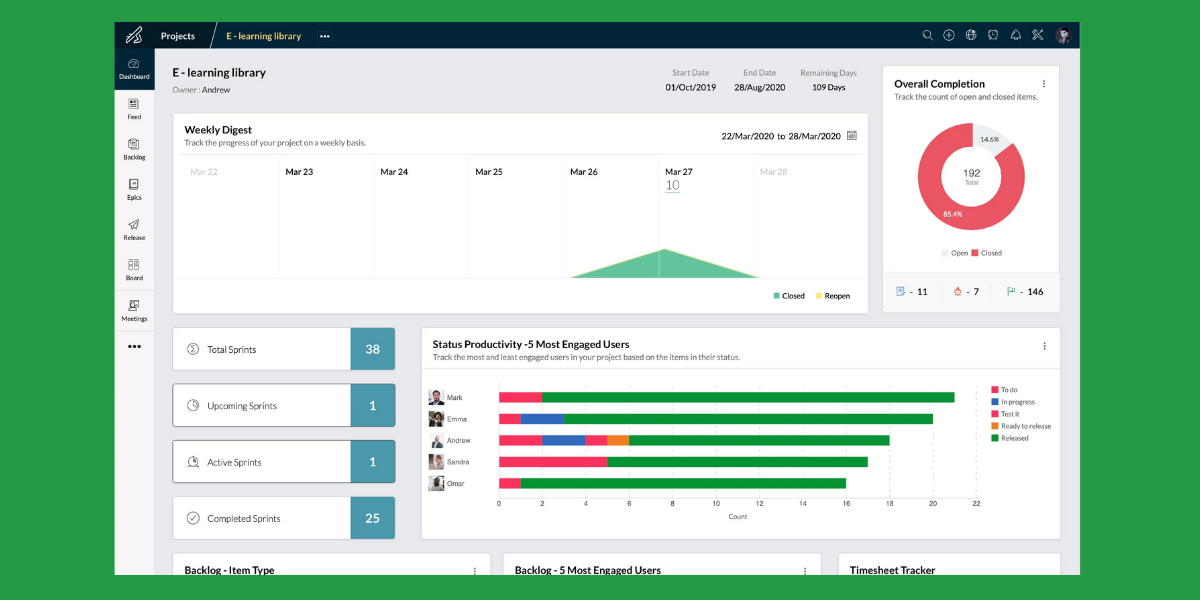
Using Zoho Sprints enables the team members to take a quick look at the big picture with the help of Sprints Dashboard. It becomes possible to track the team member engagement, knowing more about all the backlog metrics, and understanding the competition levels of all your sprints.

These dashboards have the capability to make sure that you divide the work in an effective manner and work on increasing the team member’s efficiency. Even after a member is done working on the Zoho Sprints, one can always look at the bigger picture with a simple to read and understand overview.

2. Effective Time Management

Effective Time Management

Zoho Sprints is one of the agile project management tools that help in managing and tracking time effectively. Zoho Sprints has a tab called Timesheets that is used for tracking log hours while differentiating billable and nonbillable hours for the Sprints.

Anytime a team member is logging in the time, they can start the timer from anywhere in Sprints. In addition, the Meetings tab also enables a person to schedule meetings, set clear agendas, and effectively choose participants.

The meeting reminders and the ability to search meetings take out all the pain of planning and logistics. In essence, Zoho Sprints can be considered as a perfect tool for managing time efficiently and considering time as money.

3. Analytics

Zoho Sprints present many benefits such as Velocity Charts, Burn-up Charts, Burn-down Charts, and Cumulative flow diagrams that can be used to stay at the top of data. It is software that offers analytics updates in real-time and it is these updates that help in making predictions, probable changes, and identifying bottlenecks.

In addition, with the help of release reporting, one can also take a good look at the closed sprints that were used by the team resources. The reports on Zoho Sprints help in taking a business to the next level by turning important data into insights that are considered worthy of taking action.

4. Tracking the Team

Tracking the Team

The Scrum Board in Zoho Sprints also helps in seeing where a team stands. One can personalize a board by creating custom statuses, sorting, and viewing.

In addition, it is also possible to monitor the sprint activity with the help of graphs that are based on task status. This helps in not getting the tasks lost in cracks. With the help of the Scrum Board, a clear view of projects can be obtained very easily.

5. Customizing Projects

Zoho Sprints is an agile project management tool that enables you to make a project entirely your own. Since each project has a different personality, custom fields can be used for giving a better context to almost every project. The tool leaves no room for any kind of doubt and helps in building layouts that ensure the detailing of work items.

By creating custom views for work, one can get quick access to important work items. It is also possible to minimize the time spent on mundane tasks by using existing templates or creating entirely new ones for the recurring projects.

One can also create new item types for categorizing work items based on a project that is being worked on. The custom item types such as bug fixes, minor changes, or enhancements can be used at any place where they are applicable.

6. Accommodating Change

Zoho Sprints help in planning and implementing changes for efficiently keeping up with changes that an agile journey mostly includes. With the use of Backlog, it is possible to use feedback from the last sprint and plant the next one. This always ensures that a product is moving ahead in the right direction.

The feature of Epics helps in structuring your work effectively. It is possible to break down Epics into sprints and use an established understanding to gain a better understanding. Lastly, with work item management, streamlining the sprint planning and working smartly around the tasks becomes possible using labels and checklists.

7. Collaboration

With the Zoho Sprints integration, the remote teams can be brought much closer. It is a tool that helps the distributed teams to brainstorm, collaborate and work together from any place or on any kind of device.

The social feed notifies team members at the time of all important events. Team members can then comment on the code changes and also carry out useful deliberations.

8. Release Management

An effective process of release management involves collaborating with multiple teams, and tools. Hence, Zoho Sprints brings everything together on one platform.

It is possible to sync all the code repositories, integrate effectively with the CI/CD tools, and also get contextual reports for all the releases.

Beginning With Zoho Sprints

Beginning With Zoho Sprints

If someone asks, “What is Zoho Sprints?” then in simple language, it is a tool that makes project management agile. It helps in getting a team agile while making a workspace much more vibrant.

Below we will gain a quick understanding of the way in which Zoho Sprints actually works by taking an example. Let’s take a person “X” as a marketing manager in a company, “Y”. If the person “X” is new to Zoho Sprints, he/she will go about managing it in the following way:

1. Create Projects: The person “X” might begin by creating a marketing project where the main task will be managing all work items related to promotion, marketing, and events. After this, the person will invite all team members in the marketing department for collaborating together.

Some team members will be given managerial roles and some executive. Finally, person “X” will be defining the estimation type of the project which will then help the team in clearly understanding estimation points of work items.

2. Building Backlog: This person “X” along with the team members will be noting down all requirements on a project in the Backlog. These items might include carrying out tasks such as social media promotions, writing blogs, shooting promotional videos, conducting events, etc.

The person “X” will then create Sprints in the project. A sprint with the name of Social Media can include managing Instagram, Facebook, Twitter, etc.  and a sprint with the name of Online Blogs can include the list of all blogs that are to be written in a month.

The person “X” will assign the managers as Sprint owners so that it becomes the responsibility of these owners to prioritize the items and move them from backlog to sprint. Either the person “X” or the sprint owner can start the sprint and complete it.

3. Working Around Board: Just as the sprint begins, the team moves all work items across different statuses on the board. As and when the status of a task keeps changing, the project keeps on progressing.

When the different items in the sprint tab are finally closed, the sprint gets completed successfully and a part of the project is completely ready for delivery. All that the team members need to do is move the work status over different statuses so that as and when everything is completed, it is easy to track progress and get desired results.

The above mentioned steps explain clearly the way in which Zoho Sprints functions and makes the job much easier.

Conclusion

Zoho Sprints is the best software to plan, track and manage results in one place. With just a simple login and a simple to read dashboard, it helps the team members collaborate seamlessly. As one of the best agile project management tools built for modern workspace, it is the tool that all organizations need for easy project management.

In case you need any assistance in the implementation of Zoho Sprints, then an expert Zoho consultant can be of utmost support to you. Get in touch today to get things going and succeed in project management.

An Introduction to Zoho Sprints Read More »

CRM Services, , ,
How To Effectively Manage Business on Zoho ONE - Encaptechno

How To Effectively Manage Business on Zoho One?

Imagine the seamlessness of this: If we give you a solution to move from scattered applications to a centralized, orderly, and most importantly, integrated suite of business apps, how simple would that make things for you? Considerably simple, right?

How To Effectively Manage Business on Zoho ONE - Encaptechno

Well, we are here to tell you that this is not just easily possible but it is also one of the best ways to effectively manage your business.

With the implementation of the Zoho One suite, you can get all-in-one business software for running your entire business. Well-known as a leading and the best software for centralizing the workflow, Zoho One offers functions that make the business processes efficient by mapping them out.

Zoho functions as a suite of applications while offering over 40 tools that assist in optimizing important business processes that contribute to business development. It is a suite of applications that carries almost all business processes like support, teamwork, business communication, automation, marketing, and sales. In essence, Zoho One can be considered as an operating system for a business.

Why Zoho One?

Why Zoho ONE

In case you are wondering if the Zoho One implementation is worth it and it can run your entire business with seamlessness then the answer is an astounding “Yes.” In a usual scenario, you are constantly jumping from one app to another while duplicating the data between these applications, paying several subscriptions, and then using them for more applications to connect them and pay a big amount on the individual applications for a business.

When you implement Zoho One and access all the Zoho One apps from any device with a single login and a password, you can have a centralized platform for managing everything. In case you are keen to understand whether Zoho One is suitable for your business or not then you can hire a Zoho partner who has extensive domain knowledge and experience.

This will enable the Zoho partner to assess your business processes in complete detail and also recommend you the best applications for your business to run, tailor, and meet your specific business needs.

In case you are also looking to migrate from a current set of applications to Zoho One then these experts will help you with a detailed roadmap for the implementation and automating the business processes all over the organization.

As long as your Zoho partners have a wide range of experience in the Zoho One implementation, working seamlessly will become easy and possible. Some of the prominent benefits that come from the Zoho One implementation are:

  • Automating and streamlining the business processes.
  • Eliminating any complexity of running multiple business applications and also negating the need for several contracts and renewal cycles.
  • Each department in a business can easily connect with all others seamlessly.
  • Zoho partners will remove your data silos by easily integrating Zoho One with all applications that are important for a business.
  • Administrators are going to have detailed supervision of the business data. Hence, if you can make the employees more efficient because they can easily access data from a single place based on the roles and access control for making informed business decisions.

Now that we have gained an understanding of Zoho One and why the businesses should implement it, we will take a look at understanding effectively managing the business on Zoho One. This will help in understanding efficient Zoho One implementation as well.

1. Integrated Business Management

Know About All ApplicationsOne of the prominent challenges of unsystematic software implementation that happens in most organizations is that there is no proper integration between important functions of a business. When the software applications do not have the seamlessness of integration, it can end up wasting a significant amount of precious time. This problem is solved completely with the Zoho One implementation.

It helps in saving a lot of time because integrated business management makes all processes automatic. For instance, just when the marketing professional approaches a lead, the information of the client will go into the CRM application. The prospect will get registered and then the sales process can begin easily. What’s more, is that all of these things will happen in real-time.

Just like this, the capability of productivity tools helps in interacting with the project management tools and enables fast report generation and sharing. Zoho Analytics proves extremely helpful in working with each application to offer a clear picture of how a business is performing.

2. Simple Customization

Planning the ImplementationEach business model is different and works to fulfill different goals. The software application designed for general utilization is not always going to meet the needs of all businesses. Zoho One takes care of this problem by providing effective customization options.

Zoho One brings with itself an option that can enable your team members to create applications that help in significantly improving your workflow. For example, Zoho Creator comes with a well-designed GUI which makes it easy to design applications that are capable of performing on various platforms and devices. It is a software application that enables greater integration with APIs and other software platforms.

Zoho One implementation offers many options for customizing a business functioning. You can focus on your needs and streamline everything accordingly for maximum productivity. In case you are still doubtful about how you should go ahead then a Zoho partner will prove helpful in managing your software and improving the digital functionality of your business

3. Employee Based Access

At the present time, the working professionals are on the move. An increasing number of business organizations are keen on adding remote workers to their staff and each employee needs easy access to business efficiency and simple management software. When there is no real-time connection, communication and partnership can be impacted.

Zoho One comes into the picture by offering the employees account-based access to the online resources. The staff members of an organization can start a report at their office on a work computer but they can finish the same report in a remote site on a PC or a laptop.

Account-based access offered by Zoho One is an extremely helpful security measure. One can decide the small number of employees who need access to each application while also limiting access to others. This helps in making the role of each employee clear and also results in very high productivity.

4. Single Sign-On

Businesses may be using different tools and application software to do sales tracking, accounting, and HR-related work. With the use of Zoho One implementation, this is no longer a problem because the platform already has everything one would need to operate a business.

This entirely helps in getting rid of going on different sites or applications just to get important work done. Just sign in or Zoho One and almost everything can be accessed from there.

5. End-to-end Encryption

One of the biggest benefits of cloud-based systems such as Zoho One is accessibility. That said, if the right security measures are not in place then this advantage can become a liability. The customer data can be impacted if there is any kind of security breach which can then affect the business reputation.

The Zoho One apps offer end-to-end encryption for safeguarding customer data. Each application goes through many rounds of security checks to ensure that there are no vulnerabilities left. Zoho is focused on the security data of all clients because it serves as an important standpoint in any business.

Moreover, you can use security options within an organization as well. Each employee does not need separate access to the customer data. There is a feature of role-based access in the Zoho CRM application which limits the number of employees who can see and change customer information. This is a practice that prevents any sudden changes and also maintains data safety.

6. Consistent Support

Hiring an ExpertWith around 40 applications offered in the Zoho One suite, there is a huge amount of information that is available. Zoho understands the total time that it takes to sift through the documentation process. Hence, there are numerous options to support your business.

Zoho comes with special online guides that play an important role in understanding the basics of setting up a functional system. In addition, you can also understand how to benefit from advanced features such as remote operation and system integration.

Zoho also provides sessions to introduce new features and provide ongoing support. Certified Zoho partners are available to work for scaling up your business with the help of Zoho One. All you have to do is reach out for support to make the most out of Zoho One.

7. All-Inclusive Solution

Many small to medium-sized businesses have a conventional tendency to implement and use software applications in an unsystematic way. As these businesses expand their reach, they understand the need for marketing, sales, communication, and accounting software tools. More often than not, when any software need is not met at the right time, it is delayed for a long time.

With Zoho One implementation, businesses begin with each application considered important for an efficient workspace. Other than the fundamental productivity tools, Zoho One comes with applications that manage after aspects such as human resources, group management, finance, business communication, etc.

Conclusion

Any business comes with different important factors that involve operational strategy for promoting the services and using the tools to execute business strategies. However, all businesses require marketing, generating sales, engaging customers, satisfying them, etc. Moreover, the internal aspects such as setting up meetings, managing employees and different activities are some things that have to be taken care of as well.

Zoho One implementation enters the picture as a savior for all of the above. It provides businesses with a single platform that can be used for managing all the important applications that can be useful in running a business. If you run a business, implement Zoho one for efficient functioning and effective management of your business.

For understanding more on this, get in touch with the team of Encaptechno for expert assistance.

How To Effectively Manage Business on Zoho One? Read More »

CRM Services, , ,
Zoho Inventory Overview - Encaptechno

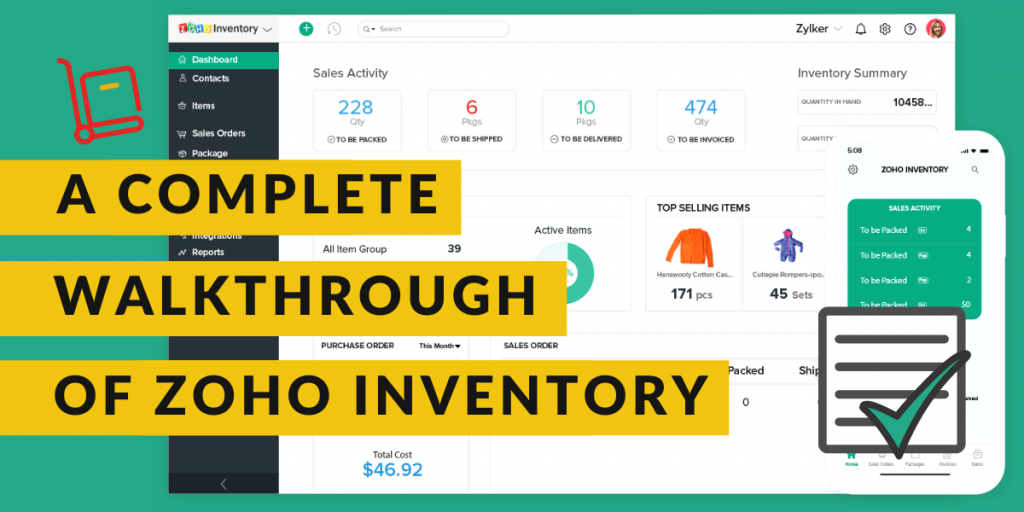
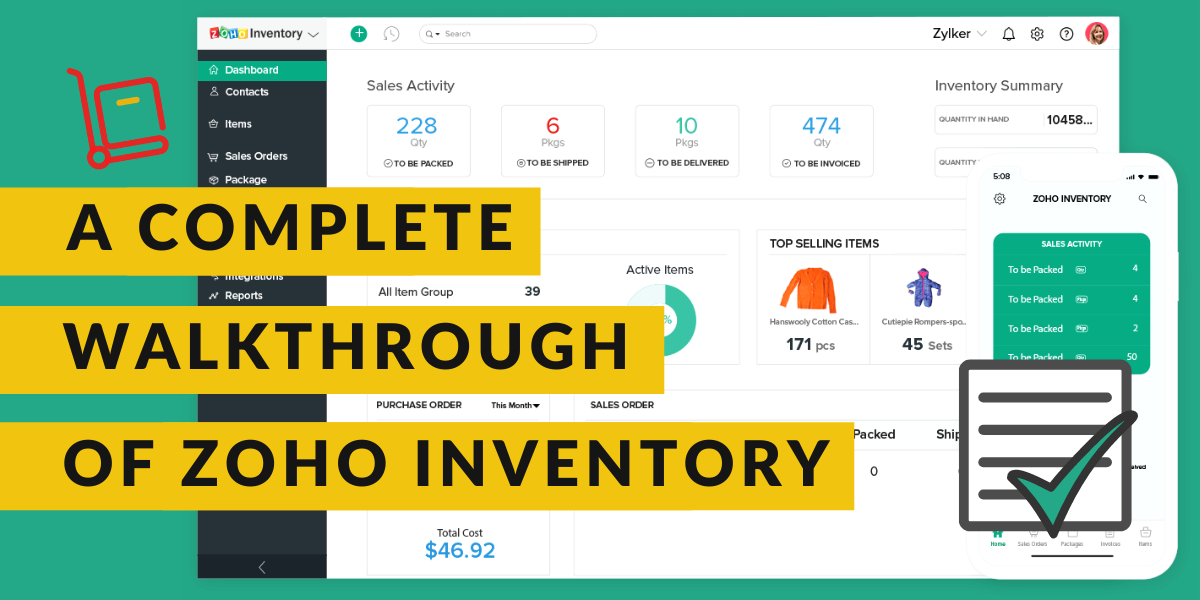
A Complete Walkthrough of Zoho Inventory

Zoho Inventory is an important part of Zoho’s suite of applications that are particularly designed for small to medium-sized businesses. It is a cloud-based tool and includes an application for both Android and iOS devices. Besides being exceptional inventory management software, Zoho inventory integration also offers multichannel selling, order management, good reporting options, warehouse management, etc.

Zoho Inventory Overview - Encaptechno

It is all these qualities that make Zoho Inventory perfect for retailers who have both an online and a physical retail store. Zoho inventory management software is a great option for retailers who sell their products on a global scale because it streamlines everything for these retailers and makes business operations easier.

With both a mobile application for instant changes and an extensive range of desktop applications, the Zoho inventory is an extremely smart choice for the purpose of inventory management. It facilitates great management of inventory across various warehouses and also allows end to end tracking. If you are a retailer who is trying to find a dependable solution for managing inventory across multiple warehouses or know someone like that then Zoho inventory can help immensely.

In this blog, we will go through a complete walkthrough of the Zoho inventory to understand the tool much better.

Creating an Account

Creating an Account on Zoho Inventory

Zoho Inventory is a web-based application that works best and supports the latest versions of the browsers such as Mozilla Firefox, Safari, Edge, Google Chrome, etc. There are two common ways in which you can sign up for the Zoho Inventory. If you already have an existing Zoho account then you can proceed with that and if you don’t then the best probable way to move ahead is by going ahead with a new sign-up.

For a new sign up, the first and foremost requirement will be to sign up for the 14 days free trial period. This period will enable you to test the product and use all its features included in the professional plan of the Zoho Inventory. You have an option of upgrading to either of the paid plans during or after the trial period.

To go ahead with a new sign up for the Zoho Inventory, take the following steps:

  • Log in to the Zoho Inventory website.
  • Click on SIGN UP NOW. You can find this button in the top right corner of the page.
  • Enter the company’s name because that will be the organization name in the Zoho Inventory.
  • Make sure that you enter a regularly used email address and a strong password. This will act as your login credential.
  • Choose a country in which your company is located.
  • Mention the phone number for authentication purposes.
  • Click on SIGN UP to complete the process so that you can be navigated to the organization details page.

Zoho Inventory Quick Setup

Set up your organization details. When you sign up for the Zoho Inventory management software, you are going to be redirected to the organization details page that will ask you to enter some basic information about your business. On this page:

  • The portal name is going to be auto-generated. In case you wish, you have an option to suit this name according to your business needs.
  • You can now choose the industry type and enter the complete address of your organization
  • Choose the currency so that it serves as a base currency for all future transactions and cannot be edited later.
  • Now select the time zone of your company’s location
  • For comparing the setup, click on the Click to Finish button so that you can be logged in and redirected to the Zoho Inventory organization.

Setting Up Data

After signing up for the Zoho Inventory and setting the organization details, you can also set up all the data and manage your business in the right way. In order to get started, follow the steps mentioned below. It is also highly recommended that the steps should be followed in this order only for a better start-up process.

  • The first step is to update the organization details. You can configure the organization details, upload the brand logo, and add significant information for completing the organization’s profile.
  • The next step is to create and import the items. Click for loading your item details into the Zoho Inventory.
  • The third step is to make purchases. It is about purchasing stocks from different vendors.
  • The last and final step is to sell the products. Create sales orders for your customers and learn more about them.

Joining an Existing Zoho Account

In case you are already using one of the Zoho Finance apps such as Zoho Books then you can sign into the Zoho Inventory with similar credentials. Here are the steps that you should follow:

  • Log in to the Zoho Inventory website.
  • Click on the SIGN IN button that you can find on the top right corner of the page.
  • Begin to enter your Zoho Credentials.
  • After you sign in to the website, you are going to be redirected to a page that mentions all organizations that you are a part of in different Zoho Finance Apps.
  • Choose from any of the existing organizations for which you wish to create a Zoho Inventory organization.
  • Finally, click on the Join Organization button at the bottom of the page and go ahead.

This will let you set up a new organization with a similar name as the selected organization almost immediately in Zoho Inventory so that all the data can be synced easily with the existing organization.

Sign In the Zoho Inventory

In case you have already signed up for the Zoho Inventory, from the next time ahead you will be able to directly sign in with the help of your registered email address. For signing in:

  • Go to the Zoho Inventory website
  • Now click on the Sign In button that is there in the top right corner of the window.
  • Enter the right email address and password and go ahead.
  • Click Sign in and you will be logged into the Zoho Inventory
  • In case you have also configured two-factor authentication, you can enter the One Time Password sent to your mobile phone.
  • Check the verify code.
  • In case you have not configured the two-factor authentication and wish to do the same then click on Manage TFA to do the same.

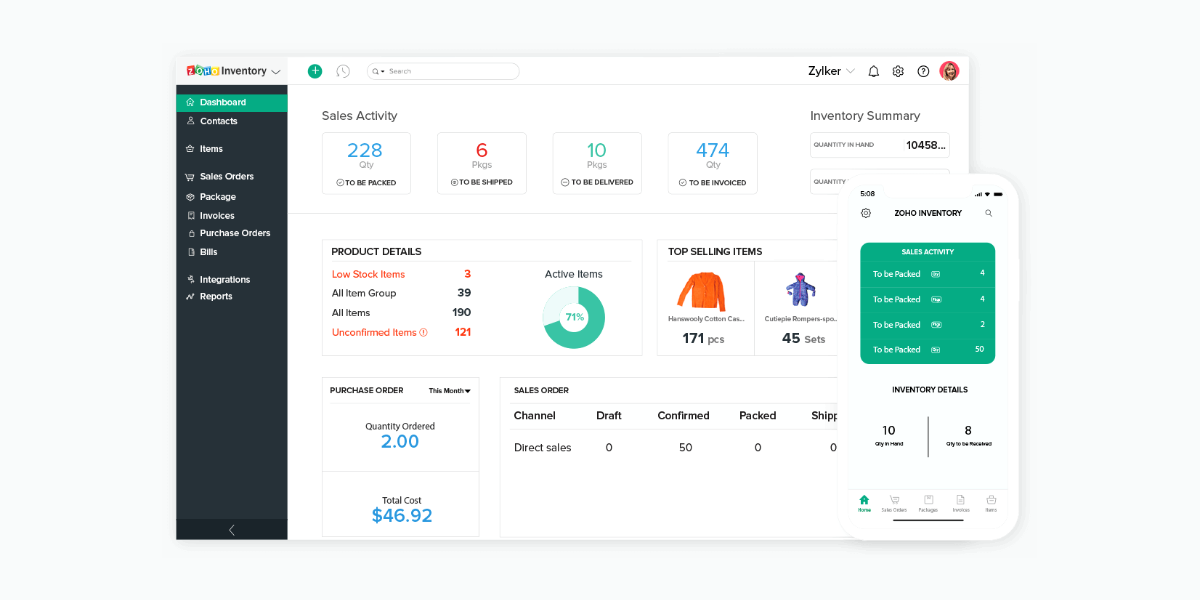
Zoho Inventory

Zoho Inventory

  • Dashboard: The main purpose of the dashboard in the Zoho inventory management software is to give information on what all transactions were doing so far. It will contain an inventory summary, product details such as all items, item groups, low stock items, unconfirmed items, sales activity, etc. It is basically like a home page and the very first thing that you are going to see when you log into your Zoho Inventory account. Its main purpose is to give you a clear picture of all the sales completed by a company and stock summaries as well such as sales orders generated by far, stock purchased from a vendor for the selected period, top-selling items, etc.
  • Sidebar: The sidebar is to access all modules of the Zoho Inventory. It enables the creation of transactions like sales orders and invoices from the Sales modules and it also helps in recording the transaction such as receives and bills from the Purchases module.
  • Recent History: With the help of recent history, you can view the recently visited transactions.
  • Organization Name: Here you can manage and even change between different Zoho Inventory organizations.
  • Quick Create: The Quick Create tab enables you to create new transactions for different modules almost instantly.
  • Settings: This allows you to customize the Zoho inventory modules so that they become suitable for the business.
  • Help and Support: You can get quick access to the user guide and also reach out to the support team with the help of this section.
  • Notifications: Finally, notifications help in receiving all the important alerts on marketplace sync status, new product updates, and low stock updates.

Navigation in a Module

The module page of Zoho inventory management software is designed particularly to facilitate easy and simple transactions, filter them, navigate to the module settings, and perform other functions as well. It includes the following things:

  • Page Filters: With the help of this option, you can filter any data in the modules based on the present criteria. This also allows you to create your own filters.
  • Collapse Button: This button is for collapsing the sidebar and providing more space to navigate within the modules.
  • Creation Button: The creation button helps in creating transactions, contact, and also an item based on the module in which you might be tagged in.
  • Action Buttons: This button helps in performing various actions on the transactions that are specific to different modules.
  • Search: You can look up items, different transactions, and contacts in the search bar.
  • Hamburger Icon: It helps in sorting the modules based on factors such as created time and last modified time. This icon also helps in importing and exporting the data regardless of the respective modules. Furthermore, you can also generate the respective module preference page from this icon.
Conclusion

It can be easily said that Zoho Inventory is one of the best-suited tools for retailers and online merchants. It is a scalable tool with four plans while also including a free plan.

If you are a retailer or know one who might be interested in the Zoho inventory integration then get in touch with the expert team of Encaptechno. We can help you from beginning to end until you start to see tangible results because of the Zoho Inventory implementation.

A Complete Walkthrough of Zoho Inventory Read More »

CRM Services, , ,
Zoho MarketingHub-Marketing Automation Software-Encaptechno

Zoho MarketingHub: A Complete Marketing Automation Software

Zoho MarketingHub is comprehensive marketing automation software that enables marketers to successfully monitor marketing activities across all channels. It is possible to generate more leads and convert them into customers while retaining them for a long time with the functionalities of this software.

Zoho MarketingHub-Marketing Automation Software-Encaptechno

Besides automating services, the Zoho MarketingHub also monitors the CRM data for various patterns and trends. It is possible to keep track of dozens of performance indicators; MarketingHub can proactively alert a person to potential opportunities or problems.

Generating More Leads with Zoho MarketingHub:

Generating More Leads with Zoho MarketingHub

A majority of the value in the automation processes is derived from reducing opportunity costs. This cost for any unfamiliar person is the way to lose an opportunity by focusing on something that doesn’t require attention in particular. The opportunity cost of the paperwork can be extraordinarily high because it is mostly menial and requires very little expertise. This makes it almost perfect for computers to accomplish because they are bad at contemplating things but exceptional at executing defined processes.

When the leads are nurtured and qualified, Zoho MarketingHub enables the sales team to focus on the things that can be used to close deals. This reduces the opportunity cost of any paperwork and other distracting but important tasks that help the marketing team to stay focused.

MarketingHub can also assist in generating more leads with an integrated sign up form and marked opportunities. With the help of detailed tracking, one can get a clear picture of when and why do the visitors leave a website. Knowing this can help in determining the best way to get valid numbers that match and fulfill the business goals.

The sign-up forms can tie in almost directly with the Zoho CRM while feeding the leads directly to a database. Once further automation is available in the database, the results improve significantly. The best thing is that the cost is generated based on the number of leads generated by the MarketingHub because as those leads get generated, the cost scales in proportion to the returns generated.

Predicting Campaign Effectiveness:

MarketingHub keeps track of the marketing efforts significantly. It is possible to get measurable estimates of the return on investment of multiple marketing campaigns. The value and depth of the analysis differ in direct proportion to the quality of the information provided.

For all the users who are deeply plugged into Zoho’s systems, the marketing automation system can produce extremely valuable results. Providing absolute and useful tools for understanding the effectiveness of new campaigns based on the effectiveness of the previous campaigns.

For the small businesses that mostly rely on web advertising, this way of prediction can become extremely useful. Although tools like Google AdWords provide a lot of data to the end-users, the data can become difficult to process and understand. Particularly, the relative importance of some statistics is not well explained by the interface. Rather, users are given an opportunity to do their independent research. This leads to learning what is necessary to accomplish marketing goals.

Zoho MarketingHub also helps in making better sense of the data that is provided by AdWords by producing an easily understandable prediction of success. It utilizes conversion estimates for the keyword-based ads to quickly assess whether or not the conversions of a particular ad make it worth your while financially.

With an advantage of predictions in Zoho MarketingHub, it is possible to make much better decisions and assessments. Applying the marketing budget to the more effective and trustworthy ads while avoiding the weight that often marks the performance of otherwise successful advertising campaigns and marketing strategies.

With the help of Zoho MarketingHub’s built-in support for multichannel marketing, you can reach the clients through email, SMS marketing channels, and social media, all executed and managed entirely from the MarketingHub interface.

Tracking User Journey:

Tracking User Journey

Besides analyzing the marketing plans and automating the common marketing tasks, the MarketingHub also offers a suite of highly powerful and effective analytics tools. Some of the website analytics through user behavior tracking gives detailed insights into user behavior. The MarketingHub also suggests touchpoints that help the users complete their purchase.

For expanding the range of typical marketing analytics platforms, the Zoho MarketingHub takes a particular view through what is called Journeys. This allows for creating a special engagement plan for every lead and also has marketing materials that appeal to specific needs.

Going about this process is manual but exhausting. Fortunately, Journeys are automated based on the unique combination of some attributes in every lead. Based on attributes such as lead source, lead status, and job titles, Journeys can automatically be executed into a multi-channel marketing plan that gives leads for every reason to choose you. You can simply set up a plan for various lead attributes and the Zoho MarketingHub can execute the specified plan for that lead.

With the help of Zoho MarketingHub, it is possible to get marketing automation that works easily. Almost anyone can use it and anyone can set it up. The MarketingHub is a perfect tool to go beyond the basic manual marketing process to an entirely full-fledged marketing automation toolkit.

Custom Email Campaigns Based On Interest:

It is possible to use the behavioral data gathered by the Zoho MarketingHub and send it to extremely targeted email campaigns based on the products or services that the leads are most interested in. Once the leads receive this information, it is even more possible to give them lead scores dependent on how the interaction goes on with the content.

You can tell if the users skimmed the content or really went through it. Furthermore, it is also possible to choose to send the leads that score the highest to your sales team automatically. This ensures that the team does not waste any time reaching out to any lead that is not qualified.

Tailoring the Customer Journey:

You can use Zoho’s Marketing Hub data for modifying the website itself so that the leads can be easily converted quickly and easily. Additionally, it is possible to modify the customer journey not just by the product or service interest, but also by the user persona.

This is something that makes your potential customers much more satisfied with the content and your company on the whole even though they might not know why. When you will look at a list of your customers, you will be really seeing a list of people who trust you entirely. If you think that you have a brand with products and services that pairs well with the ones that your customers have consumed already then you can use Zoho MarketingHub.
The tool provides data that can be used to make decisions about sending more email campaigns, promotions, customer surveys for helping to sell much more and easily.

Marketing Through Multi Channels:

Marketing Through Multi Channels

With the help of Zoho MarketingHub, it becomes easy to market with a wide range of marketing channels. Some of the channels that can be used are:

  • It is possible to engage the subscribers by sending them some emails, track their responses, and follow up with them accordingly.
  • It is also possible to identify, analyze, and refine the touch points all through a customer’s journey and make much better business decisions.
  • You can share promotional campaigns on various social media channels for increasing the brand reach and also measure the campaign reach. It also helps to integrate all the required tools for performing multi-channel marketing.
  • Zoho MarketingHub integrates with different SMS players and can be used to send relevant and personalized text messages to various audiences.

Implementation of Zoho MarketingHub:

Implementation of Zoho MarketingHub

The entire process of implementing the Zoho MarketingHub with the help of expert Zoho consultants will enable you to discover almost anything that the marketing automation by Zoho can offer. To being with, the Zoho MarketingHub makes it simple for everyone to engage with and convert the leads to customers.

Lead management with the help of Zoho MarketingHub allows marketers to design the signup forms for blogs, channels, and websites. Starting the conversions with the pop-ups and on spot, forms help in educating the leads on the brand and further enhances the chances of meetings and conversions.

It is also possible to gather the audience for the informative messages for the follow-ups through a webinar conducted with the help of Zoho MarketingHub. All these tools are designed and made to improve the lead generation process. The leads generated from these sessions and conversions can be synced with the Zoho CRM to facilitate comfortable communication at all times.

Conclusion:

Zoho MarketingHub is essentially Zoho’s answer to some of the big marketing automation giants such as HubSpot. It comes with all the features that make the process of marketing simple and efficient. Other than tracking the click paths and seeing how to convert the web traffic, it is also possible to send email campaigns and launch social posts directly from the application.

Basically, you can get just what you put into it when it comes to the Zoho MarketingHub. Hence, as long as you connect the tool to the website while enabling the important data to flow in, the reports become simple to understand.  In case they are not, you can get in touch with the team of Encaptechno and get some expert assistance. We will ensure that you get the maximum benefit out of Zoho MarketingHub.

Zoho MarketingHub: A Complete Marketing Automation Software Read More »

CRM Services, , ,
Benefits of Salesforce Slack Deal - Encaptechno

Benefits of Salesforce Slack Deal

Salesforce bought Slack recently with a deal of $27.7 Billion. This salesforce slack integration is aimed at giving two companies a much better shot at competing against a long time industry powerhouse Microsoft. Slack has been the living example of the Silicon Valley startup success. Starting as a game company, it managed to raise significant profits in not a very long time.

Benefits of Salesforce Slack Deal - Encaptechno

The Salesforce and Slack integration extracted a large sum of money from the market. This acquisition is being considered as the largest in the 21-year history of Salesforce. This San Francisco company was one of the first-ever to begin selling software as a subscription service that could be easily used on any internet connected device instead of comparatively difficult processes of installing the programs on the computers.

The concept of cloud computing is considered the wave of future success. However, software as a service has turned into an industry that has become a gold mine for long time software makers. Microsoft has developed its own thriving suite of services called Office 365 that includes a Teams chatting service with many same features as the 6-year-old application of Slack.

In this blog, we will be talking about the benefits of the Salesforce Slack deal in detail to understand the dynamics of this deal in detail.

Large Investment More Expectations

As far as Salesforce is concerned, the deal was entirely worth all the money for the simple reason that it enables the company to club all the elements of a platform, the ones that have expanded over the years from CRM to marketing, data visualization, workflow and much more.

Salesforce’s acquisition of Slack enables the company to give Salesforce a missing communication layer on the top of so many products, something that is very important during digital interactions with stakeholders of a company.  Slack is aimed at becoming the next generation of Customer 360 because it pulls a couple of elements together.

In these times when the teams are distributed and collaboration has become more important than it has ever been, the Salesforce Slack integration will be the next big thing. There is a natural connection between what people do during the course of their work, what machines do behind the scenes in the systems of record, and the way in which Slack can connect the gap between human beings and machines.

When Slack is included in between the important business operations, it will become possible to eliminate any friction in the complex enterprise software such as Salesforce. Rather than moving through emails, opening a browser, clicking on a link, signing in, and accessing the tool that is needed, the final approval can be built into a Slack message.

In case you have multiple actions to complete in one day, there is a tangible opportunity to enhance the velocity with a better impact and not only within the minutes saved by a person doing the approval but the way in which the entire business operates.

Battle with Microsoft

Battle with Microsoft

Although it wasn’t stated explicitly that the Salesforce Slack integration is about competing with Microsoft, this was, by all means, the underlying reason why companies decided to come together. Their operations will prove much better together as compared to being separate. Plus more than anything, both of these companies have a complicated history with Microsoft and when they will come together, they will be able to put up a considerable fight against Microsoft.

Slack has had a long battle with Microsoft entailing to file a suit against the company last summer in the EU over what was called an unfair bundling of Teams with Office 365. Microsoft has considered Slack to be a threat and because of this, there has been competition between two enterprise companies.

Hence, an important benefit of Slack coming together with Salesforce is being able to put up a strong fight against Microsoft. Slack will be able to gain considerably with this acquisition. The ownership by Salesforce will put Slack on a firm foot against the dominant player in productivity and collaboration in the software industry.

Ever since Microsoft has launched Teams in 2017, it has been investing massively in the platform while moving many users from Skype for Business with a rapidly growing list of features. Microsoft Teams has millions of active users who benefit considerably from its availability at no extra cost in the Microsoft subscriptions. This offers a large footprint over enterprise users.

From the viewpoint of Slack, it is evident that it has been facing a formidable challenge from the tech giant Microsoft and with the Salesforce acquisition, Slack can benefit immensely by being a large part of the entity. Salesforce can also help re-establish user adoption because of rapid growth. The Covid-19 pandemic has been responsible for a rapid shift to remote working and in these times this integration is for the better.

Stepping Up Market Reach

Stepping Up Market Reach

With farsighted and enterprising ambitions as to where the business can go next, Slack needs a way to step up in its market reach and product investment opportunities. Doing this independently can be a great challenge and hence Salesforce Slack integration will be beneficial.

This isn’t to say that the integration of Slack with Salesforce will not be challenging but by all means, it will be worth it. Salesforce and its possibilities include enabling it to function at an arm’s-length as a standalone unit for a small time as the case has been with some of the previous multi-billion deals. When a deal such as this goes ahead, it will end up benefiting the users as well.

It would naturally mean a much more profound and impactful integration across the breadth of Salesforce’s portfolio. Additionally, the slack customers who are already the Salesforce customers as well are going to benefit a lot more from the deal with Salesforce and Slack.

Slack Retains Its Independence

The present customers of Slack are on the guard and have closely been watching how to handle the Salesforce acquisition. It is well realized that Salesforce will have to walk on a fine line between respecting the product independencies and brand while also finding some ways to create and build on the existing hooks into the Salesforce so that a CRM giant takes complete benefits of the substantial investment.

This will not be so easy to manage but the customers will definitely be able to see a similarity of independence. There is a distinct layer of independence like that and there will never be any flinching from it. Significant money has been invested in the integration and that is naturally well thought of.

Both the parties have come across expressing that we wanted to ensure that a real integrated value proposition and a real integrated platform for the developers come out. The technology, independence of Salesforce is most likely to stay intact and the collaboration will come out to be a fair coming together of the two parties.

Together They Can Do More

As for the two companies coming together, the top management of both of these companies sees many potential benefits of merging the Slack communications with the enterprise software prowess of Salesforce. Slack will make Salesforce more accessible and also help link the automation and workflow.

Automation is considered to be more event-driven. With the long-running processes and what people are doing with the Slack platform, it is more of incorporating the workflows and bots with everything else. The combination of the Salesforce platform with Slack leads to the best automation based on the intelligence capabilities run on the Slack platform and that in itself is incredible.

The only challenge that both these companies face now is the direction in which they should move forward with the acquisition. All the expectations in a deal that is this large are essentially making the collaboration work and will continue to do so in the coming times as well.

Salesforce has a considerable amount of experience with large acquisitions and it pulled off prominent deals with success. Hence, it is very much likely that both Salesforce and Slack are going to get the deal right. The companies will work in a way to ensure that the deal leads to success.

Conclusion

The Salesforce Slack integration has pointed out many questions until now. Customers of both the companies and even the ones who wanted to join the platforms are finding themselves all caught up in what is likely to happen with the coming together of these two forces.

Salesforce is known for market-changing collaborations but some of these collaborations have been known outside their significant industries as Slack. The brand loyalty of this chat company called Slack can influence how much Salesforce decides to change and how much does it leave alone.

Salesforce has announced some important plans to combine with existing software Slack but this can mean more changes for Salesforce users as compared to Slack in the short term. Regardless of the changes, it is assured that the benefits will be plenty.

Benefits of Salesforce Slack Deal Read More »

CRM Services, ,
Salesforce Winter 2021 Release Quick Highlights - Encaptechno

Salesforce Winter ’21 Release Quick Highlights

Salesforce has released its Winter ’21 release while introducing many new features that offer various benefits. The CRM team has put together highlights from this new release so that they can help the developers in understanding and working with them in a better way. The features that have been introduced in the Salesforce Winter ’21 release are focused on enhancing the user experience with the sole objective to make everything more productive.

Salesforce Winter 2021 Release Quick Highlights - Encaptechno

One of the key differentiators of every Salesforce release is the innovation and feature upgrades that the company introduces. It is because of these changes that Salesforce attracts customers relentlessly. In case you are a Salesforce customer, you must use the new functionality available from every update to make the most out of what is available.

The core philosophy is to have a thriving CRM system by adopting a continuous improvement and leveraging upgrades that are delivered to make the most of the CRM investment. The only thing is that with the sheer number of fixes, changes, and additions, the Salesforce developers can often get overwhelmed when they are busy with everyday work.

In this blog, we will be listing some of the most important and top Salesforce Winter ’21 Release quick highlights for your attention:

1. Dynamic Forms

In the new release, the feature of Dynamic Forms helps the Salesforce instances for lightning. This offers multiple benefits because it enables the admins to form sections of a page and fields that can be used as components for the lightning app builder which then helps in configuring and giving the users access to sections and fields just as needed. There is no longer a need for blocks of fields on a record page.


The feature of Dynamic forms in the new Salesforce release helps in enhancing the way in which the users interact with the record pages. It increases the load time of the page, helps in easily managing the fields and sections on pages with no need for using the page layout editor, and also reduces the page layouts as needed. In the new feature, the dynamic forms are enabled for each org, so one can start setting them up from the lightning app builder.

In the component palette of the lightning app builder, the field section and the components of the field are now available to create the dynamic forms. You can begin by opening an existing record page in the lightning app builder and then clicking the upgrade now from the record detail properties to launch the Dynamic Forms migration wizard that helps to add fields and different field sections to pages. On the other hand, you can also create new pages from scratch.

It is recommended to reconsider your page design set up by leveraging the dynamic forms, particularly when you see multiple record types. You can get in touch with Salesforce implementation partners if you need assistance in setting up this feature or redesigning the pages.

2. Lightning Components

Many people have built Aura and Lightning Web Components by now and most of this logic runs on the Aura Enables Apex methods that reside in the controller classes. In the Salesforce Winter ’21 release, if you want to successfully communicate with the Apex method, the user should have an appropriate Apex class enabled on the profile or a permission set.

The fact this applies to all the components, even the new and the existing ones may require the profile changes to maintain great functionality. Fortunately, it is simple to add permissions. All you have to do is open up a profile or even permission to set and select the Apex Classes section to add the controller class to the list. In case you have been managing the profiles and permissions with the help of managed packages, the new release makes it great for you to begin.

3. Analyze Lightning Page

Analyzing the lightning page is a simple feature for the admins that helps them to utilize and vastly improve the loading time of the lightning pages. With the help of analyzing features, you can quickly understand what causes longer load times than usual.

Besides this, you can also receive quick recommendations for any improvements with a simple click of a button. For using this feature properly, you can go to the lightning app builder, click on the Analyze button so that the pages begin the evaluation. The pages are then analyzed based on the fields related to the list components and the metadata of a record page.

4. Apply Audience to the Record Detail Page

Many communities require additional customization because they are external facing. Due to this new update extending the customization to the record detail page, the previously customizable feature through the use of record types gets triumphed.

Additionally, you can now vary with what people see on a record detail page using the audience criteria based on the record fields. For instance; it is possible to display multiple theme layouts or different pages for high-value or low-value opportunities. Also, the record criterion is further moved from the advanced section to the main body of the editor section which helps in easy combination with user criteria to create the custom formulas.

5. Updated Highlights Panel

A simple but very useful update that can help the users to become considerably efficient is the updated highlights panel on the record page. It helps in making the users see more record information on a highlights panel when they move over a lookup relationship field. This is when you hover over the accounting field on an opportunity.

There isn’t a required setup for this kind of feature because it will be automatically turned and displayed in the first few fields on the compact layout. The users are no longer required to go to the related records for seeing more details.

6. Customizing User Search Results

With the new Salesforce release, Einstein search can help in personalizing all that is returned by the re-ranking of the results so that they can be made more relevant to the individual user.

The results are evaluated based on factors such as recent user activity, ownership of records, and geographic location. Anyone who uses performance, enterprise, professional and unlimited editions in lightning can begin using this feature.

For turning on the Salesforce Einstein Search, go to the quick find box in the setup and typing and selecting, “Enable Einstein Search”. Further, select all of the three checkboxes to enable the search. This feature is very quick, simple to turn on, and easily delivers personalized results to the users making everything more efficient.

7. Creating Engaging Email Templates

Creating Engaging Email Templates

The users can create engaging email templates very quickly by using the new email template builder offered by Salesforce. The new builder enables one to quickly build templates using the drag and drop functionality instead of the HTML code.

In addition, the drag and drop functionality also enhances the speed of the entire process of creating engaging and visually attractive email templates for the sales team that can be sent to the clients. The builder is now available for all editions of Sales Cloud in lightning as well as editions in Pardot using the Pardot Lightning app.

For accessing the builder or for creating and editing the email templates, the users should have access to lightning content builder or they should also be managing the content builder permissions.

8. Composite Graph APIs

This highlight is no less than a game-changer for anybody who is working with the Salesforce API. The new composite graph API helps the developers to create complex requests while combining numerous operations that don’t have to be related to each other within a single transaction.

It is also possible to define an all-or-nothing behaviour while not having to worry about any rolling back of data in case a multi-step operation fails midway. This only means that one can perform multiple actions in just a single API call and in just a single transaction. Some of the potential efficiency gains for the API heavy implementations are highly authentic.

9. Outlook Integration

Outlook Integration

Some of the important changes for email integration in the Winter 21 Salesforce release lead the Einstein Activity Capture to replace the lightning sync. In case you are already using the lightning sync, you can keep using the product. However, implementing Einstein will leverage improved integration and new functionality. The new Einstein Activity Capture features help in setting up and improving syncing behavior for ensuring the right record in automatic syncing.

Besides this, it is also possible to control sharing settings on emails by providing unlimited access. The insights dashboard empowered with analytics helps in diving into records syncing and creating email insights based on the information synced with Salesforce.

The Salesforce Einstein also helps in creating around ten custom insights as they look for keywords and highlight them in the activity panel. This is a great benefit because it helps the users to take action at a time when it is most relevant.

10. Displaying Survey Pages

The Salesforce Surveys allows an ability to create a unique customer journey by defining which survey page is used for skipping to next based on the Salesforce data.

You can let the data in the Salesforce org determine which survey page participants should view next. Besides this, variables can be used to define conditions in a page for branching logic. Further, using associated records merge field variables and participants record merge field variables help in defining the first level conditions. Using the org variables defines conditions based on org’s information and the custom variables define conditions based on values that one defines.

Conclusion

The Salesforce Winter ’21 release brings multiple features to the table that are extremely helpful. In case you need support with implementing any of the Winter ’21 releases, a Salesforce implementation partner like Encaptechno that comes with extensive knowledge, previous experience in facilitating customer success, and offering a comprehensive experience can help a lot.

Contact Encpatechno today to get immediate support in implementing the Salesforce winter release today and get things going.

Salesforce Winter ’21 Release Quick Highlights Read More »

CRM Services, , ,
Tips for Establishing your App on Salesforce AppExchange - Encaptechno

Tips for Establishing your App on Salesforce AppExchange Successfully

Tips for Establishing your App on Salesforce AppExchange - Encaptechno

AppExchange is actually a marketplace for all types of Salesforce products like Salesforce applications, flow solutions, lightning components, etc. It is considered the largest business application marketplace for app development and around 80% of Salesforce users utilize the valuable ecosystem that it offers for connecting with the key stakeholders and installing the applications in just a couple of clicks.

As the Salesforce implementation partners, some of the biggest and most successful SMEs and Fortune companies use the AppExchange marketplace for effectively integrating everything into just one system. It is quite useful in solving issues that are linked to building solutions from the beginning with a short time and third-party services that the users ask for integrating or any different problems that can be solved through Salesforce components.

It is best to consider Salesforce AppExchange as a community where the Salesforce partners, brands, or clients can interact and form solutions as different services. As for the lighting platform developers and consultants are concerned, the AppExchange helps in helping customers reach business solutions. On the other hand, the Salesforce AppExchange is used as a hub of talent and tools for uncovering maximum productivity.

After understanding what is Salesforce AppExchange, we will look at different ways in which the AppExchange works, you can use it and publish an application with it successfully. So let’s begin:

The Working of Salesforce AppExchange

For anyone who is looking for a marketing tool to establish and promote an app, the Salesforce AppExchange can be highly reliable. It enables a person to describe solutions, support, other details, and pricing which can then be used by the customers to find out if the services being offered are correct for them or not.

In addition, one can also be used to upload photos, videos, and different types of content for making it clear for the customers to nicely understand what is being delivered. On the basis of the information that is provided, the AppExchange is capable of organizing businesses into different areas such as sales, marketing, and analytics.

How to Create a Listing?

You can create a listing right after you have created a provider profile and uploaded the package in a rightful manner. You are also allowed to make just one listing per application or component. This is because having just one listing makes it simple to maintain and upgrade the offerings over a lifecycle.

It also assists in achieving a high rank because the metrics used by the AppExchange for ranking applications and components are not diluted all across the listings. Furthermore, this also proves to be beneficial for the customers because they can easily find your services and the reviews in one place only without having to get lost in multiple other listings.

It must also be remembered that the listings and components can be browsed by anybody who needs the services that are mentioned already. For installing the applications and components, it is best that one has the “Download Packages” information. For creating the package, you have to get the due permission to “Create Package” and for uploading that package to the Partner Community, you must get the permission to “Upload Package”.

Building an App for Salesforce AppExchange

There are five major steps involved in changing an idea into the Salesforce application development

1. Join the Partner Community

Join the Partner Community

The primary step for the app development process needed for AppExchange is to join the Salesforce Partner Community. For that, you have to follow the simple steps given in the ISV Basics Trailhead to become a part of the Partner Community.

An amazing and reliable source for collaborating within the Salesforce ecosystems with the help of groups, joining the Partner Community offers some great resources to learn the best practices. One can ask questions, stay updated with new features and tools for the partners, and also register for webinars and other events.

After joining the Partner Community, you will be receiving a free Partner Business Org that includes the business technology for growing and building with Salesforce. Within this Partner Business Org, there will also be access to the Channel Order App (COA), Environment Hub, License Management App, etc.

The LMA is very helpful in managing the leads and license for the AppExchange offerings and the COA allows one to create, submit, and track various orders with the help of Salesforce. The environment hub on the other hand gives access to a special kind of Development Org called a “Partner Development Org” only available to the partners with better limits and more permissions.

2. Building an App

Building an App

After joining the Salesforce Partner Community, it is time to start building the application with the help of the Salesforce application development. Before a person starts building anything, it is important to think about security. When you read ahead to the final step which the Security Review, you will understand that all apps on AppExchange are supposed to meet some standards before they can get listed.

For the Salesforce application development process to be successful, it is necessary to include the Security Review best practice into an application right from day one. Building an application while keeping security in mind enhances the process and enables them to get an app through the security review standards very quickly.

There might be a need to spin some of the different Orgs utilizing the Environment Hub which means moving on to the next step. The trailhead unit helps in walking through different Orgs you will wish to create. Irrespective of what you might be creating, it can make sense to change at least Orgs before starting, one for development and another for packaging. For signing up for a new org, you just have to click on the “Create Org” button in the Environment Hub application.

One of the handy tips is to earn the ISV app development module because this trailhead module covers the ISV development lifecycle, the detailed method of managing and creating Orgs, and following the correct approach for packaging and testing an application. In addition, it is also a great time to check out the Developer intermediate trail, expand the Salesforce developer skills and check out the lightning experience trail for learning about the lightning experience.

3. Package Your Application

Package Your Application

After the application has been built finally, it is time to package your application. A package can be described as a bundle of components that help in composing the application. The managed package provides intellectual property protection and enables the delivery of seamless upgrades while offering support for license enforcement features.

It is also only responsible to distribute the managed packages on the AppExchange and not the unmanaged packages. If you wish to get instructions on creating and uploading a managed package, you can log into your packaging org and reference the steps mentioned in the ISV force guide.

It is important to test your application before creating a managed package because many attributes of your components are locked once they are put in a managed released package. The trailhead unit helps in walking through packaging and testing an application as well.

4. Design

It is possible to attract the prospects after the app development with a compelling AppExchange listing that assists the customers to understand the values that you can offer with the help of screenshots, pricing, demos, and on the spot trails and installations.

You can also include an attractive header image, a screenshot, and a description rich with SEO keywords. This particular page of the ISVforce guide explains how to create and edit an AppExchange listing.

Begin this step by linking the managed package to your listing then go to the organization tab in the publishing console and click on “Connect Organization”. Follow the step given below of the ISVforce guide helps in connecting a packaging org to your AppExchange listing.

  • After linking your packaging to a listing, skip to the next step and submit for the security review. Submitting the security review, come back and complete the design of your listing. The steps 4 and 5 can be completed simultaneously.

5. Review

Protecting the customer data and maintaining trust is both a part of the Salesforce core values. The Security Review helps in establishing a reliability factor between you and your customers. All the apps that are published on the AppExchange have to go through a mandatory review so that assessing the app’s security posture is done in the right way.

You can prepare for it early right in your development process. What’s more is that Salesforce offers multiple free security resources for assisting you with the education, design, and development of applications.

Taking the advice of a Salesforce consultant can help a great deal in having a practical and a hands-on experience with the fundamentals of application security, testing tools and following instructions on submitting for Security Review. After you pass the security review, it will become possible to publish the app on AppExchange which will make it possible for the complete Salesforce ecosystem to see and interact with the listing that you have created.

Now that you have published the app, it is now time to market and promote it correctly. To do that, follow the steps mentioned below

1. Target Audience: We all know that the first step in marketing any product is to have a good knowledge of the audience that we are targeting. Go ahead and conduct appropriate client interviews to understand the needs much better and assess all functionalities that can be best implemented for the application.

Create a strategically strong marketing plan to target and attract an audience. When you know your customer needs and what attracts them the most, framing the app in a way that it attracts the audience also becomes easy.

2. Promoting the App: For promoting the application, you can take many routes. Begin by posting on social media accounts for promoting your app and reaching a wide audience. On the other hand, you can also create Salesforce specific events that can help in connecting face to face with the Salesforce customers and leaders. Staying updated with the Salesforce events pages will help you advertise with the right events.

Salesforce also provides funds for industry events and the promotion of these products through the conferences can be highly valuable. Build a network with the help of social media and events so that you can promote the app at an exponential rate.

3. Make a Demo and Collect Reviews: Making a demo for your customers can help greatly in increasing the sales process by answering an increasingly more number of questions that the customers may have about the functioning of an app. More information about a product helps a customer to become comfortable with it.

When you build more reviews, it will become possible to garner a good reputation and attract in future customers for your application. In addition, the leads will be able to receive valuable feedback for improving your services. Customer reviews are always important for the success of an application and help in increasing the sales of a product.

4. Striving for Continuous Improvement: After an application gets launched, the work does not get over. There will be important updates to release, problems to fix and taking care of the maintenance problems as well.

You will also be required to take the necessary steps that can help in preparing for any issues or changes that might come ahead. It can be a good idea to have a post implementation plan that can help a company in foreseeing any expected problems ahead while ensuring that you are prepared to face those problems.

Conclusion

All the steps that are mentioned above can help a great deal in ensuring the building, publishing and promotion of an application on the Salesforce AppExchange. Should you need any more help with the processes then the team of Encaptechno can be of immense help to you.

Irrespective of the fact if you are a customer or you are just looking to learn more about building on the AppExchange, our team dedicates to the goal of building the best for you. In case you wish to learn more about how to start building for achieving success on the AppExchange, feel free to get in touch with us. We will offer an in-depth session on how to start or where to go next.

Tips for Establishing your App on Salesforce AppExchange Successfully Read More »

CRM Services, , ,
How to Publish Applications on Zoho Marketplace - Encaptechno

How To Publish Applications On Zoho Marketplace?

How to Publish Applications on Zoho Marketplace - Encaptechno

The Zoho Marketplace is pretty much similar to an e-commerce website for the Zoho Marketplace developers and users. It enables the developers to build and publish a remarkable Zoho Creator app and for the users, it is like a store or a gallery to choose from a wide range of applications for a number of purposes.

All a user needs is a Zoho account and a strong understanding of Zoho Creator to become a developer. The developer then has an ability to access the Zoho Developer Portal for the purpose of creating applications and for privately sharing the applications with clients, publish them in the marketplace for free or on a paid basis for all the Zoho Creator users. The consumers can install the required application and make use of it for their business needs.

The Zoho Marketplace is a platform that enables one to sell business applications to millions of Zoho users. A collection of business applications that augment the productivity of the Zoho products are known as extensions. With the help of a simple development process and a well-defined user base, one can easily build and market the extensions to the right audience.

Benefits of publishing applications on Marketplace

Benefits Zoho Marketplace

1. Advanced Developer Platform:

The Zoho Marketplace helps in high-quality custom application development. Essentially, your applications can be created according to your own style. A sandbox enabled developer platform along with helpful documents, REST APIs, tutorials, and much more is offered. This helps in developing extensions in any way you want.

2. User-Friendly Publishing:

At the time when the final extension is ready to ship out, things should be seamless. Zoho offers an optimized process that makes sure the final product reaches the customers at the earliest.

3. Connecting Customers:

It is possible to use the social network pages and forums for determining the potential use cases and the user requirements along with communicating with the present and the potential customers.

4. Marketing Assistance:

After the extension has been built, the developer is offered all the necessary support in making a marketing plan that can be tailored to the target audience.

Partnering with Zoho is extremely hassle-free and rather beneficial. Just by developing an extension and publishing it in the marketplace, one can become a technology partner. There are three steps in which this works:

  • Build: The first step is to find the product that you wish to integrate with and check out which developer resources and tools are available. After the choice has been made, you can start the process of integrating.
  • Deliver:  After you have completed building the extension, it is time to submit it finally. This is when it gets reviewed by the technical team and gets published after the vetting process is completed.
  • Earn: After getting selected, your extension is going to be open to all possible users in the marketplace. You can leverage your GTM plans for making the most of the extensive user base.

Now that we have understood all about the Zoho Marketplace, its benefits, and the process that can be followed for partnering with it, it is time to create and publish the application.

The first and most important step is to access the Zoho Developer Portal. For any developer who wishes to develop applications for the marketplace, the primary step is to access the Zoho Developer Portal. There are two tabs on this portal namely Applications and Clients. In the applications tab, developers have the option to create applications that can be shared with the customers or published in the marketplace. In the client’s tab, developers have the option to invite clients with whom the applications can be shared privately.

Creating the Application

Creating the Application

To create a good application, the developers can integrate with the Zoho Developer Portal and follow the steps mentioned below:

  1. The foremost step is to click on the create an application.
  2. It is then time to decide a final name for the application and click on create.
  3. After the completion of these steps, you will instantly be taken to the “Application details” page. This page will further have four steps:
  • The tab application details will be displaying all the information that is needed in the application.
  • It is then the time to display clients who have been invited for sharing the application.
  • The third step is to develop an application.
  • The next and final step is to publish the application on the marketplace or share the application privately with the clients.
  1. The fourth step is to click on Develop app to begin the process of building the application.
  2. After all the changes have been made in the application, it is time to click on the “Back to app details” for returning to the application details page.

Invite Clients

The developers can invite clients for the purpose of sharing their applications with the clients in a safe and private way. After clicking on the “Application Details” page, the next step is to click on the back option (on the top left corner) to complete the navigation to Zoho Developer Portal. To add the clients from the Zoho Developer Portal:

  1. Begin by clicking on the Clients tab.
  2. The next step is to click on the Invite Clients tab. On the next page, you can mention the following details:
  • To: This is for mentioning the email address of the client to whom you wish to write the email. This email account should be linked with the Zoho account of the client.
  • Subject: This is for mentioning the subject of the invitation email. It is likely to be pre-populated with a subject message that can further be edited.
  • The From and Message boxes are most likely going to pre-populate and will not be edited.

Inviting the clients will be listed in the Clients tab with status as Pending in case the client has not accepted the invitation as yet. These clients can include the option of Re-invite, which can then be used to repeat the invitation.

Editing the Application

Editing the Application

The applications created by the developers are listed in the Zoho Developer Portal within the Applications tab and they can be edited whenever there is a need. For the purpose of editing an application, the developer can follow the steps given below:

  1. Click on Develop for the application that is required to be edited. You can click on Edit, after which you will be navigated to the “Application Details” page.
  2. On the “Application Details” page, the next step is to click on the Develop app so that the application gets edited.
  3. When the required changes are made in the application, click on Back to app details for returning to the “Application Details” page.

Publishing the App

Publishing the App

The app requires it to be published so that it can become possible to privately share with clients or to share them in the marketplace. To publish an application effectively, do the following:

  1. Navigate to the Zoho Developer Portal and then simply click on Publish for the required application or click on edit for the required application and right on the next page, click on Publish.
  2. This will directly take you to the “Publish Application” page. Any change that you make to the application will get listed here. You can begin by selecting the required changes and then you can click on Proceed.
  3. Next, you will navigate straight to the “Publish Details” page. For publishing the app to a client, set the “Publish to” option to the client.
  4. You can then set the “Client” option to the required client from the drop-down. Only those clients who have accepted the invitation can be listed in the dropdown. This is from where you can also invite to share the application. The developer and client should be using a similar version of Zoho Creator. For instance; if the developer is using the C4 version the client should also be using C4.
  5. Go ahead and mention the required application name. In case the app name is changed here, the new app name will get reflected on the client’s side and the old app name will get retained just like that in Zoho Developer Portal.
  6. Furthermore, the version name will also be automatically populated according to the release. For example; the first publication will contain “Version 1”, the second publication will contain “Version 2” and so on. The developers can edit the version name just as required.
  7. Within the description box only, you can describe multiple aspects of the app. For example; the changes that can be made to the version.
Conclusion:

Ever since the launch of the Zoho Marketplace, it can meet the demands of the users who wish to integrate with the third-party applications with Zoho applications, extend the Zoho applications with any additional features and automate the new processes with the custom applications.

Zoho Marketplace is contextually integrated within the supported application so the users can browse through a wide range of solutions, find the ones that can best fit the requirements, and install them without any need for leaving the application. In addition, the users can also browse and buy directly from the Zoho Marketplace only.

At present, the Zoho Marketplace provides extensions for the Zoho CRM and custom applications. It also offers a wide number of Zoho developed extensions for Zoho SalesIQ. In the future, it is expected that the Zoho Marketplace will provide more extensions as well.

If you are looking to create and publish custom applications on the Zoho Marketplace then you must collaborate with a Zoho consulting partner such as Encaptechno for high-quality guidance. They will assist you to go about the process with extraordinary precision.

How To Publish Applications On Zoho Marketplace? Read More »

CRM Services, , ,
Scroll to Top