
Encaptechno

Cloud Services

What is DevOps: A Complete Overview - Encaptechno

What is DevOps: A Complete Overview

What is DevOps: A Complete Overview - Encaptechno

The acronym for the blend of development and operations is DevOps. It refers to a collective method that helps an organization’s Application Development team and IT Operations team to work together effortlessly and with enhanced communication. DevOps is a practice that promotes software development and operations teams to communicate, collaborate, integrate, and automate. 

  • DevOps is a set of cultural practices, concepts and technologies that improve an organization’s capacity to produce high-velocity application services and allow it to evolve and improve products faster than traditional software development and infrastructure management methods. As a result, organizations can better serve their clients and compete in the market because of this quickness.
  • It is a mindset that boosts iterative software development, automation, and the deployment and management of programmable infrastructure. DevOps concentrates on developing trust and improving communication between developers and system administrators. DevOps is a software development method that tries to increase how businesses can deliver new features. 
  • DevOps fosters better, more constant communication, cooperation, visibility, integration and transparency between application development teams (Dev) and their IT operations counterparts (Ops).
  • Every phase of the DevOps lifecycle is infused with this closer link between “Dev” and “Ops,” from early software planning to code, build, test, and release phases, deployment, operations, and continuous monitoring. In addition, this relationship fuels a never-ending cycle of advancement, expansion, testing, and deployment based on consumer feedback. As a result of these efforts, essential feature modifications or additions may be released more quickly and frequently.

How is DevOps used?


DevOps is a culture, technique, and collection of technologies that help developers, testers, and IT operations work together more effectively. It is a software delivery, quality, and innovation approach created and used by IT professionals, developers and business leaders to improve an organization’s software’s speed, quality, and innovation. DevOps is also about removing organizational hurdles that impede teams from properly collaborating. As a result, DevOps is becoming an essential element of most operations. 

DevOps enables businesses to deliver more value to both internal (such as other departments) and external (such as customers) customers (such as end-users). Netflix, Google (Google Cloud), Facebook, Capital One, and many other corporations have implemented DevOps in their development processes, which has allowed them to scale quickly while keeping all operations secure.

DevOps Culture


DevOps is a shift in mindset. There is no more to say. It’s not just a matter of implementing agile planning, automated testing, or continuous delivery; these are all crucial techniques. 

DevOps culture is all about operators and operators working together and sharing responsibility for the product they make. Enhancing transparency, communication, and collaboration across development, IT/operations, and “the business” is one way. DevOps culture entails closer collaboration and shared ownership for the products that development and operations generate and maintain. This allows businesses to align their people, processes, and tools to focus on consumers.

It entails forming multidisciplinary teams responsible for a product’s whole lifecycle. DevOps teams work independently and pursue a software engineering culture, methodology, and toolkit that prioritizes operational needs alongside architecture, design, and development. 

The developers who built it also run it bringing them closer to the user and allowing them to understand their requirements and needs better. In addition, when operations teams are more involved in the development process, they can include maintenance and customer requirements, resulting in a better product.

Increased openness, communication, and collaboration amongst teams formerly performed in silos are at the core of DevOps culture. However, critical cultural transformations are required to bring these teams closer together. DevOps is a transformation in corporate culture that prioritizes continuous learning and improvement, mainly through team autonomy, quick feedback, high empathy and trust, and cross-team collaboration.

Practices in DevOps
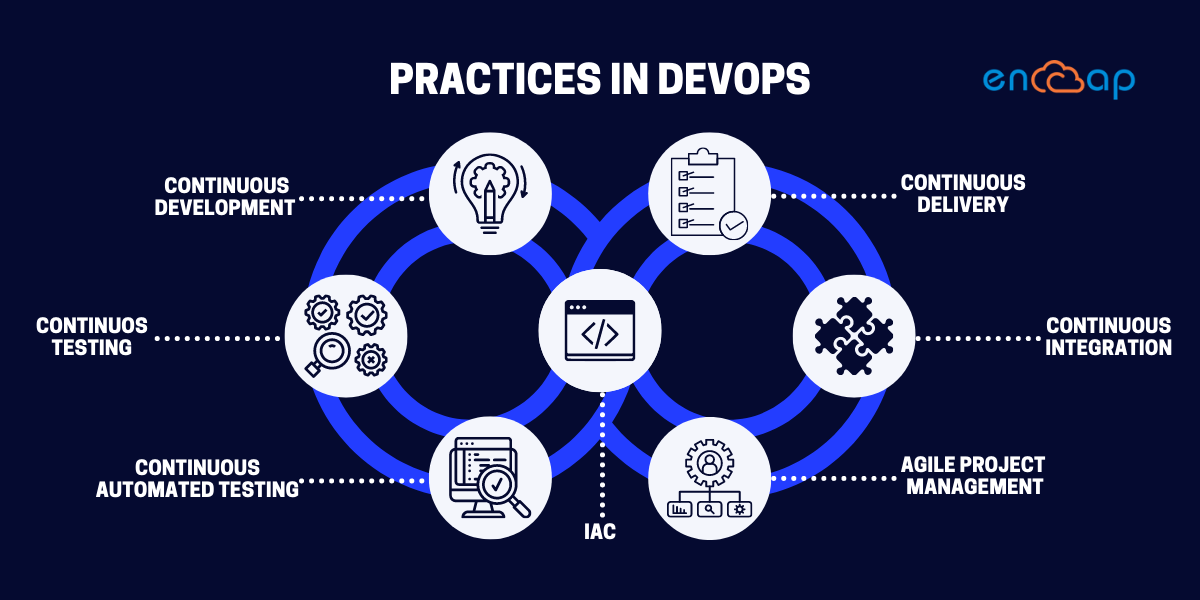
Continuous improvement and automation are crucial to DevOps approaches. As a result, many methods concentrate on one or more stages of the development cycle. The principles of DevOps are being executed in 83 per cent of IT decision makers’ organizations.

These are some of the practices:

Continuous development 


This approach covers the planning and coding phases of the DevOps lifecycle. In addition, version-control techniques may be involved.

Continuous testing


This method incorporates automated, prescheduled, ongoing code tests as application code is produced or modified. 

Continuous Integration


Continuous integration (CI) is a development technique that requires developers to integrate work into a shared repository often and receive immediate feedback on its success. 

The ultimate goal is to produce small, usable portions of code that are frequently checked and incorporated back into the centralized code repository.

Continuous Delivery


Every update to source code should be ready for a production release as soon as automated testing confirms it. 

This includes building, testing, and deploying software automatically. To ensure that code can be deployed in an automated form with suitable pauses for approval depending on the individual demands of a programme, an approach to code approval and delivery approval must be in place. 

Infrastructure as code


Infrastructure as code (IaC) is a method for managing the infrastructure that enables continuous delivery and DevOps. 

It comprises scripts to set the deployment environment (networks, virtual machines, and so on) to the required configuration regardless of its starting condition.

Agile project management


Agile project management and software development is an iterative approach that aids teams propose value to clients faster and with fewer headaches. Instead of waiting for a single effective release date, agile teams concentrate on providing work in smaller increments. In addition, continuous evaluation of requirements, plans, and results allows teams to adapt to input and pivot.

Continuous automated testing


A quality assurance team uses automation tools like Selenium, Ranorex, and UFT to perform committed code testing. Bugs and vulnerabilities that are found are reported to the engineering staff. This step also includes a version control system to track changes to files and share them with other team members regardless of their location. In addition, automation is used to relieve the load of manually conducting repetitive tests, speed up the testing process, and allow the execution of more complicated or challenging tests. 

Lifecycle of DevOps

Lifecycle of DevOps

DevOps represents an agile relationship between development and operations. It is a process practiced by the development team and operational engineers from the beginning to the final stage of the product. The DevOps lifecycle is a collection of phases that include continuous software development, integration, testing, deployment, and monitoring. A competent DevOps lifecycle is required to produce higher-quality software across the system.

Continuous development


This phase entails the software’s planning and coding. 

During the planning phase of the DevOps lifecycle, the project’s vision is decided. 

And the programmers get to work on the application’s coding. 

There are no DevOps tools necessary for planning. However, there are several tools available for code maintenance.

Continuous integration


This is the most critical stage in the DevOps lifecycle. For example, a software development practice demands developers to commit source code changes more frequently. This could be done once a day or once a week. Then each commit is created, allowing for early discovery of any errors that may exist. 

Compiling code entails unit testing, integration testing, code review, and packaging, but it also involves unit testing, integration testing, code review, and packaging.

Jenkins is a widely used tool in this phase. Jenkins gets the new code and prepares a build of it, an executable file in the form of war or jar, whenever there is a change in the Git repository. 

Continuous testing


The testing step of the DevOps lifecycle follows, in which the developed code is examined for defects and mistakes that may have crept into the code. This is where quality analysis (QA) comes in handy for ensuring that the generated software is usable. The QA process must be conducted successfully to decide whether the software fits the client’s needs. 

Continuous testing is accomplished with automation technologies like JUnit, Selenium, and TestNG, which enable the QA team to explore multiple codebases simultaneously. This assures that the generated programme has no defects in terms of functionality. 

Continuous monitoring


The code is continuously integrated with the current code after being tested. Monitoring is a component of the DevOps approach that contains all operational elements, where vital information about the software’s use is recorded and carefully analyzed to uncover trends and pinpoint issues.

Continuous monitoring is an operational phase whose goal is to improve the software application’s overall efficiency. 

Continuous feedback


Continuous feedback is necessary for determining and analyzing the application’s conclusion. It establishes the tone for enhancing the current version and launching a new version in response to stakeholder feedback. Only by assessing the results of software operations can the overall app development process be enhanced. Information acquired from the client’s end is referred to as feedback. 

Information is essential in this case because it contains all of the facts on the software’s performance and related difficulties. 

It also includes suggestions from the software’s users.

Continuous deployment


The code is forced to the production servers at this phase. 

It is also vital to check that the code is correctly implemented. New code is regularly released, and configuration management solutions are essential for completing tasks often and quickly. Chef, Puppet, SaltStack and Ansible are the most common tools used in this phase. During the continuous deployment phase, containerization tools are also essential. Famous tools for this purpose include Vagrant and Docker, which aid in generating consistency throughout the development, staging, and testing environments. 

Continuous operations


The final level of the DevOps lifecycle is the simplest to grasp. 

Continuity is at the core of all DevOps operations, allowing developers to automate release procedures, spot errors promptly, and create better versions of software products. 

Continuity is essential for avoiding detours and other unnecessary steps that hinder development. Continuous operations have quicker development cycles, allowing companies to advertise more frequently and reduce the overall time to market. DevOps adds value to software goods by making them better and more efficient, attracting new consumers.

Benefits of DevOps

Benefits of DevOps

DevOps is a more holistic approach to software development in which the development and operations teams collaborate on the project. As a result of faster feedback loops and more frequent delivery of updates and additions, the software development life cycle is shortened.

Maintain a stable working environment


Do you realize that the stress associated with delivering new features, repairs, or upgrades can destabilize your workspace and decrease overall productivity? With DevOps methodology, you can enrich your work environment by taking a consistent and well-balanced approach to operations.

High productivity is a result of transparency.


This approach allows for simple communication among team members by eliminating silo(ing) and promoting collaboration, focusing more on their specialized sector. As a result, integrating DevOps practices has increased productivity and efficiency among a company’s personnel. According to a DevOps trends survey in 2020- 99% of respondents expressed that DevOps has had a favorable influence on their organization.

Enhancement of innovation


By enabling teams to learn more and better understand client expectations, DevOps fosters innovation. Brainstorming multiple viewpoints and bouncing ideas off one other is a common way for people to develop new ideas. In addition, DevOps cultivates and supports an environment where rigid guidelines do not bind developers. This indicates that every project’s scope is always subject to change as long as the final results are satisfying.

Improvement in customer satisfaction and experience


The primary motivation for businesses to implement DevOps is to provide high-quality services to consumers or end-users faster. The most straightforward approach to keeping ahead of the competition is to focus on benefits that revolve around good customer service and improved income. 

Agility and efficiency can come from various sources, but what matters is deepening customer connection at the end of the day.

Modern customers want a better experience across all digital platforms and brand touchpoints. Issues can be recognized earlier in the development pipeline by focusing on collaboration between different teams and creating multiple feedback loops. As a result, time spent troubleshooting is minimized, and customer experience improves.

Enhancement in the company’s agility


It’s no secret that being agile in your business can help you remain ahead of the competition. Due to DevOps, it is now possible to get the scale required to alter the business. DevOps checks all of the boxes commonly thought to be subsets of agility, enabling firms to become more agile. DevOps approaches, for example, allow a company to be adaptable when it comes to balancing capacity in response to demand changes. In addition, it permits them to understand better how customers use the goods and their general preferences so that they can persist in providing valuable features. It also enables the management of features and needs for several apps running on various platforms.

Improvement in collaboration and communication


DevOps entails a significant cultural transformation that eliminates communication barriers and allows people to cooperate and share resources freely—avoiding finger-pointing and enabling trust and collaboration by coordinating several teams to become cooperative. Consider how many problems could be solved by teams working independently rather than following a formal chain of command.

Facilitation of reliability and quality


For apparent reasons, the quality of your software is necessary, and DevOps may help you in maximizing that quality. 

DevOps alters the way companies conduct traditional software testing. It boosts testing to a fundamental component of the SDLC, delegating responsibilities to all engineers involved. 

It encourages exploratory testing, which can improve software quality by identifying practical ways to test various elements of completed software. Another crucial takeaway from a solid DevOps methodology is service dependability. Reliability refers to a system’s capacity to operate consistently within its environmental limits.

Conclusion


DevOps is a collaborative method that brings together an organization’s development and operations teams. DevOps is not solely a process or a collection of technologies. 

DevOps is a mindset that alters how different teams in an organization collaborate to achieve business objectives.

If your company hasn’t yet adopted DevOps practices, you should seriously consider doing so. Regardless of what is holding you back, the benefits of DevOps are too great to ignore. Our service offerings at Encaptechno can assist you in determining practices that deliver value in the most innovatively and cost-effectively way possible. In addition, our team at Encaptechno will be happy to assist you in implementing them to get started with DevOps and help you achieve DevOps maturity.

What is DevOps: A Complete Overview Read More »

Cloud Services, , , , ,

Hiring Offshore Developers: Discover 9 New Benefits for Your Organization - Encaptechno

Discover 9 New Benefits of Hiring Offshore Developers for Your Organization

Hiring Offshore Developers: Discover 9 New Benefits for Your Organization - Encaptechno

An offshore developer (OSD) is a software developer who works on various software development projects from a remote location. Offshore development companies, to which tasks are frequently delegated, are third-party organizations located in countries with a large pool of tech talent and lower living costs. This enables them to offer IT services at competitive prices while maintaining high quality. As a result, offshore development has saved many small and large organizations, benefiting your company’s growth. As a result, hiring offshore developers has become a popular option for many IT organizations worldwide. 

Companies increasingly prefer to outsource their work, including cost savings, access to top skillsets, and flexibility. As a result, many businesses are increasingly turning to offshore developers and offshore development center. Engaging their assistance gives clients high costs, service quality, and time savings.

Starting or expanding a business necessitates a significant expenditure of resources with the expectation of a return on that investment. For example, if your company has a technology component, you’ll need to spend on digital services, and recruiting developers will be a big part of that. 

According to a study, revenue in the BPO sector reached roughly $276.1 million in 2020 and is predicted to expand at 6.7 percent by 2025.

Why should you hire offshore developers?

Why should you hire offshore developers?

Outsourcing development to offshore developers can be an effective way to complete assignments more quickly. When done correctly, you can also save money on the costs that an in-house team would incur. Let’s dive in deeply to study the reasons why you should hire offshore developers-

Expand the size of your talent pool


Hiring offshore developers allows you to quickly broaden your IT talent pool because you can employ them globally. In addition, this assists you in identifying the best candidate for your position.

Increase productivity

Increase productivity - Why should you hire offshore developers?

You can increase your productivity by outsourcing some of your software development because the talent you choose will bring you a fresh perspective and help you solve the issues that hinder application development. Furthermore, suppose you outsource projects to offshore developers that use technology that you do not have. In that case, you will be capable of completing tasks more efficiently, making you more flexible and adaptable.

Scale your projects with ease

Scale your projects with ease - Why should you hire offshore developers?

Hiring offshore developers may be the right solution for you if your organization cannot handle larger-scale projects due to limited resources and technologies but has no trouble finding new clients and negotiating deals. You can always collaborate with an offshore development company with the resources required to handle the demands of a challenging project that exceeds your capacity.

Easily meet deadlines


Outsourcing development can help you complete projects on time, meet deadlines consistently, and improve your ability to handle client demands. In addition, with the assistance of offshore developers, you will receive additional help from highly qualified developers, allowing you to move more quickly. 

At the same time, you will be competent to guarantee quality and consistency because outsourcing enables you to evaluate some of the world’s best talent.

Spend less money

Spend less money - Why should you hire offshore developers?

Outsourcing development can be cost-effective if you need quality development work but don’t have the necessary budget. Outsourcing development saves you money by avoiding the high costs of recruiting in-house teams (nearly 58 percent more than outsourced teams). Still, it also eliminates the need to spend extra money on infrastructure expansion, technology purchases, or training to achieve your project goals.

Benefits of hiring offshore developers


According to Deloitte’s global outsourcing survey, approximately 72 percent of companies prefer software development outsourcing to in-house development. But why do businesses prefer outsourcing development so much or why do people prefer to hire offshore developers?

 Let’s explore them one by one-

Low-cost labor


Low labor costs are one of the main reasons why corporations should outsource. Yes, it’s no secret that developers in Asia, Latin America, and Africa charge significantly less than developers in the United States or Europe.

More time to concentrate on other critical tasks


You and your company will save a lot of time by outsourcing developers. This is especially true for start-ups with a limited workforce constantly switching back and forth between fundamental company operations. In addition, outsourcing is an excellent choice for smaller start-ups that don’t have a lot of money to work with. You and your group will be able to focus on other essential business duties when your organization has rapid access to skilled individuals and expert offshore development teams to work on your technical section. While you would have to monitor an in-house team’s development constantly, an excellent outsourcing company will complete your essential duties.

Possibility of new incentives and projects


Do you have a list of tasks that you haven’t completed yet? It can be difficult to budget for new and exciting projects when you have an in-house team that requires space, resources, and technologies. Hiring offshore developers will reduce your costs, allowing you to work on other ideas and everything else that needs to be done.

Professional team

Professional team - Benefits of hiring offshore developers

Hiring offshore developers does not imply hiring a person sitting at home in jeans, slaving away at his computer. Instead, you’re hiring an entire team, with a dedicated leader in charge of ensuring everything works well and acting as your point of contact for any questions or concerns. Of course, you need to contact one person, but that person is supported by a team of experts who will see your project through to completion.

Enhanced efficiency


The offshore developers you recruit have excellent knowledge, skills, and experience. To put it another way, they are experts in their industry. As a result, hiring them is a significant plus because they can put their skills and expertise to work and provide superior results.

Globalization

Globalization - Benefits of hiring offshore developers

Hiring remote engineers from all around the world let you expand your business’s reach. Furthermore, with offshore developers on board, you may take advantage of the time zone difference to operate around the clock.

Fast turnaround time


Working across different time zones helps offshore developers provide consistent turnaround times, not hinders. Your team is working while you are sleeping. Your team is at work when you are awake. They can have someone working on your project at all hours of the day and night if they use a distributed team model.

Increased adaptability


Hiring offshore developers allows the organization to have a more adaptable workforce that can be scaled and updated. In addition, this enables the organization to respond to shifting market demands quickly. Small businesses aiming to expand soon can benefit significantly from this. They may sustain the speed of their development while avoiding the additional expenditures of recruiting permanent developers by using offshore developers. The following section expands on this idea.

Increase the development team’s bandwidth at the very moment


There may be situations when you require more workforce right away. This covers scenarios where the development team’s bandwidth has been reached, with chances lost if extra developers are not brought on board quickly. For such instances, hiring offshore developers can be a great answer. Offshore freelance developers can begin working almost immediately, leading to quick turnaround times. This also enables them to function as the in-house tech team extensions, maintaining the pace despite the heavy demand.

When to hire offshore developers?

When to hire offshore developers?

Trying to cut down on liabilities


When considering outsourcing development, be sure the team is capable of working on a project without constant monitoring. Such a group can assist you in achieving excellent results and ensuring your company’s long-term success. However, operating and managing too many duties might result in liabilities that cost a lot of money and effort. You can quickly eliminate these risks with the help of an offshore development team.

Increased productivity


Another advantage of hiring an offshore development team is that it reduces the workload for in-house staff. In addition, expert engineers with a unique set of talents onboard make the process simple and boost corporate productivity. The development team is allocated to a particular assignment and their combined experience results in the most innovative solutions. You can assign the task to a different offshore development firm and select the best work that meets your requirements.

Looking to make efficient use of cutting-edge technology


The IT sector is replete with various tools, tech platforms, and processes that change frequently. If your internal team cannot leverage these tools and technology, you may fall behind the competition. You can remedy this by hiring an offshore development team made up of specialists that are well-versed in the use of cutting-edge technologies and techniques.

Concentrate on your primary business functions


Mobile app development, UX/UI design, blockchain technology, website development, and other software development techniques require more attention and time. Constant team supervision can detract from vital company operations while focusing on software development. When business owners hire offshore developers, they can focus more on their core competencies. They are looked after by an offshore development company’s staff of professionals and supervisors. 

The synchronized work aids the company in meeting its objectives.

Business expansion

Business expansion - When to hire offshore developers?

If you want to survive and grow in the market, one of the most challenging but vital things to achieve is business scaling. 

You must ensure that your company can adopt numerous growth tactics such as cost lowering, cutting-edge technology implementation, etc. Hiring a remote offshore staff can assist you in achieving business growth by providing operational flexibility, streamlining business processes, allowing you to reach international markets, and scaling up and down quickly.

Requirement of resources for a brief period


Hiring a full-time employee makes little sense when you have short-term projects in a specific niche on your hands. Once that project is finished, you won’t have any more for them to do.

In this circumstance, the best option is to engage remote offshore developers who can work on the project as needed. Offshore developers provide you with the most freedom. It’s also a cost-effective solution because you only need to pay them for that specific project.

Conclusion


Hiring offshore developers to supplement your core development staff is an excellent option. You’ll be able to achieve quick turnarounds in your product development goals and have the flexibility to adjust to changing market needs by employing and working with freelancing offshore developers.

It’s critical to have a core tech team with full-time developers to build around, ensuring that your company is structured correctly. However, working with a team of offshore developers allows various firms, even those with a single founder, to grow swiftly.

Contact Encaptechno if you believe your startup or business needs to hire offshore developers. We have an outstanding track record of serving clients worldwide with highly competent and skilled remote developers. 

Discover 9 New Benefits of Hiring Offshore Developers for Your Organization Read More »

Cloud Services, , ,
A Complete Overview of Cybersecurity | Encaptechno

A Complete Overview of Cybersecurity

A Complete Overview of Cybersecurity | Encaptechno


Cybersecurity is the process of defending networks and devices from external threats. The method of protecting computers, mobile devices, electronic systems, servers, networks, and data from malicious intrusions is known as cyber security. Businesses hire cybersecurity professionals to protect sensitive information, preserve staff productivity, and boost customer confidence in products and services.

Passwords are no longer adequate to protect the system and its contents. We all want to keep our private and professional data safe. This Cybersecurity is something you should be aware of.

With the Internet of Things (IoT) revolutionizing the way the world works, Cybersecurity must be implemented in all systems vulnerable to threats and attacks to prevent extortion attempts, identity theft, data loss, sensitive information misuse, cyberstalking, and so on. 

Critical Concept of Cybersecurity


The usage of authentication systems is a critical component of Cyber Security. A user name, for example, identifies an account that a user wishes to access, whereas a password serves as proof that the user is who he claims to be.

Cyber security is a broad term founded on three core concepts known as the CIA Triad. The three main components of Cybersecurity are Confidentiality, Integrity, and Availability.

Let’s explore them one by one in detail-

Confidentiality

Confidentiality
The actions of an organization to keep data private or secret are referred to as confidentiality. Access to information must be restricted to prevent data’s unintentional or accidental release. Ensuring that those who don’t have the necessary authorization can’t access assets crucial to your company is essential for protecting confidentiality. Access control mechanisms such as two-factor authentication, passwordless sign-on, and other access restrictions promote confidentiality. 

Integrity


This assures that the data remains accurate, consistent, and reliable. In addition, it means that data in transit should not be changed, altered, deleted, or accessed unauthorized. Access control and encryption can help maintain data integrity, but there are numerous more techniques to safeguard data from threats and manipulation. Regular backups should be performed to deal with unintentional deletion, data loss, and even cyberattacks. 

Availability


All relevant components, such as hardware, software, devices, networks, and security equipment, should be maintained and upgraded to ensure availability. This will assure that the system operates smoothly and that data can be accessed without interruption. 

Even if data is kept secure and its integrity is preserved, it is often meaningless unless it is accessible to those within the business and the clients they serve. This means that systems, networks, and applications must work correctly and appropriately. 

Types of Cybersecurity


Cybersecurity is an ever-evolving area that contains an ongoing digital struggle between hackers and other individuals attempting to undermine data integrity. Cybersecurity analysts and professionals ensure that those attempts are unsuccessful and secure the data. 

The numerous types of Cybersecurity are generally separated depending on the various cyber attack types used to interfere with protected and sensitive data. 

Network security


The term
network security refers to various technology, devices, and processes. It entails implementing rules and configurations to protect network and data confidentiality, integrity, and accessibility.

Mobile security


Mobile security, often known as wireless security, is the safeguarding of smartphones, laptops, tablets, and other portable devices and the networks to which they are linked against the hazards and vulnerabilities associated with wireless computing.

Data security


Data security refers to safeguarding and protecting your sensitive information from unauthorized access or usage that could expose, delete, or corrupt it. For example, using encryption to prevent hackers from accessing your data in the event of a breach is an example of data security. It encompasses the many cybersecurity techniques you use to protect your data from misuse, such as encryption, physical and digital access limitations, etc.

Infrastructure security


It’s a security mechanism that safeguards essential infrastructure such as network connections, data centers, servers, and IT centers. The goal is to make these systems less vulnerable to corruption, sabotage, and terrorism. Businesses and organizations that rely on vital infrastructure should be aware of the risks and take steps to secure their operations. Cybercriminals may target your utility infrastructure to attack your business, so assess the risk and establish a contingency plan.


Why is Cybersecurity important?


Why is Cybersecurity important_


Cybercrime has impacted the world with a
cost of $6 trillion in 2021. These costs will rise to $10.5 trillion by 2025. The desire to keep the data, information, and devices private and secure drives the relevancy of cyber security. People today save enormous amounts of data on laptops and other internet-connected devices. Much of it is confidential, such as financial information and passwords. Companies do not have to be concerned about unauthorized people accessing their network or data by relying on cybersecurity. It assists them in safeguarding both their customers and their personnel.

Cybersecurity is critical because it safeguards all data types against theft and loss. Sensitive data, personally identifiable information (PII), personal information, intellectual property, data, protected health information (PHI), and governmental and industry information systems all come under this category. You’d rather spend a little money on cyber security and save a lot of money on your company’s security than lose a lot of money to industrial spying.

Common Cyber Threats


Common Cyber Threats


Despite the measures of cybersecurity professionals to plug security breaches, attackers are continuously looking for new and advanced ways to avoid detection by IT, bypass protection measures, and exploit new vulnerabilities. In
2020, cyber attacks have been ranked as the fifth most important risk, and they have become the new normal in both the public and private sectors. This dangerous industry is anticipated to develop even more in 2022, with IoT cyber attacks alone expected to double by 2025.

Individuals and corporations are vulnerable to cyber attacks, often because they save personal information on their mobile phones and use insecure public networks.

Let’s explore some of the common cyber threats-

Malware

Malware
Malware, often known as malicious code or malicious software, is a computer virus. Malware is a program installed on a computer to jeopardize data confidentiality, integrity, or availability. It is carried out in secrecy and may impact your data, programs, or operating system. Malware has grown into one of the most severe external threats to computer systems. Malware is capable of causing broad damage and disruption, and it necessitates significant effort on the part of most companies.

DDoS (Distributed Denial-of-Service) Attacks


According to Cisco research, the number of distributed
denial-of-service (DDoS) attacks will increase to 15.4 million by 2023, up from 7.9 million in 2018. DDoS attacks overload an online service with numerous locations and traffic sources, rendering it unusable. During a DDoS attack, website response time delays, restricting access. By planting malware, cybercriminals create vast networks of infected computers known as Botnets. The most common cybercrime may not be a DDoS attack. Instead, the attacks are frequently used to divert attention away from fraud and cyber intrusion. 

Attacks on Passwords

Attacks on Passwords
A cyber attacker can gain access to diverse information with a suitable password. Any of the different ways to maliciously authenticate into password-protected accounts is a password attack. These assaults are frequently aided by software that speeds up the cracking or guessing of passwords. The most famous attack tactics are brute force, dictionary assaults, password spraying, and credential stuffing.

SQL Injection


An SQL or Structured Language Query injection is a kind of cyber-attack that enables a hacker to have control over the database and steal data from it. Cybercriminals exploit vulnerabilities in data-driven systems to install malicious code into a database using a malicious SQL query. This equips them with access to the database’s sensitive information.

Social engineering or Phishing


Phishing is a technique of social engineering in which people are tricked into revealing personal or sensitive information. Phishing scams solicit personal information such as credit card numbers or login passwords via text messages or emails that seem to be from a respectable company. The FBI has noticed a spike in pandemic-related Phishing, which they ascribe to more remote work. According to IBM, the average cost of a data breach has risen by
$137,000 because of remote work.

Man-in-the-middle Attacks


An eavesdropping attack in which a cybercriminal intercepts and relays messages between two parties to steal data is a man-in-the-middle. An attacker, for example, can block data passing between a guest’s device and the network on an insecure Wi-Fi network.

Ransomware


Ransomware is a virus that prohibits or restricts people from accessing their computers. Ransomware demands that you pay a ransom using online payment channels to restore your system or data access.
A ransomware attack strikes a business every 11 seconds according to Arcserve, 2020.

Ransomware infiltrates computer networks and uses public-key encryption to encrypt files. This encryption key, unlike other viruses, remains on the cyber criminal’s server. This private key will be demanded as a ransom by cyber thieves. Encryption is being used as a weapon by cybercriminals to hold data hostage.


Some Effective And Practical Tips For Cybersecurity


Some Effective And Practical Tips For Cybersecurity
Cybercrime is unquestionably one of the world’s fastest-growing crimes, and it continues to impact organizations across all industries. You need to pay greater attention to Cybersecurity if you don’t want your company or firm’s name to find up in the news due to a security breach. As cyber security threats become more regular, it’s critical to understand what you can do to secure your personal information online.

However, staying safe from cyberattacks is difficult. It’s challenging to keep up when thieves constantly seek new ways to disclose security flaws. Nonetheless, there are a variety of measures that you may take to protect against cyber-attacks.


  1. Keeping your operating system and programs up to date is vital. Always make sure your devices have the most up-to-date security updates.
  1. Use antivirus software to detect and eradicate threats. Antivirus software prevents malware and other harmful viruses from entering your device and corrupting your data and information. 
  1. Make sure your passwords are strong enough and difficult to guess. A password manager can help you keep all of your accounts’ passwords solid and unique. 
  1. Another technique to help protect your online accounts from being stolen is to use two-factor authentication. For example, you can have a code sent to or produced on your device, such as your phone, that you can use to verify your identity each time you log in. 
  1. Links can easily be misrepresented as something they aren’t, so double-check before clicking on one. By hovering over the link in most browsers, you can see the target URL. 
  1. Never open email attachments from unknown senders since they may contain viruses. In addition, malware is sometimes propagated by clicking on email links from unknown senders or unfamiliar websites.
  1. Always keep an eye on your devices. Your device’s physical security is equally as important as its technical security.
  1. If you leave your laptop, phone, or tablet for an extended period, ensure that it is locked and safe so that no one else may operate it. Likewise, if you save sensitive information on a flash drive or external hard disc, ensure it’s encrypted and secured.
  1. The security of the files you share is only as good as the tools you use to share them. If you want to prevent unauthorized access and keep your files safe, use a secure file sharing solution to encrypt your files while they’re in transit and at rest.
  1. Don’t use public WiFi networks that aren’t secure. These networks are vulnerable to man-in-the-middle attacks. It is best to stay away from public networks or use a VPN when you’re connected to one.
  1. Bluetooth can hack devices, allowing your personal information to be taken. Turn off your Bluetooth if you haven’t used it in a while.
  1. Be cautious about what you post on social media online. By looking at your public profile, criminals and hackers can discover a lot about you. So check your social media account’s privacy settings regularly.

Conclusion 


Technology and best cybersecurity practices defend vital systems and sensitive data from an ever-increasing number of constantly changing attacks. You should protect your network and computer with cyber security in the same way you safeguard and protect your home by locking the door when you leave your house.

To implement an effective Cybersecurity strategy, an organization’s people, processes, computers, networks, and technology, whether large or small, should all share equal responsibility. It is conceivable to withstand severe cyber danger and attacks if all components complement each other. 

Encaptechno allows users to hide their Internet Protocol (IP) address and browse the internet with an encrypted connection. This keeps them safe from hackers and helps them avoid cyber threats. Reach out to us today 

A Complete Overview of Cybersecurity Read More »

Cloud Services, IT Staffing, , , ,
Amazon S3 Vs Amazon Glacier | Encaptechno

Amazon S3 Vs Amazon Glacier

Amazon S3 Vs Amazon Glacier | Encaptechno


When you establish your first
AWS-hosted application for your new business, the first thing that jumps to mind is to prioritize the preservation of frequent and inactive data. Both Amazon Glacier and Amazon Web Services S3 are storage options that help you avoid data loss.

Businesses face various crucial conditions when conducting business online, including data corruption, administrative failures, malware attacks, etc. Therefore, even if you have a capable and long-lasting system, it is critical to keep a backup of all types of data on hand. Amazon S3 has been around for a long time. However, Amazon Glacier arrived later with premium features and capabilities. Both are legitimate services designed to provide an appropriate backup alternative in a tragedy.

Amazon’s Simple Storage Service (S3) and Glacier are two of the most popular cloud file storage systems. S3 enables you to store and recover any amount of data from anywhere on the network, known as file hosting. In addition, S3 offers object storage, which allows you to store files and metadata about them, which can be utilized for data processing.

You may create a low-cost storage system using Amazon S3’s great scalability, reliability, and speed. For various use situations, Amazon S3 provides many storage classes. S3 Standard is one of them. S3 Standard general-purpose storage for repeatedly accessed data, S3 Intelligent-Tiering for data with unknown or changing access schemes are designed for 99.9% availability, S3 Standard-Infrequent Access (S3 Standard-IA), and S3 One Zone-Infrequent Access (S3 One Zone-IA) for data requiring long-term storage for 99.5% availability are some of these options.

Amazon S3 Glacier (S3 Glacier) and Amazon S3 Glacier Deep Archive (S3 Glacier Deep Archive) are available for long-term data storage and preservation. Amazon Glacier and Amazon S3 are “Data Backup” and “Cloud Storage” technologies.


What exactly is Amazon S3?


Amazon S3, also known as Amazon Simple Storage Service, has been used by enterprises worldwide for a long time. It is recognized as one of AWS’s most widely used cloud storage offerings. It offers characteristics that allow you to store and retrieve an unlimited quantity of data without time constraints or limitations. 

With S3, there are no geographical limitations to data retrieval or upload. However, the pricing model is determined by how frequently it is retrieved. Amazon Simple Storage Service is an entirely redundant data storage system that allows you to store and recover any quantity of data from anywhere on the internet.

Amazon S3 is a cloud-based object storage solution that is simple to use. S3 provides industry-leading scalability, availability, access speed, and data security. In various circumstances, S3 can be utilized to store practically any quantity of data. Static websites, mobile applications, backup and recovery, archiving, corporate applications, IoT device-generated data, application log files, and extensive data analysis are all common uses for the storage service. Amazon S3 also has simple management tools. These tools, which you may access via the online console, command line, or API, let you arrange data and fine-tune access controls to meet project or regulatory requirements.

Amazon S3 organizes data into logical buckets, making it convenient and straightforward for users to find what they’re looking for. S3 also has an object storage facility for files, data, and metadata. But, again, its motive is to make it simple for individuals to locate data or files when they need them.


What exactly is the Amazon Glacier?


If you’re searching for a cost-effective way to back up your most static data, Amazon Glacier is the way to go. It’s often used for data backup and archiving. Customers should expect to pay around $0.004 per GB per month to retain their critical data for the long term.

The most incredible thing about Amazon Glacier is that it is a managed service, so you don’t have to worry about monitoring or maintaining your data. Amazon Glacier’s key selling point is that it can store data that isn’t accessed regularly for a long time. 

When opposed to S3, Amazon Glacier’s use cases are far more focused. As a result, it is a more robust solution for firms looking to protect sensitive and inactive data. With Amazon Glacier, you may store your source data, log files, or business backup data.

The only objective of Amazon Glacier’s development is to manage long-term data storage. Hence, it’s not designed for frequent retrievals. As a result, the retrieval speed with Glacier may be slow. But then the low-cost feature of Amazon Glacier compared to S3 draws the main business. Amazon Glacier is optimized for data that is retrieved infrequently and for which retrieval durations of several hours are acceptable to keep costs low. As a result, with Amazon Glacier, significant savings over on-premises options, customers can store considerable or minor amounts of data for as little as $0.01 per gigabyte per month.

Amazon Glacier is a low-cost storage service that offers secure and long-term data backup and archiving and is optimized for data that is retrieved infrequently and for which retrieval durations of several hours are acceptable to keep costs low.


Let’s explore in detail the features of Amazon Glacier

  • Inexpensive cost: Amazon Glacier is a pay-per-gigabyte-per-month storage solution as low as $0.01 per gigabyte per month.
  • Inexpensive cost | Amazon GlacierArchives: As archives, you save data in Amazon Glacier. You can use an archive to represent a single file or bundle many files to upload as a single archive. To get archives from Amazon Glacier, you must first start a job. In most cases, jobs are completed in 3 to 5 hours. After that, your archives are stored in vaults.

  • Security: Amazon Glacier uses Secure Sockets Layer (SSL) to encrypt data in transit and automatically saves data encrypted at rest using Advanced Encryption Technology (AES) 256, a secure symmetric-key encryption standard with 256-bit encryption keys.


Let’s dive into more detail to study the features of Amazon S3

  • Bucket criteria: Objects containing 1 byte to 5 terabytes of data can be written, read, and deleted. You can store an unlimited number of things. Each object is saved in a bucket and accessed using a unique key supplied by the developer.
    A bucket can be kept in any of the available regions. You can select an area to reduce latency, lower expenses, or meet regulatory criteria.
  • Scalability: Using Amazon S3, you won’t have to worry about storage issues. Instead, we can save as much information as possible and access it whenever we want.

  • Low-cost and simple to use: Amazon S3 allows users to store vast data for very little money.

  • Security: Amazon S3 allows data to be transferred via SSL, and the data is automatically encrypted once it is uploaded. Additionally, by defining bucket policies using AWS IAM, the user has complete control over their data.

  • Enhanced Performance: Amazon S3 is connected with Amazon CloudFront, which distributes material to end users with minimal latency and high data transfer speeds without any minimum usage commitments.

    Enhanced Performance | Amazon S3

  • Integration with AWS services: Amazon S3 is connected with Amazon CloudFront, Amazon CloudWatch, Amazon Kinesis, Amazon RDS, Amazon Route 53, Amazon VPC, AWS Lambda, Amazon EBS, Amazon DynamoDB, and other AWS services.

Transition from S3 to S3 Glacier


Let’s have a look at when this transition is appropriate:

  • When a large amount of data is accumulated but immediate access to it is not necessary.
  • When it comes to archiving.
  • When putting together a backup plan.
  • S3 Glacier’s budget is significantly reduced when dealing with big amounts of data.

Expedited, Standard, and Bulk Retrieval are the three archive extraction modes (also known as retrieval tiers) available in Amazon S3 Glacier to satisfy varying access time and cost needs.

  • In 1–5 minutes, you can have your archives ready.
  • Standard extraction, which produces archives in 3-5 hours.
  • Batch retrieval costs $0.0025 per GB and allows for cost-effective access to massive amounts of data (up to a few petabytes).
  • The cost of retrieving data varies.

What are the steps to moving to Amazon S3 Glacier?

  • Decide how much data you’ll be working with.
  • Decide how frequently you’ll need to access data from the backup.
  • Determine how much time you’ll have to wait for your backup.
  • Consider whether you need to use the API to obtain data.

You can choose if you should transform from normal S3 to Amazon S3 Glacier based on this information, as well as which technological aspects will be crucial for your job.

Battle of Amazon S3 Vs Glacier


  • S3 is mainly used for frequent data access, whereas Amazon Glacier is primarily utilized for long-term data storage.
  • Amazon Glacier does not support hosting static online content, whereas S3 does.
  • The data is saved in the logical buckets on S3. However, Amazon Glacier stores data in the form of archives and vaults.
  • Object migrating from one storage class to another is possible with S3. On the other hand, the Glacier items will only be moved to the Deep Archive storage type.
  • When compared to Amazon Glacier, Amazon S3 is more expensive. The many retrieval options included inside these storage technologies account for this disparity.
  • The minimum storage day with S3 is 30 days, while the minimum storage day with Glacier is 90 days.
  • Setting up Amazon Glacier is simple; however, S3 is more complicated.
  • Glacier makes it faster and easier to create and organize archives or vaults, whereas S3 takes time to develop folders or buckets properly.

Similarities between Amazon Glacier And S3 


  • Both Amazon Glacier and Amazon S3 are expected to provide 99.999999999 per cent object durability across multiple availability zones.
  • Both S3 and Amazon Glacier have a high availability rate.
  • Both Glacier and S3 have no theoretical limit on the amount of data you may store.
  • Both Glacier and S3 allow for direct uploading of things.
  • SLAs are provided for both Glacier and S3.


Conclusion

Amazon S3 is a web-based cloud storage service designed for online backup and archival of data and applications on Amazon Web Services (AWS). Disaster recovery, application hosting, and website hosting are all possible with Amazon S3. Amazon S3 Glacier offers long-term storage for any data format. Data can be accessed in three to five hours on average. A developer may utilize Amazon Glacier in conjunction with storage lifecycle management to move rarely used data to cold storage to save money.

The most significant distinction between the two Amazon storage services is that S3 is meant for real-time data retrieval, whilst Amazon Glacier is utilized for archival. Therefore, S3 Glacier should only be used for low-cost storage scenarios when data isn’t needed right away. On the other hand, S3 is recommended for organizations that require frequent and quick access to their data.

These are a handful of the explanatory qualities that illustrate how AWS Glacier and S3 differ and how they are similar. As a result, select the appropriate AWS storage solution to match your data storage and retrieval requirements. 

At Encaptechno, we design AWS certified solutions to help you plan and implement an Amazon Web Services (AWS) migration strategy to improve your applications. Our team at Encaptechno has the expertise to plan a seamless migration of all aspects of your computing, application, and storage operations from your current infrastructure to the AWS Cloud. Reach out to us today. We would be glad to hear from you about your project goals and discuss how we can help!

 

AWS Cloud Consulting Services | Encaptechno

Amazon S3 Vs Amazon Glacier Read More »

Cloud Services, , , ,
What is Network Operations Centre and its Uses? | Encaptechno

What is Network Operations Centre and its Uses?

What is Network Operations Centre and its Uses? | Encaptechno


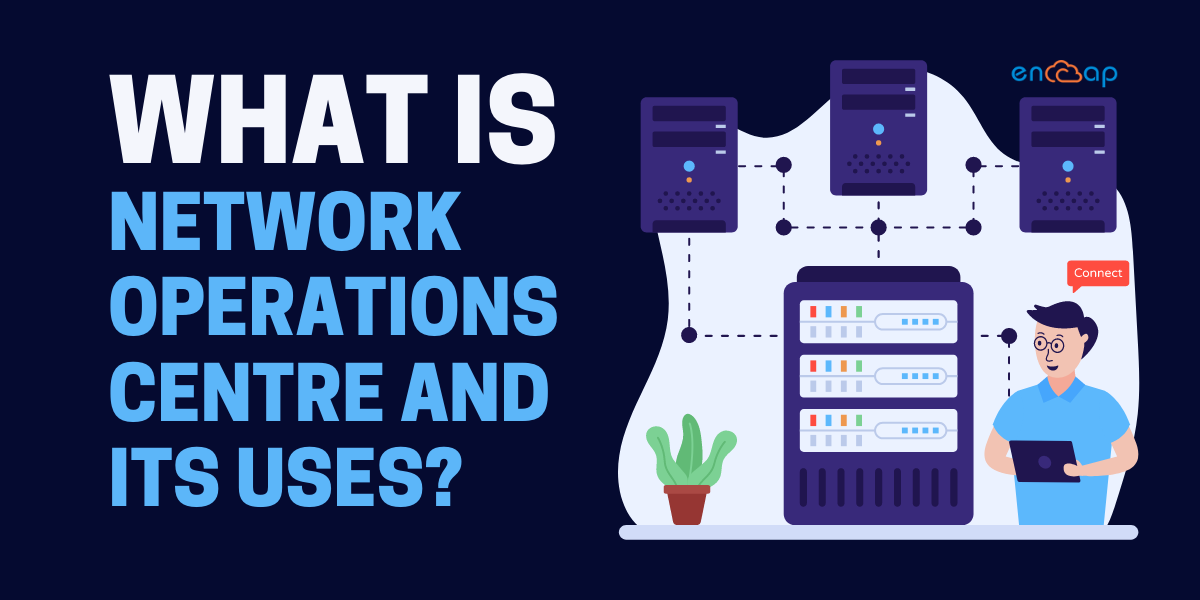
A network operations centre is basically like a centralized location where IT teams continuously monitor the performance of a network. You can consider NOC to be the first line of defence against network disruptions and failures.

With network monitoring, most organizations can gain complete visibility into their network so that anomalies can be detected and immediate steps can be taken to prevent problems or resolve them as they come forth. The NOC is meant for overseeing infrastructure and equipment, wireless systems, databases, network-related devices, firewalls, telecommunications, dashboards, etc.

The management services also include detailed monitoring of the customer support calls along with helpdesk ticketing and integration of customer network tools. This enables NOC to play an important role in making sure that a positive customer experience is delivered.

NOCs can be built either internally or can be located on-premise and many times within the data centre. Sometimes, their function can also be outsourced to an external organization that specializes in network and infrastructure monitoring and management. Irrespective of the design of the NOC functionality, the staff is responsible for spotting issues and making quick decisions.

Purpose of NOC


The first and foremost goal of any NOC is to maintain optimal network performance and availability. NOC ensures continuous uptime and manages many critical activities including monitoring the network for problems that require attention.

A network operations centre also ensures server, network, and device management including software installation, troubleshooting, and distribution across all devices. NOC ensures incident response including managing power failures and communication line issues. It ensures security because it manages threat analysis and helps in tool deployment along with the security operations.

NOC also ensures backup and storage, data management, firewall and intrusion prevention system management, policy enforcement, service level agreement, and freelancer management. Network management and performance monitoring are difficult to tackle in the present times. Today’s organizations deal with complex networks spanning across the globe, employees working from home and a vast number of devices.

There is an added volume of users, website traffic and malware that impacts network performance so the potential for problems comes from almost anywhere. There are times when even small issues can lead to downtime in productivity and one’s ability to meet the customer needs.

The network outages affect the revenue, and the reputation of both the IT team and organization and also hurt the revenue. Keeping this in mind, NOCs are designed to prevent the downtime just so that the customers and the internal end-users do not realize when inevitable incidents take place.

NOC Best Practices


The efficient network operations centres team use a wide range of best practices. Some of them are mentioned below:
  • Monitoring a range of information and network systems including communication circuits, LAN/WAN systems, cloud resources, firewalls, switches, routers, VoIP systems, etc.
  • Offering timely response to all incidents, solving performance issues, and outages.
  • Categorizing some problems for escalation to appropriate the technical teams.
  • Recognizing, identifying, and prioritizing incidents in accordance with customer business requirements, operational impact, and organizational policies.
  • Documenting actions in accordance with standard company policies and procedures.
  • Collecting performance reports for many systems and reporting trends to senior personnel for predicting future issues.
  • Working with internal and external technical teams to create and update knowledge base articles.
  • Notifying the customer and third-party service providers about issues, remediation, and outages.
  • Performing the basic system testing and completing operational tasks.
  • Supporting the technical teams in operational settings with high uptime requirements. The different shift schedules may also include day or evening hours.

In addition to the network performance, application availability is also important. Both of them must be focused on driving business goals for enterprises and service providers. Shifting applications to the cloud is the key driver in network operations sending more time on application availability and performance as we go forward.

Specifically, the network operations team needs to make sure internal and external networks and services do not impede application availability but instead accelerate delivery.

When to consider NOC?


You must consider a NOC if you want:

1. Reduce Network Downtime


NOC functionality
is an excellent way to minimize network downtime which can be especially useful on important days. Businesses that experience downtime during crucial times may face steep downtime costs and productivity issues.

Even if the business does not dramatically suffer from occasional network downtime, you must keep in mind that the hackers know that not everyone has consistent support which also means that they might think of taking advantage of the network when it is least protected.

Keep the network security on high alter so that the network functionality can be maximized and you can keep the hackers at bay.

2. Increased Assistance


Your in-house IT department may need more assistance. On a daily basis, there are so many tasks to complete that businesses often benefit from contracting out some of the low-level tasks to a third party company.

While you may think that network monitoring can be a task that is important for ensuring network health and security, you can choose not to exhaust the in-house IT departmental resources on this task. This is more so when there are other important jobs that must be completed.

When the network operations centre handles network monitoring, an in-house IT department gets freed up to complete other projects including upgrading the network or even positioning if for future use.

3. Professional Expertise


The
network operations centre can also be very useful for you if you have little to no internal IT support. In case you think that you have little or not fully dedicated IT staff then you are leaving the management of your network to another employee with limited knowledge.

Taking the risk of leaving your network security to an employee who is not an IT professional can put you and your company at a risk. When you outsource the monitoring to a NOC, the burden gets lifted from internal employees and the network gets protected easily.

Benefits of Network Operations Centre

1. Cyber Attacks


Cyber Attacks | Benefits of Network Operations CentreThe common cyberattacks including ransomware and phishing pose threats to the security of business operations and sensitive data. The fact is that
Network Operations Centre is important for reducing these threats.

NOC is a tiered system of trained IT professionals for monitoring the network and quickly solving issues that arise along with it. The employees are trained to offer customer services also which means that the problems will not be solved quickly but professionally.

2. Quick Resolving


With the help desks, so many problems may not be identified until end-user contact the help desk about it. This leads to problems with some network concerns such as cyber threats because typically an end-user will not see a cyber threat until it gets too late already.

On the other side, the NOC functionality is perfect for identifying cyber threats before they have an opportunity to attack. Solving the network issues can reduce downtime and secure the data in a better way.

3. Customization


The network operations centre can customize the offerings for fitting a business’s needs. For example, NOCs have consistent security options for companies who need security and proactive network monitoring outside of standard business hours.
 

The right NOC is able to customize parts of their offerings for the company such as times of day when the network is monitored, the security software that gets installed on the network and so on.

4. Internal IT Assistance


In case a business has an internal IT department and just needs some support in managing employee support tickets then the NOC works with the department in a limited capacity to take the workload off. This works by handling employee help requests.

Making some space for the internal IT team allows the NOC functionality to complete other projects such as infrastructure upgrades and future planning which then leads to a more productive and efficient department.

5. Network Uptime


The NOCs have goals that go way beyond just maintaining security. Another one of the objectives is to make sure that there is minimal network downtime. One of the ways in which the
Network Operations Centre ensures the uptime is by always backing up the data.

In case there is a network outage, consistent backups mean that the data can be recovered quickly with minimal data loss. In addition, NOCs can find processes that must be altered and streamlined for improving network functionality by remotely monitoring the network issues.

For example, an overloaded network server that causes traffic bottlenecks can be adjusted to speed up the end-user processes. The network uptimes ensure business productivity and it can prevent the costs associated with network downtime as well.

6. Improved Productivity


Improved Productivity | Benefits of Network Operations Centre
The NOCs use different security software platforms for proactively noticing computer and network issues while taking steps that can address problems before the end-users see a dip in network functionality.

Proactive monitoring and issue resolution mean that the end-users do not have to create many support tickets. This frees up the time that is otherwise spent on chatting with an agent and waiting for the issue to get fixed.

7. Constant Network Monitoring


With NOC, you can expect increased support with around the clock network monitoring. The complex interconnected platforms are developing in the network infrastructures. Allowing the engineers to look at your network is much better than using automated monitoring.

These engineers are skilled to offer around the clock support. They monitor the network all the time but after a point, they can prove to be inefficient and costly. The implementation of NOC will give you value and will make you efficient with not just a skilled staff but also bringing impairments and outages to your attention.

8. Immediate Handling


The remote monitoring of networks with a NOC provider offers businesses the simple ability to have incidents taken care of at all times of the day or night by the remote staff. You can also be notified about the problems immediately.

Basically, with NOC the company is made aware of the problems the instant it arises. This way, it becomes easy to address the problem and manage it using different channels.

9. Saving Time and Labour


The IT departments can focus on procedures for business development with the use of NOC. All too often, many companies do not use the ability of the IT departments.

The companies invest energy in performing operations that can be outsourced to free them from more tasks. This examination of risk, stockpiling information and investigating applications can be outsourced to a network operations centre easily.

Doing this ends up saving a lot of time for IT teams to focus on more complex tasks that are not being outsourced to the NOC. When you come down to doing it, you will see that a lot of time is being saved and that too effectively.

Basically, the IT team gets free to do things that are more vital to the company than analyzing data and monitoring the network. This helps them to work on issues that arise because of importance rather than routine maintenance of systems. Ultimately this increases job satisfaction and also productivity because they are not doing mundane tasks.

10. Latest Infrastructure


The infrastructure must be of high quality while offering superior performance. The providers of NOC services get a benefit because they offer the latest benefits of hardware, software, and other tools that give the clients solutions best suited to them.

Some of the top providers of NOC services have recently started offering more solutions administrating in real-time and reporting on-demand as well. This has increased the need for services alot more.

Conclusion


The Network Operations Centre is responsible for maintaining the systems and networks of an organization. It also prevents catastrophic failures while maximizing uptime. NOC must be staffed by people who understand how to use technology and it should have proper training and equipment as well.

Encaptechno offers services that meet these challenges effectively. We have an industry-leading portfolio of networking monitoring and management services that is created from the ground up for addressing the challenges faced by the organizations of today. Get in touch to know more about our services and benefit from them.

What is Network Operations Centre and its Uses? Read More »

Cloud Services, , , ,
What is Application Modernization_ Why is it Important_

What is Application Modernization? Why is it Important?

What is Application Modernization_ Why is it Important_
The common business goals include gaining efficiencies, reducing costs, and making the most out of all existing investments. Application modernization is something that helps in achieving all of that. It is a process that includes a multi-dimensional approach of adopting and using new technology for delivering portfolio, application, and infrastructure value quickly. It also helps in positioning an organization to scale at an optional price.

Application modernization services lead to optimizing your applications. After an organization is successful in doing that, it becomes possible to operate in the new and modernized model without causing any disruption in simplifying a business operation, architecture, and overall engineering practices.

Application modernization is like taking your application environment in the form that it is in today and transforming it into something that is elastic, agile, and highly available. While doing this, you can change your business into a modern enterprise. For optimizing cloud adoption and migration, one must first assess and evaluate an enterprise and test its readiness.

After a person is successful in assessing an organization’s readiness, it becomes possible to select either one or two applications, modernize these applications for maintaining, extending, deploying, and managing them, and establish a foundation for modernization at scale. This is an iterative approach to application modernization that is divided into assessing, modernizing, and managing.

Modernizing Applications Effectively


Modernizing Applications Effectively
When it comes to
application modernization trends, it mostly comes to two specific patterns known as refactoring and re-platforming. Below, we will explore both of them in detail including the real-world success stories that help in understanding the real meaning of refactoring and re-platforming an application:

  • Refactor: The process of refactoring can be linked to rearchitecting an application into a comparatively modular design that is commonly referred to as microservices or modular architecture. The entire process of refactoring can provide high rewards such as adopting modular architectures with server-less technologies helps in improving agility by lowering the time and resources needed to build, deploy, scale, and maintain applications.

Application modernization services also reduce the overall cost of ownership by improving operational efficiency and resource utilization. With the modular services, there are more moving parts for managing which is why it is recommended that one should adopt serverless technologies as much as possible for eliminating the operational overhead.

Most customers focus on refactoring by automating software delivery wrapping the applications with the APIs and decoupling application components. The new applications can be created from the ground up with a modular design and technologies for achieving the benefits. All business-critical applications are considered prime candidates for refactoring.

Let’s take data warehouses as an example. They connect organizations to the customers as mobile applications generate new revenue and competitive differentiation and back-end services power the organization with an added efficiency. When the applications are not quick enough, scalable, have poor resource utilization, and need cost and operational overhead for maintenance, refactoring is the best way forward.

The process of refactoring to microservices also lends itself to the formation of small and independent teams that can take ownership of each service easily. This is an organizational change that fosters an environment of innovation for the development teams while giving them the authority to make changes that can lower organizational risks as a whole.

  • Replatform: The process of replatforming involves moving from services that you have been managing yourself to fully managed cloud computing services. This is done without changing the core architecture of an application. You will mostly choose the option for the applications that must be reshaped to match the overall cloud strategy or for taking better advantage of the native capabilities of the cloud provider.

The cloud provider should be able to offer assistance throughout the whole process. More so, AWS provides managed services that allow you to reduce operational overhead without rewriting any code. If you are managing the messaging broker today, you can simply replace it with the fully managed Amazon MQ service without rewriting or even paying the third-party software license.

On the other hand, if you are migrating a Windows-based application that needs file storage, it is also possible to use the fully managed Amazon FSx for the Windows File Server. For reducing the amount of time that is spent on managing Kubernetes clusters, one can choose to move to a managed Kubernetes service such as Amazon EKS. Once you are ready to move to an existing application straight to containers, it is also possible to streamline the process with AWS App2Container (A2C).

The A2C is a command-line tool used for modernizing NET and Java applications into containerized applications. It helps in analyzing and building an inventory of all applications running in virtual machines, on-premises, or in the cloud and packages for perfect application artifacts and identified dependencies into containers.

Benefits of Application Modernization


Benefits of Application Modernization
The process of modernizing a business application is an important part of doing a business. You can choose how you want to migrate the application with AWS and at which pace while leveraging the reliable infrastructure of an industry with the deepest set of services.

While deploying the application modernization services, the enterprises can also reduce any paycheck periods to just 6 months along with the total cost of ownership. With the use of AWS, your cloud migration and application modernization plans are based on business needs and not agreements or licensing.

For example, with the use of AWS, you can lift and shift the applications, refactor them and completely re-platform them as well. You can make the choice that suits your organization the best. Modernizing an application with AWS can help in reducing costs, gaining efficiencies, and making the most out of existing investments.

The three important benefits of application modernization are mentioned below. They include:

1. Driving Growth


Driving Growth
All enterprises that are looking to modernize technology can save money with the use of AWS while building new applications and retiring from legacy solutions. When an organization plans cloud migration to AWS, it becomes very easy to reduce the cost of ownership.

Many resources are freed and you can focus on the core mission of your enterprise which is to manage services and buildings. In addition, the hyper-scale breadth of services and automation levels in AWS also helps in achieving incremental savings and significant cost optimization.

When you deploy enterprise solutions in AWS, you can also retire expensive legacy infrastructure, reduce costs, gain agility with automation and free up many resources that drive innovation as opposed to focusing more on undifferentiated work.

2. Accelerating Migration to Cloud


The business applications are like an engine that helps the company to run and allows you to make decisions, gain insights, and also process valuable data. As an important part of the digital transformation journey, you can reach new levels of operational efficiency, increased scalability, and improved performance when you migrate to AWS.

Owing to this, migration to the cloud requires a provider with experience in retiring datacentres, the right program, and enterprise technologies ready to move applications to the cloud. AWS offers the Migration Acceleration Program and services for migrating databases, servers, and data and giving a person the right tools to achieve cloud migration.

3. Maximizing Investment Value


As the cloud journey goes ahead, an organization wants to maximize the value of hardware, software, and business applications. An important part of a digital strategy requires a person to run hybrid environments and maximize the use of existing solutions that are built on Microsoft Windows Server, Oracle, IBM, etc.

With the use of AWS, it becomes possible to use innovative technology for running all systems of a platform that allows integration with legacy applications and cloud-native solutions. This also gives an ability to run the value enterprise applications in the cloud and empowers an organization to get the best possible return from assets, legacy, and everything in between.

  • Increases Productivity: In this digital era, almost everyone wants to upgrade themselves with the latest technology. However, if an organization is using an out of date software or technology, the employee satisfaction level goes down and that impacts the productivity as well. 

In addition, if the developers and administrative staff can access modern technology, it becomes easy to be more productive. When one works on the same thing repeatedly, things become boring. 

Anytime when the company grows, they hire new staff, and educating every new resource on how to run a legacy IT system is costly and time-consuming. However, application modernization services, tedious tasks, and repetitive processes can be automated because of which it is easy to educate new employees.

Business Outcomes After Application Modernization


The process of application modernization requires a holistic approach of assessing, modernizing, and managing to bind the different dimensions that provide completeness at an accelerated pace. The common framework that is recommended by AWS envisions modernization across five important technical domains including automation, developer workflows, self-service data, architecture evolution, and organizational value.

The framework used in AWS professional services and AWS partner engagements includes a knowledge base with solutions, playbooks, self-service technical patterns, and templates. A successful modernization project also produces the following business outcomes.

1. Business Agility

The business effectiveness translates the business into requirements. With application modernization, you can tell how responsive the delivery organization is to business requests and how much control the business has in releasing functionality into product requirements.

Business and Organizational Agility

2. Organizational Agility

The delivery process includes agile methodologies and DevOps ceremonies. It supports clear role assignments and overall collaboration and communication all across an organization.

3. Engineering Effectiveness

Application modernization services improve quality assurance, testing, continuous integration, continuous delivery application design, configuration management, and source code management. Achieving all business outcomes requires a holistic approach and a modernization process that must be based on strategic dimensions.

Conclusion

At the present time, most applications are built with a combination of modular architecture, agile development processes, and serverless models that enable organizations to innovate much faster, accelerate marketing time and lower the total cost of ownership.

The modern applications cover an expanding range of use cases including web and mobile apps, back-end services, data processing techniques, and machine learning. These applications take advantage of the latest technologies and help in quick development and deployment.

Encaptechno has gained prominence in offering the best amazing web services. If you want to know more about the application modernization services then please get in touch with Encaptechno, today.


What is Application Modernization? Why is it Important? Read More »

Cloud Services, , , , ,
Create a Better Client Centric Experience With Salesforce | Encaptechno

Create a Better Client Centric Experience With Salesforce

Create a Better Client Centric Experience With Salesforce | Encaptechno

In the present business landscape, it is not anymore enough to have an excellent product or service at a good price. The customer experience that a company offers is much more important than its products and services. This is something that is being understood and acknowledged by all smart business owners.

It is becoming increasingly common to see businesses use new technologies such as artificial intelligence and the Internet of Things. These are the things that enable a better customer experience while also making sure that customer satisfaction is achieved. Businesses must figure out ways to offer the best customer experience if they wish to stay ahead of the curve and competitive.

The ability of businesses to offer amazing services before and after a transaction means that it is possible to offer improved personalization and a highly valued and connected customer experience across channels.

To make this easy, a business must adopt customer retention strategies so that there is an increased focus on becoming customer-centric. The ability to become customer-centric means putting the customer at the center of everything that is done in a business. From sales to marketing, the customer service touchpoints make a difference at every point.

Even though the definition might differ between the industries and individual companies, customer-centric businesses will all have one thing in common with each other and that is the fact that all of them are passionate about customer experience.

What Is Being Customer-Centric?


Keeping the customers first at every point is not a new thought. However, it must be kept in mind that the technologies that change customer behavior such as AI, IoT, Social Media, etc. are also enabling businesses to personalize interactions with customers in a completely different way.

Here, personalized interactions do not necessarily mean scaling up a generic experience with a customer’s name. Rather, it is more about creating a dynamic experience at each and every moment beginning from the initial search to every moment of the journey that comes in between. In case a customer has been able to establish a relationship with a brand this means that the customer can receive personalized recommendations based on purchasing history as scrolling is done on a website.

Context: The process of generating a better customer experience can be associated with the process of modifying a garment’s design so that it fits each customer individually. A special highlight in the way tailors work focuses on knowing each customer differently including their build, the way the garments should be, the right fabric, etc. Similarly, organizations today are shifting to selling experiences that fit the needs of the customers. This means that there is a constant modification of products and services so that the end result leads to customer satisfaction.

For example, a hotel group can use personalized information to offer the best experience to customers while anticipating the needs of this customer in advance. This information can be used to offer the right personal care kit to suggest the right food or yoga classes. It can be anything. Another example could be of an online retailer who might show similar products that the customers may have viewed on other browsers while providing direct comparisons to these products.

Importance of Being Customer-Centric


Importance of Being Customer-CentricOffering a personalized customer experience is considered an important step in the lead management system. In fact, customer expectations are evolving at a quick pace. The consumers in the present world are way more informed and less loyal as compared to the past generations. The customers look for different experiences that give rise to their trust and the customer will shop around anywhere to find them.

In contradiction with the past, offering services with a smile is not enough. Businesses must realize that customers want to be treated as a person and not merely a number so that eventually the business can win. With so many customers thinking that it has become easier than ever to take the business elsewhere, the pressure is on organizations to get the customer experience right.

The good news is that most customers even pay more for a great experience. This means that if businesses use the right tools then they have an opportunity to increase revenue by delighting their customers in a way that no one can.

What Is a Customer-Centric Organization Like?


An organization must know the importance of customer-centricity if it has to succeed. It is important to start with the customer experience and work backward with the technology. This is a lesson that successful companies have been implementing since forever while they stand out as being customer-centric companies.

Salesforce Cloud is an excellent example of a technology that can help businesses. It offers businesses a wide potential to rethink their business model. Retailing is one industry that has not started to explore what is possible. The retailing industry has understood the importance of customer-centricity for some time now but retailers lack both the technology and knowledge to connect sales, marketing, service, and commerce systems that enable a comprehensive customer view.

With technology such as Salesforce Cloud, all relevant and personalized engagements emerge as a key differentiator and retailers can finally make the investments to deliver on the promise of putting a customer at the center of everything. The key to becoming a competent customer-centric organization is starting with empathy. Otherwise, it is easy to risk not seeing the point and alienate the customers.

For example, Nike is a company that really started selling more shoes when the brand turned into a service that can help in tracking running, compete with friends and feel healthier. Nike is a brand that is a lot more than just selling shoes, it is the idea that focuses on delivering a brand promise in a meaningful way.

Why Do Companies Feel Held Back In Offering Customer Experiences?


Why Do Companies Feel Held Back In Offering Customer Experiences_
The thing that is holding companies back from cultivating great customer experience is some deep-seated problems. These problems are such that if the companies do not address them timely then they will get worse but the good thing about all of these problems is that they can be fixed.

To make sure that the companies offer the best customer experience, it is important that they work with a combination of innovation, discipline, and technology. More than anything, the companies require unwavering leadership so that business processes can be reimagined when times are painful. Doing nothing and letting the customers move to future-proof competitors can be much worse.

A problem that may get in the way of progress includes siloed front, middle, and back offices that may affect end-to-end visibility. In addition, backward-looking business intelligence affects shaping the future; the static workflows are focused on the past and find it difficult to adapt to the future; all compliance and regulatory issues serve as a problem.

These are some challenges to offer customer centricity which are also remnants of the old ways of doing business. They hold the companies back to move ahead and work smartly. While looking at these challenges and exploring new ways to adapt to the digital future, Salesforce Cloud is undoubtedly the best solution.

Customer-Centric Businesses Need a Single View of All Clients


Personalization is not enough if one has to become truly customer-centric. Offering customers a connected experience all across an organization is also important. Sales offer an integrated customer experience which ensures a seamless handoff between departments and striking a contextualized engagement based on early interactions.

Using Salesforce Cloud enables companies to recognize the customers wherever they engage while having a connected experience. Basically, with the support of a salesforce implementation consultant,you can win at each interaction a customer has with your organization. With siloed data being a major roadblock to connectivity, businesses are supposed to look at how they unlock the data held in multiple systems.

Moreover, the businesses also have to ensure that everyone in the organization has a single view of their customer and the role of customer experience is streamlined. If the organizations encourage employees to think about customer experience in terms of what’s better for the customer than the business then this can be a tangible step towards building a truly customer-centric culture.

Organizations go wrong when the employees work with a territorial and a myopic view of customer experience. When people say that customer experience should be owned by marketing they do not understand it goes way beyond that. It actually involves marketing, sales, and services. It does not matter who owns the customer experience more than who is implementing it and when it comes to it, everyone in an organization implements it.

In case there is any disconnection in a team then the result is disconnected metrics and customer experience. Measuring the customer experience in association with revenue and other organizations promotes alignment. All leaders must demonstrate a commitment to the long-term outcomes of customer experience even if the traditional performance indicators drop in the short term.

Customer–Centricity Begins With Trust


Customer Centricity Begins With Trust
Since the customer experience runs on data, building trust with all customers is important. In the past, high-profile data breaches have been in the news quite often while highlighting the poor procedures of many organizations. On the other hand, the data misuse scandals affect tons of people which has also left many people wondering how personal information is used.

Many customers think that their personal information is not secure while most others think that companies do not have their best interests at heart. Even though many people are comfortable offering personal information for better experiences, the responsibility is on businesses to be transparent about how personal information is stored, accumulated, and used. In case the businesses use this information to push irrelevant things, they will automatically lose customer trust.

The companies that are successful in earning customer trust can experience many benefits. In addition to spending more with brands they trust, the customers are also more likely to recommend these brands. However, if a company gets it wrong then the stakes are higher of losing a customer. Trusting a company makes the customers more likely to recommend that company further.

The Future is Customer-Centric


The Future is Customer-Centric
Organizations must focus on becoming more customer-centric if they wish to survive at the present time. Just as viewers expect recommendations while accessing a streaming service, the tailored customer experience is becoming more of a necessity to customers irrespective of the company that they engage with. The organizations that fail to get on board with this may not be around for a long time.

There is no better customer retention strategy than placing the customers at the heart of every interaction. The customer-centric businesses can create a dynamic, seamless, and uniquely personalized experience for customers that help them in achieving desired outcome and sales. The customer-driven organizations completely reset the valuable and meaningful experience with customers.

In the future, we can see more and more brands deploy the right technologies, right processes and hire the right people to connect all of their customer data while bringing a fundamental shift for companies as they reorient from being product-centric to customer-centric.

Conclusion


The use of the Salesforce cloud has the ability to change how business is conducted completely. The organizations can gain an ability to move faster than ever before with a wide level of customer and market-driven intelligence far beyond what was there in the past.

At the same time, customers will have many opportunities to forge the types of relationships they want with the brands they trust. There will be an easy association between the customers and brands that focus more on delivering experiences that delight customers rather than disappoint them.

This will only be possible with technologies such as Salesforce Cloud. If you wish for your company to become truly customer-centric then take the support of an expert Salesforce implementation consultant from Encaptechno who can guide you professionally. For any more queries, get in touch now.


Create a Better Client Centric Experience With Salesforce Read More »

Cloud Services, CRM Services, Salesforce, , , ,

All You Need to Know About AWS CloudFormation

Encap - Blog (Continued)


AWS CloudFormation
is a dedicated service provided by Amazon for the purpose of helping the users set up and model the AWS resources. It enables you to spend more time on important things such as focusing on managing the AWS resources and directing your focus on the applications that run within the AWS.

You can create a template that offers you a description of the resources within the AWS that you want such as Amazon RDS DB instances and Amazon EC2 instances. CloudFormation intends to take optimal care of configuration and provisioning of those AWS resources for the users. There is no more necessity of creating or configuring these resources individually as AWS CloudFormation takes complete care of that.

In this blog, we will try and understand all you need to know about AWS configuration.

Working of AWS CloudFormation


AWS CloudFormation
is a concept that functions on the stack concept. It gives you the potential to create and delete AWS resources collectively with respect to a unit. The users can define the characteristics associated with mappings, stack parameters, output values, and resource properties. This is done with a template which is a JSON compliant file.

You can write and create the template from the beginning or you can also use one of the example templates pre-offered by AWS. Along with this, the users can make the most out of the many AWS products within the CloudFormation such as Amazon EC2, Amazon RDS, Amazon Elastic Beanstalk.

While a stack is created, the AWS CloudFormation makes specific service calls upon AWS. This helps in configuring and provisioning the AWS resources. The CloudFormation performs only the actions that you have permission to do. For instance, if you wish to create Amazon EC2 with AWS CloudFormation then you will need special permissions for it. Along with this, there will also be a need for deleting the stacks and terminating the instances.

To manage the permissions, the individuals can use AWS Identity and Access Management. Following this, the calls that AWS CloudFormation processes are declared by the templates. To ensure that you create and modify a CloudFormation template within the YAML or JSON, there is a need to use the AWS CloudFormation Designer. You can create the account and start designing right away.

In addition, you can also prefer other text editors for doing the same but the AWS designer is a suitable platform for deriving effectiveness. The CloudFormation template elaborates on the resources that you wish to use and the settings that are associated with them. For example, if you wish to create one EC2 instance then your template will declare the same and describe the properties accordingly.

After you have created the template, you save it either in the S3 bucket or locally. You must also make sure that you save it with an extension such as .yaml, .txt, or .json. Form the CloudFormation stack by specifying the Amazon S3 URL or the template file location over the local computer. In case you think that the template includes some parameters then you can give the input values for the same after which, you can proceed in the direction of creating the stack. The parameters allow you to enter values for the CloudFormation template and with it, you can customize resources each time you wish to create a stack.

Keep in mind that in case you are just specifying or calling a template that is stored locally then the CloudFormation will automatically upload it on the S3 bucket in the AWS account. The AWS CloudFormation is meant for creating buckets for all regions where you can upload a template file. The buckets within the CloudFormation are accessible by everyone who has Amazon S3 permissions enabled in the account.

AWS CloudFormation Concepts


Anytime you use the AWS CloudFormation, you get to work with templates and stacks. You get to create templates to describe the AWS resources and their properties. Anytime you create a stack, the CloudFormation provisions resources that are described in the template.

1. Templates


An AWS CloudFormation template is a JSON or YAML formatted text file. It is easy to save these files with any extension such as .yaml, .template, .txt, or .json. The AWS CloudFormation uses these templates as blueprints for building the AWS resources.

For instance, you can describe an Amazon EC2 instance in a template as instance type, AMI ID, block device mapping, and Amazon EC2 key pair name. Whenever you create the stack, you can also mention a template that the CloudFormation is using to create whatever you described in the template.

2. Stacks

When you use the AWS CloudFormation, you can manage related resources as a single unit called a stack. It becomes easy to create, update and even delete a collection of resources by just creating, updating, and deleting stacks. All the resources present in a stack are defined by the stack’s CloudFormation template.

Let’s say that you created a template that includes an Auto Scaling group, Amazon Relational Database Service database instance, and an Elastic Load Balancing load balancer. For the creation of these resources, you can create a stack by submitting the template that you have created, and CloudFormation provisions all these resources for you. You can work with the stacks by using the CloudFormation console, AWS CLI, and API.

3. Change Sets

If you think that should be changed to the running resources in a stack, you can update the stack. Before you make any changes to the resources, a changeset can be generated which is basically a summary of all proposed changes. The changesets allow you to see how the changes impact the running resources, particularly for critical resources before implementing them.

For example, in case you change the name of an Amazon RDS database instance, the AWS CloudFormation will create a new database and delete the old one. You can’t risk losing data in the old database unless you have backed it up already. In case you form a changeset, you will see that the change will cause the database to get replaced and you will feel that you plan accordingly before updating the stack.

Why is AWS CloudFormation Needed?


To create an architecture that supports acceptance, production, and test environments, there is a need for AWS CloudFormation that can help in doing some activities for the same. The common activities carried out by CloudFormation for building this architecture are launching an instance, creating load balancers, making required installations, attaching instance to load balancers, creating RDS and configuring the EC2 security group, creating and configuring the security groups, and creating the auto-scaling groups.

The AWS CloudFormation template for infrastructure automation is a JSON file that is basically intended to be a powerful tool that can manage all important things. It basically helps in specifying the necessity of resources while the CloudFormation powers you with the resource provisioning in a predictable tangent.


Situations in Which AWS CloudFormation Can Be Used


The AWS CloudFormation helps in deploying or upgrading the template and its resource collection with the use of AWS Management Console, AWS Command Line Interface, and APIs. Its use cases are not charged additionally because you are only required to pay for the AWS resources that are important for running dedicated applications.

Hence, it can be concluded that the AWS CloudFormation is Infrastructure as Code which actually means that it can be used to read, reuse, and review things. Below, we will see some situations in which the AWS CloudFormation is used. This will help in getting a much better clarity.

The AWS Cloud Formation helps in doing the following things:

1. Simplicity Infrastructure Management

To make a scalable web application that also includes a backend database, you may end up using an Auto Scaling group, Amazon Relational Database Service database instance, and an Elastic Load Balancing load balancer.

These services are used individually for provisioning the resources and after the resources are created, you can configure them to work with each other. These tasks add complexity and time before the application is up and running. You create an AWS CloudFormation template and modify an existing one as well.

A template is capable of describing all the resources and properties. When you use the template for creating a CloudFormation stack, the auto-scaling group, load balancer, and database get provisioned for you. After the stack gets successfully created, the AWS resources are up and running. The stack can delete just as easily and the resources too. With CloudFormation, the collection of resources can easily be managed as a single unit.

2. Replicate Your Infrastructure

If an application demands more availability then this means that there is a need to replicate it into multiple regions. This is because when one region becomes unavailable, the users can use an application from another region.

There is a natural challenge that you need to face at the time of replicating an application which is that you have to replicate the resources too. It is therefore important for you to record all the resources on the basis of the demands of the application. However, along with this, you also have to configure and provision all the resources in each region.

The AWS CloudFormation template can be reused for creating the resources in a consistent and repeatable way. It allows the reusability of the templates and this can be done by describing the resources once and by provisioning the same around many regions. In this way, the infrastructure can be replicated to multiple regions with ease.

3. Controlling Changes Made to Infrastructure

For some cases, there might be a need for an upgrade at times. An example of this can be a need or an urge to upgrade a high-performance instance in the auto-scaling launch configuration. With this, the total number of instances can be reduced within the group.

Manual control, tracking changes, and making upgrades can be a complex endeavor and for all of these things, there is a need to remember the whereabouts of the changed resources. The use of AWS CloudFormation enables the template to describe the provisioned resources and elaborate the settings. It becomes easy to track the infrastructure changes between text files templates.

You can also easily integrate a version control system along with the templates for getting an idea of the changes made to the infrastructure. In addition to this, you can also track who made the change and when it was made. If you want to reverse the changes in the infrastructure, you can also reverse the previous template version. Therefore, controlling and tracking infrastructure changes becomes easy with the AWS CloudFormation.

Conclusion

The details mentioned above are commonly associated with AWS CloudFormation. These are insights that focus on the functionality of CloudFormation and the comfort for the users to run their applications.

The AWS CloudFormation automates the best practices and also scales the infrastructure on a global level. The best thing is that it enables you to integrate CloudFormation with the other AWS services. You can also be capable enough to manage the private and third-party resources.

If you wish to use the AWS CloudFormation, you must take the AWS consulting services that can help in understanding more details, having knowledge of what you are about to integrate, and availing seamlessness for executing applications. Get in touch to know more.


All You Need to Know About AWS CloudFormation Read More »

Cloud Services, , , ,
10 Best Azure Services 2021 - Encaptechno

10 Best Azure Services to Look Out For in 2021

The constant technological additions driving the present world change the way everything is done. Cloud computing is an advancement that helps in reforming traditional perspectives on technology. Many service providers have come out in the present times while making a strong impression in the domain of cloud computing.

10 Best Azure Services 2021 - Encaptechno

One such popular name is called Microsoft Azure that can be found easily in the cloud computing landscape. As a result of the ongoing digital transformation, multiple numbers of companies are dedicatedly focusing on the migration of their legacy systems and applications to the cloud. Integration of cloud in business strategies has now become a common step for all businesses.

This implies that the organizations must be on the lookout for industry trends in cloud computing for experiencing the best possible business benefits. In this blog, we will be understanding what Microsoft Azure is and the azure cloud services to know which services must be looked out for in 2021.

What is Microsoft Azure?

Microsoft Azure can be defined as a combination of multiple cloud computing services that include both proprietary and open technologies. Microsoft provides the proprietary technologies and includes the remotely hosted managed versions. The open technologies include some examples of Linux distributions that can be deployed on a virtual machine.

Based on the consumption of resources as compared to the reserved capacity, the pricing of Microsoft Azure is decided. This essentially means that there is no need to install an on-premise server or even lease physical servers from traditional data centers.

Different enterprises can use Azure cloud services for the purpose of deploying, managing and building complicated or simple applications. Azure offers expert assistance for programming languages, databases, services, frameworks, and operating systems. Simultaneously, the Azure development is also well known for modifying the traditional viewpoints on the basic organizational procedures.

The cost of Azure cloud services and Azure integration services is entirely based on the kind of services, physical locations, and storage needed for hosting Azure instances.

Microsoft Azure Services:

Microsoft Azure has been on the right track to offer strong competition to other entrants in the industry. The speed with which companies can deploy new and well renowned Azure cloud services is a perfect validation for the accelerated development of Azure.

1. Virtual Machines: Virtual machines play a significant role in managing workloads and running high-performance applications. This is one of the most critical azure services when the point is business migration and data encryption.

This service helps in building virtual machines with the help of Windows or Linux in almost no time. You will be able to scale up to multiple VM instances and keep your data secure while complying with all the regulations.

Another reason why this service is even more desirable is the per-second billing that it introduces. Different kinds of virtual machines provided by Azure include computer-optimized virtual machines, memory-optimized virtual machines, and general-purpose virtual machines.

So basically, the virtual machine is one of the main offerings in the computer group. It is this service that helps in creating Windows along with the Linux virtual machines promptly. One of the most important features of the Azure platform is the VM service based on your requirement. It helps in getting compute-optimized virtual machines, burstable virtual machines, general-purpose virtual machines, etc.

2. Azure DevOps: The Azure DevOps is another service that is a part of Azure development that helps in better planning and smart collaboration all thanks to the wide dev services. It is actually one of the first Azure cloud services that were introduced in the market.

Azure DevOps

The Azure DevOps helps in planning, monitoring, and discussing the work with a wide number of agile tools. The mere presence of Azure Pipelines makes it simple for a business to build easily, test, and deploy easily with the help of CI/CD.

Furthermore, you can utilize the Azure Test Plan to test and ship while using Azure Artifacts to share packages with a dev team. With the help of Azure Repos, it is possible for you and your team can simply build better codes with some advanced pull requests and file management.

Hence, Azure DevOps is a well-known service on the market considered suitable for superior collaboration and smarter dining for ensuring quick delivery.

3. Azure Cosmos DB: The Azure Cosmos DB is without any doubt one of the most popular Azure cloud services It is a fully managed NoSQL database service designed to make sure single-digit millisecond response time. The businesses leverage this service to ensure quick writes and read across the globe.

Azure Cosmos DB

Other than featuring enterprise-level security, the Azure Cosmos DB paves a path for organizations to develop applications quickly because of the APIs for SQL, Cassandra, and MongoDB. With the use of automatic scaling, the Azure Cosmos DB guarantees business continuity with prompt unlimited elasticity. It also enables us to acquire real-time insights into data operational in a business.

4. Azure Active Directory: In case you are planning to explore Azure careers, it is important to learn more about Azure Active Directory. While creating a seamless environment for the administrators, the Azure Active Directory facilitates the user ID and password management for users for logging in at the same time.

The Azure Directory is known for its exceptional ability to provide businesses with multi-factor authentication for the mere purpose of protecting users from identity thefts. This is a user governance service that makes sure secure access to applications is possible irrespective of the location of users.

Offering a single set of login credentials, this is a service that makes it simple for the application developers and administrators to use secure engagement.

5. Azure Content Delivery Network: The Azure Content Delivery Network is actually one of the most important azure categories that enable a business to accelerate and experience growth. It promises secure content delivery all over the world because this service is designed to run in integration with a number of different services including storage, web apps, and Azure cloud services.

Azure CDN is that azure cloud service that offers a superlative customer experience by decreasing the load times and providing responsive speed. It is a developer-friendly service that features robust security for minimizing and eliminating any threat found on the content delivery network. Additionally, you will be able to translate the granular customer workflows into tangible and actionable engagement insights.

6. API Management: Yet another element of the Azure cloud services that helps the businesses to effectively achieve all their outcomes is called API Management. It is a multi-cloud management platform that is equipped to analyze, manage, and deploy the APIs while making sure of an efficient and unified management experience.

This service is particularly designed for businesses that are involved in publishing APIs to internal and external customers. Not only will you be able to authorize the usage of APIs but you will also facilitate the mocking and versioning of APIs.

API management is a service that improves the way in which internal teams and customers discover the API. One of the best parts that it offers is improved security which keeps all the APIs protected with the help of IP keys, tokens, and filtering.

7. Azure Backup: A vital element of the Azure cloud services, Azure Backup is one of the most popular services amongst the businesses that are struggling with backing up the on-premise data in the cloud. This service by Microsoft Azure is a one-click backup solution that can be used for easily backing up the SQL workloads and VMs in an encrypted format for protecting the sensitive data.

This is a service that also enables you to keep an application consistent with the help of Linux and Windows. Additionally, it will also be possible to manage the built-in backup from the central backup portal that makes the entire backup operation entirely effortless.

8. Azure Site Recovery: The Azure Site Recovery service is one of the Microsoft Azure services that is and will be widely appreciated all across the globe. It is a built in disaster recovery service that makes it simple for a business to uphold the continuity while facing major IT challenges.

Other than the fact that it is easy to set up, this service is highly cost effective and offers the required flexibility. In fact, Microsoft has also bagged the position of a leader in the native disaster recovery in the service category.

Assisting to keep the maintenance costs low, the Azure Site recovery service paves the path for reducing the downtime and also helps in testing the disaster recovery plan without affecting the actual work. Furthermore, the site recovery site also enables you to make everything simple for you to comply with the standard industry regulations such as ISO 27001.

9. Azure Bots: Making things even simpler for the businesses to develop bots, the Azure Bots service is made to improve the end user experience. Irrespective of whether you want to build your own virtual assistant or a Q&A based bot, it is possible to do the same with the Azure service. As one of the most well liked Azure services, the Azure Bots can be easily made with the open source tools and SDKs.

Azure Bots

One of the best parts is that you can integrate a powerful AI in the bot for the simple purpose of enhancing interactive learning and customer experience. The extensive bot framework helps in managing a high volume of inquiries in a seemingly simple way. In addition, it is also possible to integrate the bot across communication channels such as Messenger, Cortana, Skype, etc.

10. Azure Logic Apps: Before jumping to the final conclusion on if a person should explore an Azure career or not, one must definitely understand that the possibilities are unlimited with Azure cloud services. Logic apps are an integral part of the services.

This service allows building a very powerful integration solution in almost no time. It can help in redefining the experience by automating an entire workflow and keeping the business-critical applications connected.

The logic apps makes it simple for you to also create virtual business processes and integrate with a wide range of SaaS applications at one time. By decreasing the integration challenges to a great extent, this service helps in empowering the BSB/EDI, EAI automation as well.

In sum, it can be easily said that the logic apps are highly effective and are gaining immense popularity in coming up with efficient integration solutions for applications. It is an important feature in the wide network of SaaS connections such as Google Cloud, Twitter and Office 365 and cloud based connections. It helps in connecting with devices and data in any location while helping to operate better with trading partners through electronic data interchange standards.

Conclusion:

Azure cloud services are suitable for solving a wide range of business operations. The broad range of services offered by Microsoft Azure amazes the users when it comes down to choosing the best Azure program. Regardless, it is imperative for any organization to always consider specific requirements before going for a particular set of Azure app services.

On the other hand, the services that are discussed here are likely to be used in different applications by companies in 2021. It is necessary to consider the value when it comes to making the right choice of service. The ultimate goal of enterprises is anyway to build a safe cloud platform for the creation of cost effective and reliable applications.

For everyone who works on the Microsoft Azure portal, an important understanding of the AWS service is very important. The year 2021 will be ruled by these services and you must make sure that you are well aware of what each of them offers. In case you need more help on understanding more about the Azure Cloud Services, get in touch with the expert team of Encaptechno for assistance.

10 Best Azure Services to Look Out For in 2021 Read More »

Cloud Services, , ,
Best AWS Security Practices - Encaptechno

10 Best AWS Security Practices That Businesses Should Follow

The concept of information security stands as a matter of high importance to the customers of Amazon Web Services (AWS). In addition to being a functional requirement that safeguards the mission-critical information from any accident data theft, leakage, compromise, and deletion, the information security practices provide integrity to the data.

Best AWS Security Practices - Encaptechno

Hence, it can be easily concluded that the Amazon Web services or the AWS cloud security are important subjects in the cybersecurity environment of the present world. It is so important that an increasing number of businesses are implementing the AWS cloud services to ensure that their information security stays up to the mark. In the present landscape, there is clearly no doubt that Amazon risk management offers the best security features to the users preserving the AWS cloud services.

However, an important thing to note here is that security is a collaborative responsibility of AWS and the users. You can implement the fundamental AWS security practice but due to the fact that a large volume of resources gets launched and modified in the AWS infrastructure frequently, there must be an added focus maintained in keeping up with the cloud security best practices.

In this blog, we will see the 10 best AWS security practices that businesses should follow as important measures. Before we jump on to the best practices, we will begin by understanding what AWS is in detail.

Amazon Web Services

The AWS can be considered as a widely adopted comprehensive and protected cloud platform that provides high featured services such as content delivery, database storage, compute power, and other functionalities that can help immensely in becoming global. It also offers multiple solutions and tools like cloud video editing tools and many more for the software enterprises and developers for the purpose of scaling up and growing.

Related ReadAn Introduction to the Amazon Web Services

AWS cloud service is divided into numerous services and every one of these can be configured on the basis of the user’s needs. The services enable the users to host dynamic websites by running the web and application services in the cloud while using the managed databases such as Oracle, SQL Server, or even MySQL for the purpose of storing information and safely storing files on the cloud so that they can be accessed from anywhere.

With so many benefits that AWS offers, there comes an important responsibility of maintaining the security of data in the cloud. Now that we have understood what AWS is, we will implement them for ensuring enhanced security.

1. Understand AWS Security Model

Similar to maximum cloud service providers, Amazon functions on a shared responsibility model. In order to implement security practice, understanding this model is very important. Taking complete responsibility for the AWS cloud security in its infrastructure, Amazon has made platform security an important priority for the purpose of protecting important information and applications.

In its early stages only, Amazon finds all possible occurrences of fraud or abuse while aptly responding by notifying the customers. However, the customer is in charge of making sure that the AWS environment is configured safely and the data is not shared with anyone with whom it shouldn’t have been shared. It identifies when any user misuses AWS and enforces suitable governance rules.

  • Amazon’s Role: Amazon is excessively focused on the security of AWS infrastructure because it has very little control over how AWS is used by the customers. The role that Amazon plays includes protecting the computing, networking, storage, and database services against any kind of intrusions. In addition, Amazon is also responsible for the added security of hardware, software, and physical facilities that host the AWS services. Rather, it takes responsibility for the security configuration of managed services such as Redshift, Elastic MapReduce, WorkSpaces, Amazon DynamoDB, etc.
  • Customer’s Role: The customers of AWS are liable to ensure safe usage of AWS services that are otherwise considered unmanaged. For instance; although Amazon has created multiple layers of security features for preventing any unauthorized access to AWS including multi-factor authentication, it is entirely dependent on the customer to ensure that the multifactor authentication is turned on for the users.

2. Prioritize Your Strategy In Sync With Tools and Controls

There is a significant discussion on whether one should put tools and controls in the first place or set up the security strategy on the other hand. The right answer to this may seem like an underlying discussion because it is complex in nature.

At most times, it is recommended to establish the AWS cloud security strategy in the first place so that when you access a tool or control, you can evaluate if it supports your strategy or not. In addition, it also enables you to protect security into all the organizational functions including the ones relying on AWS. When a security strategy is in place first, it proves to be of great help with the concept of continuous deployment.

For example, when a company uses the configuration management tool for automating the software patches and updates, there is a strong security plan in place. It helps in implementing security monitoring all through the tools from the very first day.

3. Strengthening CloudTrail Security Configurations

CloudTrail is an AWS cloud service that helps in generating log files of all the API calls that are made within the AWS including the SDKs, command-line tools, AWS management console, etc. It is a capability that enables the organizations to monitor activities in AWS for both the compliance auditing and the post forensic investigations.

The log files so generated are stored in the S3 bucket. In case a cyber attacker gains access to an AWS account, one of the primary few things that they do will be disabling CloudTrail and deleting the log files. For getting the maximum benefit from CloudTrail, different organizations must take some measures.

Out of them, enabling the CloudTrail across different geographic locations and the AWS service prevents activity monitoring gaps. Turning on the CloudTrail log file validation to ensure the track of any changes made to the log file ensures the integrity of the log file. An access login for CloudTrail S3 bucket that can track access requests and find any potential access attempts is also important. Lastly, turning on the multifactor authentication for deleting the S3 buckets and encrypting all log files can be a good measure.

4.Configuring Password Policy

Configuring Password Policy

Credential stuffing, password cracking, and force attacks are some of the common security attacks that cyber criminals utilize to target organizations and their users. Enforcing a strong password policy in the right place is vital to the safety of an organization because it can greatly reduce any possibilities of a security threat.

As an important step of AWS risk management, you can consider setting a password policy that describes a set of conditions for creating a password, modifying, and deleting. For example: implementing multi-factor authentication, a password renewal policy after a period of time, automating the lockout after numerous login attempts that have failed, etc.

5. Disable Root API Access and Secret Keys

With an introduction of the AWS identity and access management, the simple need for root users having unlimited access is over. A root user has complete permission to view and change anything within an environment.

More often than not, the root user accounts are created to give access to the system for administrative functions such as gathering information on the billing and activity. With the help of AWS IAM, users can be explicitly allowed to carry out functions because otherwise, no user is granted automatic access to everything. As a capability, this enables companies to increase agility without any additional risks.

What’s more, is the fact removing the remote access from the system is an easy and simple step that offers many security benefits. Besides creating a secure system as a whole, it also helps in enhancing the productivity of DevOps and other product teams by enabling the teams to operate securely through comfort and immediate management of AWS infrastructure security.

6. Implement Identity and Access Management

Implement Identity and Access Management Best Practices

IAM is known as an AWS service that offers user provisioning and access control capabilities for the AWS users. The AWS administrators can use the IAM to create and manage users and groups for applying granular permission rules for limiting access to the AWS APIs and resources. For making the most use of IAM, organizations must do the following things:

  • While creating IAM policies make sure that they are attached to roles or groups as opposed to the individual users for minimizing the risk of an individual user getting unnecessary permissions or excessive privileges by accident.
  • Make sure that the IAM users are given the least number of access privileges to the AWS resources that still enable them to complete their job responsibilities.
  • Provision access to a resource that uses IAM roles rather than providing an individual set of credentials for access that ensure any possible misplaced or compromised credentials leading to unauthorized access to the resource.
  • Rotate the IAM access keys frequently and standardize a selected number of days for password expiration for ensuring that the data cannot be accessed with a potential stolen key.
  • Make sure that all IAM users have a multifactor authentication activated for individual accounts and restrict the number of IAM users with administrative privileges.

7. Encrypt Data Regularly

Encrypt Data Regularly

Each organization should create frequent backups of the data. In the AWS cloud services, a backup strategy relies on the existing IT setup, industry requirements, and the nature of data. Backing up of the data provides flexible backup and restores solutions that protect your data against any cyber thefts and security breaches.

Using the AWS Backup is extremely viable because it provides a centralized console for managing and automating the backup across the AWS services. It helps in integrating the Amazon DynamoDB, Amazon EFS, Amazon Storage Gateway, Amazon EBS, and Amazon RDS for enabling regular backups of key data stores such as file systems, storage volumes, and databases.

8. Data Policies

All data is not created in an equal measure, which basically means that classifying the data in the right way is important for ensuring security. It is rather important to accommodate the difficult tradeoffs between a stringent security environment and a flexible agile environment. Basically, a strict security posture requires lengthy access control procedures that guarantee data security.

However, a security posture can work in counter to the fast-paced and agile development environments where the developers need self-service access to data stores. Designing an approach to data classification helps in meeting a wide range of access requirements.

The day in which data classification is done does not have to be binary as public or private. Data can rather come in different degrees of sensitivity while having multiple levels of confidentiality and sensitivity. Design the data security controls with a suitable mix of detective and preventive controls for matching data sensitivity suitably.

9. Form a Security Culture

Working on the security best practices of AWS cloud services is more like a top to bottom effort with each member of the organization taking complete responsibility. Particularly in the present time when there is a lack of cybersecurity professionals, it is harder to find individuals who are skilled in the latest technologies and tools.

Irrespective of whether you have a committed security team or no employees, make sure that you train all the employees about the significance of data security and the ways in which they can contribute to strengthening the overall security of the organization.

10. Limit the Security Groups

Limit the Security Groups

Security groups are an important way to enable network access to resources provisioned on AWS. Make sure that only the needed ports are open and the connection is enabled from the known network ranges because that is a foundational approach to security.

You can also use services such as AWS Firewall Manager and AWS coding to ensure programmatically that the virtual private cloud security group configuration is what you intend. The rules of network reachability analyze the network configuration for determining if the Amazon EC2 instance can be reached from external networks.

The internet, AWS Direct Connect, AWS Firewall Manager can also be used to apply AWS WAF rules to the internet-facing resources across different AWS accounts.

Conclusion

When you shift to an AWS cloud infrastructure or grow the existing AWS, there will be a need to take a profound look into the safety of AWS infrastructure. In addition, the users also need to stay updated with the new changes so that better and more holistic security measures can be adopted.

The best practice mentioned above can help a great deal in maintaining the security of the AWS ecosystem. However, if you need any more assistance or support in ensuring the same, getting in touch with the team of Encaptechno can be extremely helpful.

Reach out to ensure effective implementation of security practices.

10 Best AWS Security Practices That Businesses Should Follow Read More »

Cloud Services, , ,
Index
Scroll to Top